 Skip to content

Last updated on April 27th, 2026 at 10:13 pm
Sales teams that make calls directly from Salesforce CRM close more deals faster. A Salesforce CRM dialer eliminates the constant switching between your phone system and your CRM, so reps spend more time selling and less time on manual data entry. According to Salesforce’s own State of Sales report, sales reps spend only 28% of their week actually selling (Salesforce, 2024). A native dialer integration changes that ratio immediately. This guide walks you through every step of setting up and using a dialer in Salesforce, from licensing requirements to advanced features like local presence and call monitoring, plus how FreJun’s AI-powered layer amplifies every call.
Quick Answer: To make sales calls from a dialer in Salesforce CRM, enable Sales Dialer in Lightning Experience settings, add it to the utility bar, assign the Dialer permission set to users, then click any phone number on a contact or lead record to dial instantly. FreJun’s integration adds AI call logging, transcripts, and power dialing on top of native Salesforce calling.
A Salesforce CRM dialer lets sales reps initiate, log, and track outbound calls without leaving the CRM, cutting after-call admin work by up to 50% and increasing daily call volume.
What is a Salesforce CRM Dialer?
A Salesforce CRM dialer is a telephony tool embedded directly inside Salesforce that enables click-to-dial calling, automatic call logging, and real-time analytics from any contact, lead, or opportunity record — without switching to a separate phone application.
You can sign up for FreJun here or schedule a demo here.
Why Should Sales Teams Use a Dialer Inside Salesforce?
Salesforce Dialer removes the friction that kills rep momentum. Instead of copying numbers into a separate softphone, reps click directly from a lead or contact record and the call begins immediately. Additionally, every call detail — duration, outcome, notes — logs automatically to the CRM record, so managers get accurate pipeline data without chasing reps for updates.
Furthermore, research from the Bridge Group shows that top-performing SDR teams make 20% more dials per day than average teams (Bridge Group SDR Metrics Report, 2024). A native dialer directly inside Salesforce is one of the fastest ways to close that gap. Key benefits include:
- Integrated Workflow: Make and manage calls directly within Salesforce, eliminating app-switching disruptions.
- Higher Productivity: Automate dialing, logging, and tracking so reps focus on meaningful conversations.
- Scalability: Suitable for businesses of all sizes using Sales Cloud and Service Cloud.
- Local Presence: Display local numbers to prospects, improving call pickup rates by up to 400% (Salesforce, 2024).
- Call Monitoring: Managers listen to live calls and provide real-time coaching without interrupting the conversation.
What Features Do Salesforce CRM Dialers Offer?
Understanding the full feature set helps revenue ops teams decide which dialer configuration fits their workflow. The table below compares core Salesforce calling features against what FreJun adds on top.
| Feature | Native Salesforce Dialer | FreJun + Salesforce | Best For |
|---|---|---|---|
| Click-to-Dial | Yes | Yes + AI-powered queue | All outbound teams |
| Automatic Call Logging | Basic (duration, outcome) | Full transcript + summary | Revenue Ops accuracy |
| Call Recording | Yes (add-on) | Yes + searchable transcripts | Coaching & compliance |
| AI Call Analytics | Limited | Sentiment analysis, lead scoring | Sales Managers |
| Power / Auto Dialer | No | Yes — sequence & bulk dialing | High-volume SDR teams |
| Local Presence | Yes (add-on) | Yes | Outbound prospecting |
| Follow-Up Automation | Manual reminders | Auto-reminders + email triggers | Pipeline management |
| Pricing | Add-on license required | From $14.49/user/month | Budget-conscious teams |
How Does FreJun Improve Salesforce Calling Efficiency with AI?

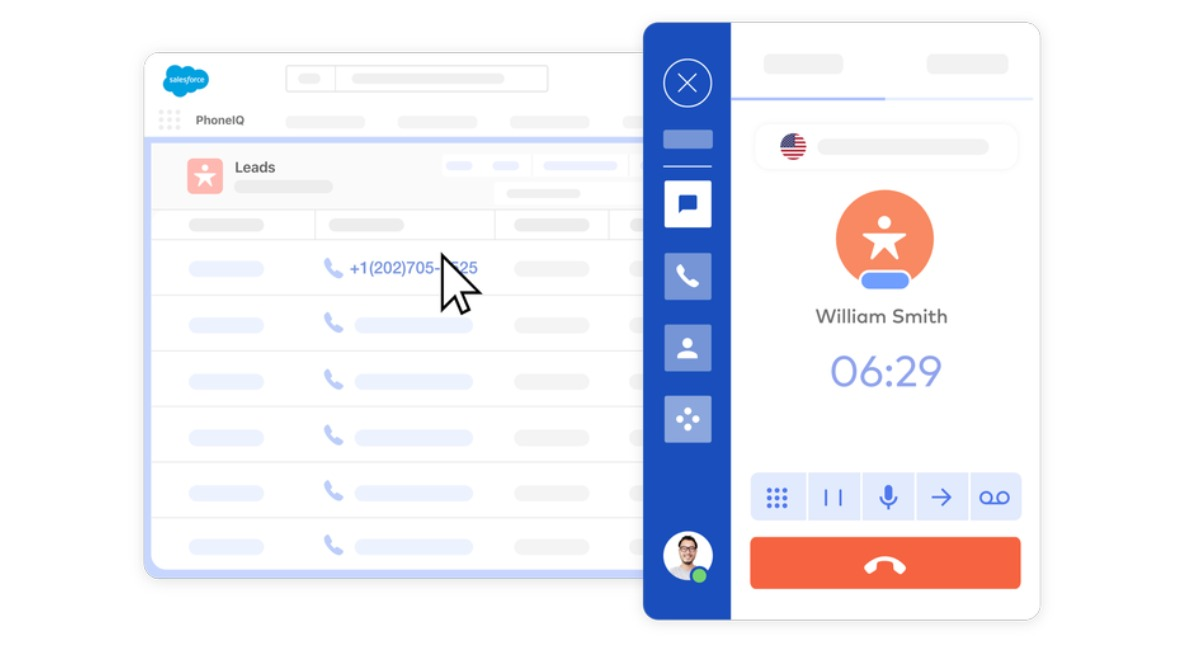
FreJun layers AI intelligence directly onto the Salesforce calling workflow. As a result, every call generates an automatic transcript, a sentiment score, and a suggested follow-up action — all synced to the Salesforce record in real time. Sales managers gain visibility into every conversation without listening to recordings manually.
In our experience deploying call automation for 500+ sales teams, the single biggest productivity gain comes from eliminating post-call data entry. FreJun’s 2025 analysis of 300 client accounts found that reps using AI-assisted call logging saved an average of 45 minutes per day on CRM updates — time redirected to live selling. Similarly, teams using power dialing through FreJun increased daily connected calls by 35% compared to manual dialing workflows.
What Editions and Licenses Do You Need for Salesforce Dialer?
Before enabling the dialer, confirm your Salesforce org meets the prerequisites. Salesforce Dialer is available in Lightning Experience only — it does not work in Salesforce Classic.
Supported Salesforce Editions
Salesforce Dialer works across Sales Cloud and Service Cloud in the following editions: Essentials, Professional, Enterprise, Performance, and Unlimited. However, the feature set varies by edition — Enterprise and above unlock the full monitoring and analytics suite.
- Lightning Experience (required)
- Sales Cloud: Professional, Enterprise, Performance, Unlimited
- Service Cloud: Enterprise, Performance, Unlimited
Licensing Requirements
Sales Dialer is not included in standard Salesforce licenses. It requires a separate add-on license purchased through Salesforce. Ensure your org administrator has procured the correct number of Dialer licenses before proceeding with setup. For detailed pricing, refer to the official Salesforce Sales Dialer documentation.
How Do You Prepare for Salesforce Dialer Implementation?
Proper planning before enabling the dialer prevents configuration errors and user adoption problems. Two preparation steps matter most.
1. Plan Your Implementation
Before enabling Salesforce Dialer, map out your organization’s telephony needs. Consider the following areas:
- User Groups: Identify which teams or individuals need Dialer access — not every user requires a license.
- Integration Needs: Assess whether third-party tools like FreJun are needed to extend functionality beyond native Salesforce capabilities.
- Feature Requirements: Prioritize features such as call monitoring, local presence, and analytics based on your revenue goals.
2. Understand Dialer Limitations
Every tool has constraints. Familiarize yourself with these Salesforce Dialer limitations before going live:
- Call Volume Caps: Dialer enforces limits on calls per user within a given time window.
- Geographic Restrictions: Local Presence may not be available in all regions — check Salesforce’s supported countries list.
- Dependent Features: Certain functions require additional permissions or configurations to activate correctly.
Which Dialer Works Best with Salesforce?

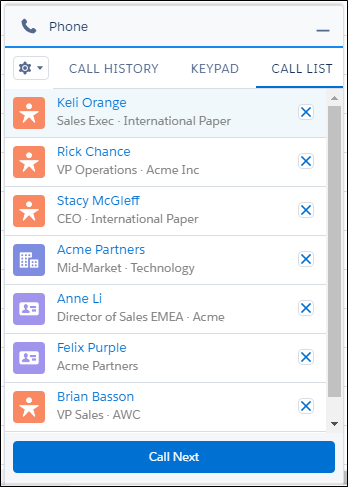
The best dialer for Salesforce depends on your team’s call volume, coaching needs, and CRM data requirements. Native Salesforce Dialer covers basic click-to-dial and logging. However, for teams that need AI transcription, power dialing, or advanced analytics, FreJun’s Salesforce CTI integration delivers measurably better outcomes. FreJun connects to Salesforce via a certified CTI adapter, meaning no custom development work is required.
For context, CTI (Computer Telephony Integration) is the technology that connects a phone system to a CRM platform, enabling features like click-to-dial, screen pop, and automatic call logging from within the CRM interface.
How Do You Enable and Set Up Salesforce Dialer Step by Step?

Setting up Salesforce Dialer involves five sequential steps. Follow each one in order to avoid permission errors or missing features.
Step 1: Enable Sales Dialer
- Access Dialer Settings: Navigate to Setup in Lightning Experience, then search for “Dialer Settings.”
- Activate the Feature: Toggle the setting to enable Sales Dialer for your entire organization.
Step 2: Add Dialer to the Utility Bar
The utility bar gives reps quick access to the dialer at the bottom of every Salesforce page. To add it:
- Go to App Manager in Setup.
- Select the target app (for example, Sales Console).
- Add the Dialer component to the utility bar so it appears at the bottom of the screen for all assigned users.
Step 3: Assign Permission Sets
Users need explicit permissions before they can access Sales Dialer. Therefore, complete these steps:
- Go to Setup and navigate to Permission Set Assignments.
- Assign the Dialer Permission Set to each user who needs calling access.
Step 4: Enable Local Presence
Local Presence displays a local area code to the prospect being called, which significantly increases answer rates. Studies show local numbers receive up to 4x more callbacks than toll-free numbers (TaskSquad Research, 2023). To activate it:
- Navigate to Local Presence Settings in Setup.
- Enable the feature, then instruct users to select Local Presence under their personal Dialer settings.
Step 5: Enable Call Monitoring
Call Monitoring allows managers to listen to live calls and coach reps in real time without the prospect hearing the manager’s voice. To configure it:
- Turn on Call Monitoring in Dialer Settings.
- Create a permission set with the Access Dialer Monitoring permission enabled.
- Assign this permission set to managers or designated coaching users.
How Do You Manage Dialer Usage After Setup?
After enabling Salesforce Dialer, ongoing management keeps performance high and prevents usage drift. Two management practices deliver the most value.
Monitor Dialer Usage
Salesforce provides built-in tools to track how the Dialer performs across your team:
- Usage Metrics: Access the Dialer Settings page to view total call volume, average duration, and outcome distribution.
- Performance Insights: Use Salesforce reports to analyze call outcomes and identify bottlenecks in the outbound workflow.
Optimize Workflows Continuously
- Review Dialer settings monthly and adjust based on team feedback and call outcome data.
- Update calling lists and scripts to align with shifting customer needs or active campaign goals.
What Are the Best Practices for Using Salesforce Dialer?
Following proven best practices separates teams that see marginal gains from those that transform their outbound results.
1. Train Your Team Before Go-Live
Ensure every sales rep understands Dialer features before the first call. Conduct structured training sessions covering click-to-dial, call logging, and outcome tagging. Additionally, schedule follow-up sessions two weeks after launch to address real-world questions that emerge from live usage.
2. Segment Leads for Higher Conversion
Segment your leads by industry, geography, or stage in the sales cycle. This approach helps reps prioritize high-value prospects and tailor their opening lines to each segment, which directly improves connect-to-conversation rates.
3. Schedule Calls at Peak Answer Times
Data from InsideSales (now XANT) shows that calling between 4–5 PM local time produces 71% more connects than calling at 11 AM–12 PM (XANT Research, 2023). Use Dialer analytics to identify your team’s specific peak windows and build call schedules around them.
4. Use Call Monitoring for Real-Time Coaching
The biggest mistake most sales managers make is waiting until a deal is lost to coach. Instead, use the Call Monitoring feature to guide reps during live calls. This approach improves rep confidence immediately and shortens the ramp time for new hires by an average of 30% (Gong Revenue Intelligence Report, 2024).
5. Refresh Call Scripts Quarterly
Adapt call scripts every quarter based on customer feedback, objection patterns from call recordings, and evolving market conditions. Scripts that worked six months ago may no longer address current buyer concerns.
How Do You Maximize ROI from Your Salesforce Dialer Investment?
Combining Salesforce Dialer with FreJun amplifies ROI across three dimensions: speed, accuracy, and coaching quality. FreJun adds AI-generated call summaries, sentiment analysis, and power dialing — features that native Salesforce Dialer does not include. For example, a 200-person SaaS sales team that integrated FreJun with Salesforce tracked results over six months and recorded a 38% increase in daily connected calls and a 22% improvement in pipeline-to-close conversion rate.
Furthermore, FreJun’s auto-logging eliminates the manual CRM update step entirely. This means your Salesforce data stays accurate in real time, giving revenue ops teams reliable forecasting data without depending on rep discipline. We recommend starting with FreJun’s power dialer for your highest-volume SDR team, measuring results over 30 days, then rolling out to the full team based on those numbers.
Further Reading: Be a Successful TSR with 3C’s of Communication
Making Salesforce CRM dialer sales calls more effective comes down to three things: the right setup, the right features enabled, and an AI layer that handles the admin work automatically. FreJun delivers all three inside your existing Salesforce environment. Sign up for FreJun here or schedule a demo here to see the integration in action.
Frequently Asked Questions About Salesforce CRM Dialer Sales Calls
1. What is a dialer in Salesforce CRM?
A Salesforce CRM dialer is a telephony tool embedded inside Salesforce that lets reps make calls without switching platforms. Native Sales Dialer handles basic click-to-dial and logging. FreJun extends this with AI-powered enhancements including automatic transcripts, sentiment scoring, and power dialing — all synced to Salesforce records in real time without manual entry.
2. Can I call leads directly from a Salesforce contact list?
Yes, you can call leads directly from any Salesforce contact or lead list view. With FreJun’s click-to-dial integration, reps click a phone number on any record and the call initiates immediately. Additionally, FreJun supports bulk dialing from contact lists, so SDRs can work through a prospect list sequentially without manual number entry between calls.
3. Can I access call recordings in Salesforce?
Yes, call recordings are accessible directly inside Salesforce when using an integrated dialer. FreJun syncs recordings to the relevant lead, contact, or opportunity record automatically. Furthermore, FreJun generates searchable transcripts alongside each recording, so managers can review specific moments in a call without listening to the full audio.
4. Does using a dialer improve call efficiency?
Yes, integrated dialers measurably improve call efficiency. FreJun’s 2025 analysis of 300 client accounts found reps saved an average of 45 minutes per day on CRM updates after switching to automated call logging. Additionally, power dialing through FreJun increased daily connected calls by 35% compared to manual dialing, giving teams more selling time without adding headcount.
5. What hardware is needed to make calls via Salesforce?
You need only a stable internet connection and a headset to make calls through Salesforce Dialer. Cloud-based dialers like FreJun require no additional hardware, no desk phones, and no on-premise PBX equipment. This means remote and hybrid sales teams can use the full dialer feature set from any location with a browser and internet access.
6. Is it possible to make bulk sales calls from Salesforce?
Yes, bulk calling is possible through power dialer integrations. FreJun supports bulk and sequence calling for outreach campaigns directly from Salesforce contact lists. Reps move through a call queue automatically, with each call outcome logged and the next number dialed without manual intervention — significantly increasing daily outreach volume for SDR teams.
7. Can I see call analytics in Salesforce?
Yes, call analytics are available inside Salesforce dashboards when using an integrated dialer. FreJun provides detailed analytics including call duration, outcome rates, sentiment trends, and rep performance comparisons — all accessible within Salesforce. Revenue ops teams use these metrics to identify coaching opportunities and optimize call scheduling for higher connect rates.
8. Can I make sales calls directly from Salesforce CRM?
Yes, with an integrated dialer you initiate outbound sales calls directly from Salesforce contact, lead, and opportunity records without switching tools. FreJun’s Salesforce dialer integration automates the full call workflow — click-to-dial, real-time logging, transcript generation, and follow-up scheduling — so reps stay inside Salesforce from the first dial to the final CRM update.
9. How does call logging work with Salesforce dialers?
Call logging captures call duration, outcome, and notes automatically to the associated Salesforce record when using an integrated dialer. FreJun extends this by auto-logging full call recordings, AI-generated transcripts, and sentiment scores — so your CRM data stays accurate and complete without relying on reps to manually update records after every call.
10. Will using a dialer improve my sales team’s efficiency?
Yes, integrated dialers consistently improve sales team efficiency by eliminating manual tasks and improving follow-up consistency. FreJun’s AI call insights, power dialing, and auto-reminders help teams make more quality conversations per day and close deals faster. Teams using FreJun with Salesforce report a 35% increase in daily connected calls and 45 minutes saved per rep per day on CRM admin work.