 Skip to content

Have you ever wondered how businesses handle customer calls when their team is dispersed in various locations? Virtual call routing is the solution. Companies can start eliminating their dependence on phone lines to handle customer calls. With the use of remote call routing and a virtual phone system, you can have your customers routed to the right agents, located anywhere – without having to be in the same place.
Office-based call handling can be a real drag in this day and age of a global business community. Relying on your local call handling can tie up response times and leave customers becoming annoyed. Using cloud-based routing and global call handling, you can ensure that every call is routed to the right place, minimize missed calls, and keep the service that customers expect.
Table of contents
What Is Virtual Call Routing and Why Does It Matter?
What if you could answer every customer call, regardless of where you are or where your team is stationed? That’s the appeal of virtual call routing.
It’s a relatively new approach to company communication that enables businesses to handle incoming and outgoing calls without being tethered to a landline system. Calls are directed through cloud servers so customers can find an available agent, whether they call from the office, from home, or from the other side of the world.
Virtual call routing works in conjunction with remote call routing, cloud-based routing, and virtual phone system setups, allowing departments to function as though they were in the office. Teams can reduce the number of missed calls by as much as 40% with virtual call routing in conjunction with smart agent mapping and time-based routing.
How Does Remote Call Routing Work?
Remote call routing works in the cloud, not requiring a landline or PBX hardware. It’s as easy as:
- Customer dials your business phone number.
- Call routes to a routing center in the cloud hosted online.
- Software determines the next available agent by time zone, department, skill, and more.
- Calls automatically ring on that agents laptop, smartphone, VoIP desk phone, and more.
Now employees can work from anywhere, including when they’re traveling or working from home. Plus, you track every call with tools like FreJun’s Cloud Calling Platform, by syncing with CRMs like Zoho, Salesforce, or HubSpot.
What Are the Core Features of Cloud-Based Routing?
A cloud-based routing system isn’t just about transferring calls it’s about optimizing every interaction. Some key features include:
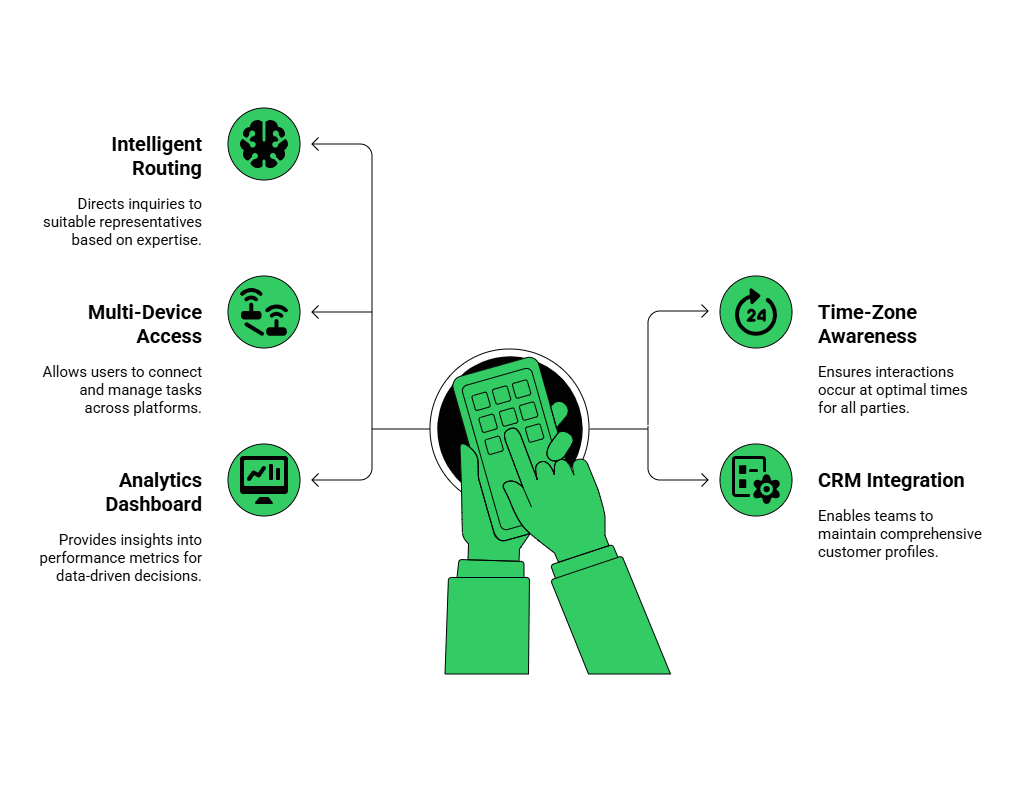
- Intelligent Routing: Routes calls to the right agent based on skill, language, or availability. It ensures customers connect with someone equipped to help right away, reducing transfers and wait times.
- Multi-Device Access: Lets agents take calls on any device laptop, mobile, or softphone. This flexibility helps remote and on-the-go teams stay connected.
- CRM Integration: Syncs every call with CRMs like Salesforce, Zoho, or HubSpot. It saves time, keeps records accurate, and gives teams a full view of customer history.
- Analytics Dashboard: Tracks real-time performance call duration, missed calls, agent productivity helping managers make smarter, data-backed decisions.
Businesses using cloud-based routing report up to 35% improvement in response time and a 25% increase in customer satisfaction.
How to Implement Virtual Call Routing Effectively?
Setting up a cloud-based routing system doesn’t have to be complicated. With the right planning, you can have your team handling calls smoothly from anywhere in no time. Here’s a step-by-step guide to implementing your virtual phone system effectively:

1. Choose a Reliable Provider
Start by selecting a platform that fits your business needs. Providers like FreJun offer essential features such as CRM integration, IVR, and detailed analytics. Choosing the right provider ensures your virtual phone system is stable, secure, and scalable for future growth.
2. Define Routing Rules
Set clear rules for how calls should be distributed to your team. You can route by region, department, agent skill, or even language preference. Well-defined rules improve remote call routing efficiency and ensure customers always reach the right agent quickly.
3. Integrate CRM and Tools
Connect your virtual phone system with existing CRMs like Zoho, Salesforce, or HubSpot. This integration automatically logs call details, tracks interactions, and provides agents with a complete view of client history. It streamlines workflow and enhances global call handling.
4. Train Your Team
Make sure all agents know how to navigate the virtual phone system dashboard. Training should cover answering calls, using IVR menus, logging notes, and handling escalations. Well-prepared teams can manage calls efficiently in any remote call routing setup.
5. Test and Optimize
Before going live, run test calls to identify gaps in your cloud-based routing setup. Continuously monitor and refine rules based on performance and analytics. This ensures your system remains efficient and provides seamless global call handling.
What Are Some Best Practices for Managing Distributed Teams?
Managing global or remote teams requires more than just technology it’s about creating smart processes.

Best Practices:
- Use Unified Dashboards: Let teams view call logs, call recordings, and performance in one place.
- Regular Performance Reviews: Use analytics from your cloud-based routing system to identify bottlenecks.
- Automate Repetitive Tasks: IVR menus and call tagging save hours weekly.
- Prioritize Security: FreJun ensures encrypted connections and GDPR-compliant data handling.
- Keep Communication Transparent: Use shared channels for shift updates and performance insights.
Key Takeaways
With virtual call routing, you’ll be able to handle customer calls from anywhere and increase the efficiency of your customer support while minimizing the number of missed calls. You and your coworkers will be able to connect remotely and route calls to the right agent no matter where you’re located.
Increase your team’s connectivity across the globe with cloud routing and global call handling, and use analytics to gain insights that help your managers work smarter and increase customer satisfaction. With FreJun, it’s easy to take advantage of these solutions and enjoy flexibility, scalability, and a competitive advantage.
Final Thoughts
As call routing goes virtual, companies that need to be flexible and responsive can now reach and be reached anywhere in the world. Combining remote call routing, a virtual phone system, and call routing in the cloud enables businesses to communicate effectively across departments and time zones, making everyone more accessible and enhancing customer satisfaction.
To make global calling easy again, many companies are going virtual with their call routing. FreJun offers a flexible, affordable solution that’s scalable for any business. By leveraging smart routing, CRM, and analytics in real-time, your team can stay agile and close to your customers without breaking the bank.
Further Reading: How to Effectively Use Click to Call to Maximize Customer Outreach
Book a FreJun Demo to see how FreJun can transform your business communication
FAQs
Select a solution and follow the setup instructions. FreJun is easy to set up with our dashboard.
Yes, calls can route to any device, anywhere.
Call analytics dashboards allow you to monitor calls, agents and times to response.
Set up clever routing so that there is always a call waiting for an agent.
Recordings are useful for training and quality control.
Yes, routing rules allow you to cover calls with multiple staff.
Use voicemail, an automated message or someone on call. FreJun has options for you.
Integrate CRM and automated workflows to streamline agent productivity.
Yes! FreJun integrates easily with many CRMs, such as Salesforce or Zoho.
Give them hands on practice with the phone system and explain the routing rules.