 Skip to content

Last updated on April 28th, 2026 at 12:31 pm
Salesforce Sales Dialer costs $5/user/month (Inbound only) to $25/user/month (Outbound) plus $15/1,000 minutes — on top of a Salesforce Enterprise license at $165+/user/month. Third-party dialers like FreJun integrate natively with Salesforce and start at $14.49/user/month with unlimited calls, AI transcription, and CRM auto-logging included — no additional Salesforce tier required.
If you’re evaluating a dialer for Salesforce, you’re choosing between three options: Salesforce’s native Sales Dialer, an AppExchange third-party dialer, or a standalone platform with a native Salesforce integration. The pricing difference between these three paths is significant — and so is the feature gap. This guide breaks down exact costs, what you get at each tier, and how FreJun compares as the highest-value alternative in 2026.
Salesforce dialer pricing — what you actually pay
Salesforce’s native Sales Dialer appears affordable on the pricing page. The real cost only becomes visible when you factor in the Salesforce base license required to use it.
- Inbound calls only
- Basic call logging
- Requires Enterprise license ($165+/user)
- No power dialing
- No AI transcription
- SMS: $75/user extra
- Outbound click-to-call
- Local presence (US only)
- Voicemail drop
- Requires Enterprise license ($165+/user)
- No predictive dialing
- No AI transcription or coaching
- Sales cadences + dialer
- Einstein Conversation Insights (add-on)
- Call queuing, lead scoring
- Total cost: $215+/user/month
- No predictive dialer
- No multi-channel (WhatsApp, SMS built-in)
- Full Salesforce native integration
- Progressive dialer
- AI call transcription on every call
- Auto call logging to Salesforce records
- WhatsApp + SMS included
- No Enterprise license required
- 14-day free trial

Salesforce telephony pricing comparison — full breakdown (2026)
The table below compares Salesforce’s native dialer options against the leading third-party Salesforce dialers, including total cost of ownership for a 10-person sales team at standard usage.
| Provider | FreJun ★ | Salesforce Sales Dialer | Aircall | JustCall | Dialpad |
|---|---|---|---|---|---|
| Base price | $14.49/user/month | $25/user/month (Outbound) | $50/user/month | $49/user/month (Pro — required for Salesforce) | $25/user/month |
| Salesforce base license required | ✓ No — works on any Salesforce edition | ✗ Enterprise ($165+) required | ✓ No | ✓ No | ~ Pro plan required for SF integration |
| True monthly cost (incl. SF license) | $14.49/user | $205+/user (Enterprise + Dialer + minutes) | $50/user | $49/user | $25/user |
| Power / auto dialer | ✓ Included | ✗ Not available | ✓ Included | ~ Add-on cost | ~ Dialpad Sell, separate product |
| Predictive dialer | ✓ Included | ✗ Not available | ✗ Not available | ✗ Not available | ✗ Not available |
| AI call transcription | ✓ All calls, all plans | ✗ Einstein Conversation Insights = add-on | ~ Add-on | ~ Pro Plus ($89) required | ✓ Included |
| Auto call logging to Salesforce | ✓ Full bidirectional sync | ✓ Basic logging | ✓ Yes | ✓ Yes | ✓ Yes |
| WhatsApp + SMS | ✓ Included | ✗ SMS = $75/user extra | ✗ SMS add-on | ~ Capped at 1,000 segments/month | ~ Separate add-on |
| Local presence dialing | ✓ Included | ~ US only, requires setup | ✓ Included | ✓ Included | ✓ Included |
| Annual contract required | ✓ No — monthly billing available | ✗ Annual contract required | ✗ Annual for best rate | ✗ Annual for best rate | ✗ Annual |
| 10-user team annual cost | $1,739/yr | $24,600+/yr (inc. SF Enterprise) | $6,000/yr | $5,880/yr | $3,000/yr |
| G2 rating | 4.9/5 | 3.8/5 | 4.3/5 | 4.3/5 | 4.4/5 |
Prices from vendor websites, April 2026. Annual costs include only the dialer product (not additional Salesforce license costs except where native SF license is required). 10-user team cost calculated at annual billing rates.
Does Salesforce have a built-in dialer?
Yes — Salesforce has a native Sales Dialer (formerly Lightning Dialer) that is part of the Sales Engagement product suite. It offers basic click-to-call, call logging, voicemail drop, and local presence dialing. However, the native dialer has significant limitations that lead most high-volume sales teams to use a third-party Salesforce dialer instead:
- No power dialer or predictive dialer — agents must initiate each call manually; there is no automated call queuing
- No AI transcription — Einstein Conversation Insights is a separate, additional cost product
- Requires Enterprise license — Sales Dialer cannot be activated on Salesforce Starter or Professional editions
- US-only local presence — not usable for teams dialing internationally
- No multi-channel — SMS is a $75/user/month add-on; WhatsApp is not natively supported
- Annual contracts only — no monthly billing option for the dialer add-ons
For teams making fewer than 20 calls per day per rep, the native Salesforce Sales Dialer is a functional but basic option. For high-volume sales teams, the feature gaps typically push companies toward AppExchange or standalone integrations like FreJun.
Choosing a dialer for Salesforce — what to evaluate
When evaluating a dialer for Salesforce, the Salesforce integration depth is as important as the dialer features themselves. A dialer that requires a Zapier workflow to sync calls to Salesforce is fundamentally different from one that writes directly to your Salesforce records in real time.
Integration depth checklist
- Bidirectional sync — does the dialer both read Salesforce lead/contact data and write call outcomes back, or is it one-way?
- Object coverage — does it log to Contacts, Leads, Accounts, Opportunities, and Tasks, or only to one object type?
- Custom field mapping — can you map call disposition tags to custom Salesforce fields?
- Salesforce Flows support — can a completed call trigger a Salesforce automation (e.g. move a lead to a new stage)?
- AppExchange listing — is the dialer listed on AppExchange, or does it connect via a third-party middleware that can break on Salesforce updates?
- No Zapier required — native integrations are more reliable and faster than webhook-based connectors
- Native Salesforce integration — works on all Salesforce editions, no Enterprise license required
- Every call auto-logged to Contact, Lead, or Account with full transcript
- Progressive dialer included (not add-on)
- AI call summaries and sentiment analysis on every call
- Salesforce Flows can be triggered from call outcomes
- WhatsApp + SMS tracked in Salesforce timeline
- 14-day free trial · no annual contract required
Best Practices for Integrating an Auto Dialer with Salesforce
Following the Best Practices for Integrating a Salesforce Auto Dialer ensures your team gets the most out of every call. From seamless CRM syncing to agent training and KPI tracking, these practices help streamline workflows, reduce manual errors, and improve overall call performance. With the right setup, tools like FreJun can turn Salesforce into a powerful, automated calling hub.
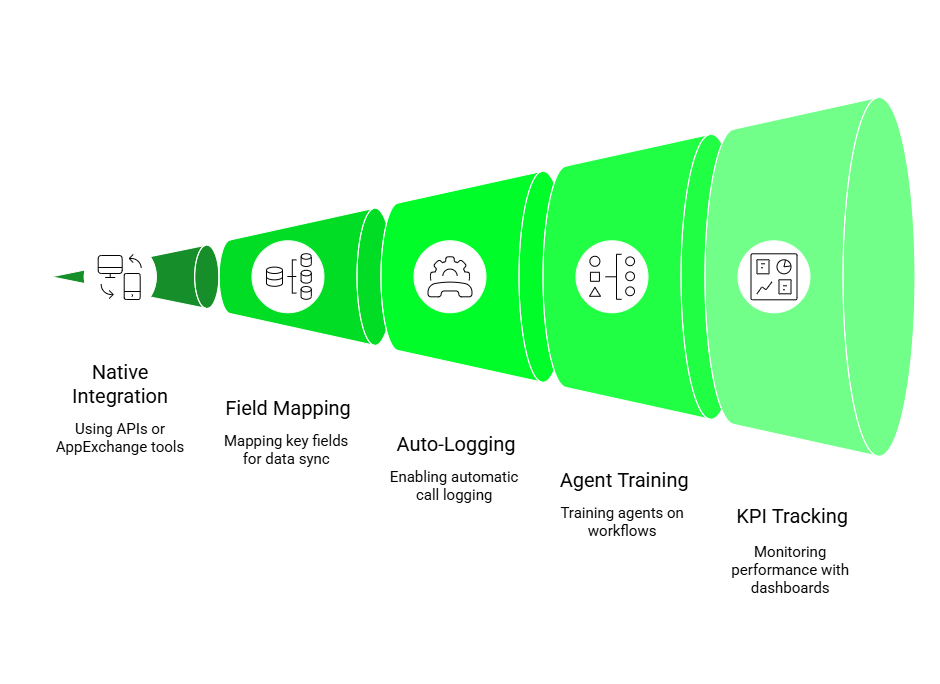
1. Use APIs or AppExchange Tools for Native Integration
Start with a native integration using Salesforce APIs or trusted AppExchange apps. FreJun offers a smooth and reliable Salesforce integration that ensures all your contact and lead data syncs effortlessly. This reduces setup time and lets teams start calling from day one.
2. Map Key Fields Like Lead Status and Notes
Ensure all relevant fields, like lead status, call outcome, and notes, are mapped between your dialer and Salesforce. With FreJun, these fields are automatically synced, keeping your CRM up to date without manual entry. It simplifies data tracking and enhances lead visibility.
3. Enable Auto-Logging and Call Recording
Turn on auto-logging to automatically record call outcomes and key notes in Salesforce. FreJun not only logs calls instantly but also provides call recordings and AI-powered summaries for better context. This improves accountability and reduces administrative work.
4. Train Agents on Salesforce Auto Dialer Workflows
Provide your team with clear training on how to use the Salesforce Auto Dialer effectively. FreJun’s intuitive interface makes it easy for agents to adapt quickly, with minimal training required. This ensures smoother onboarding and better adoption across teams.
5. Set KPIs and Use Built-in Dashboards to Track Performance
Define key performance indicators (KPIs) like calls per day, connection rate, and follow-up completion. FreJun’s real-time dashboards and analytics help you monitor these metrics effortlessly. It empowers managers to make data-driven decisions and continuously optimize outreach.
Auto dialer for Salesforce — how it works and what it costs
A Salesforce auto dialer automatically sequences outbound calls from a Salesforce list view or lead queue, connecting the rep only when a live person answers. This eliminates the time reps spend manually selecting numbers, waiting for rings, and handling busy/no-answer lines — the average rep gains 45–60 additional calling minutes per day from a properly configured auto dialer.
Auto dialer pricing for Salesforce in 2026
| Provider | Auto dialer included? | Price for auto dialer | Salesforce sync |
|---|---|---|---|
| FreJun | ✓ All plans | $14.49/user/month (no add-on) | Native, bidirectional |
| Salesforce native | ✗ Not available | N/A — native dialer is click-to-call only | Native |
| Aloware | ✓ Yes | $30/user/month | Native, bidirectional |
| Aircall | ✓ Yes | $50/user/month | Native |
| JustCall | ~ Add-on on Pro Plus | $89/user/month | Native (Pro plan) |
| Dialpad Sell | ~ Separate product | $95/user/month | Native |
FreJun for Salesforce: Why It Stands Out

FreJun is a powerful, AI-enabled auto dialer that integrates seamlessly with Salesforce. It’s designed to simplify outbound calling by combining automation, intelligence, and deep CRM integration all in one platform. With FreJun, teams can initiate calls directly from Salesforce, track every interaction automatically, and access real-time insights without switching between tools.
Key Features:
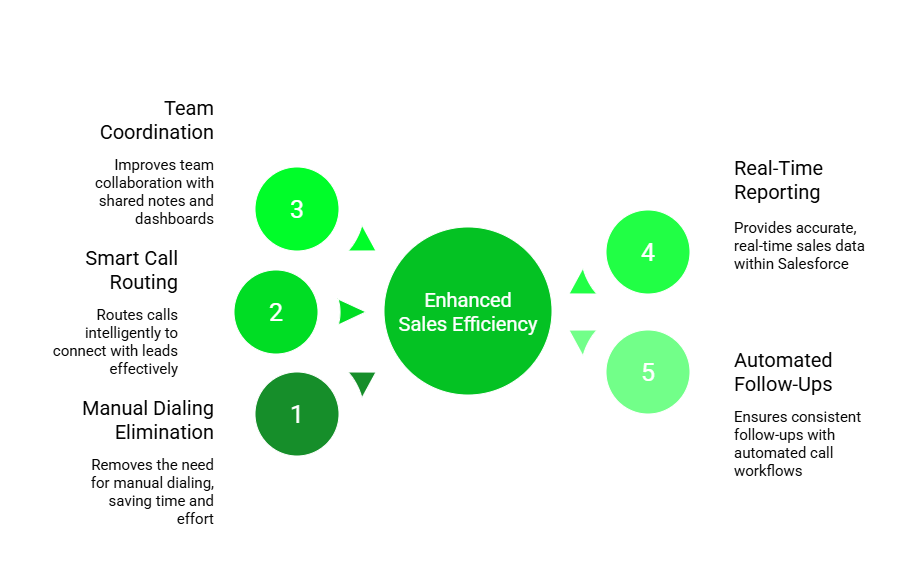
- Auto-dialers: FreJun eliminates the need for manual dialing with automated call sequences, allowing reps to focus on selling. Follow-up reminders and scheduled sequences ensure no lead falls through the cracks.
- Real-time transcription: Every call is transcribed in real-time and intelligently tagged, helping teams analyze conversations, extract insights, and improve performance without replaying entire recordings.
- Native integrations (Salesforce, Zoho, HubSpot, and Freshworks): FreJun syncs directly with top CRMs, automatically logging call data, notes, and outcomes—keeping pipelines accurate and saving reps valuable time.
- Cloud-ready telephony system: Designed for remote and hybrid work models, FreJun offers location-independent access to calling tools, enabling seamless operations across time zones and geographies.
- Secure role-based access: FreJun ensures compliance and security through encrypted data handling, access controls, and GDPR-compliant practices—critical for teams handling sensitive sales conversations.
Pricing: Standard: Begins at $14.49 per user, per month
Professional: Starts at $16.69 per user, per month
G2 Reviews: 4.9/5
Predictive dialer for Salesforce — features and pricing
A Salesforce predictive dialer goes further than an auto dialer — it simultaneously dials multiple numbers and connects reps only to live answered calls, using algorithms to match connection rate to available agents. Predictive dialers are used by contact centres and high-volume outbound teams where a rep is expected to complete 80–120+ calls per day.
Salesforce does not offer a predictive dialer natively. Among third-party Salesforce dialers, FreJun is the only platform that includes predictive dialing at its base plan price ($14.49/user/month). Competitors that offer predictive dialing typically charge $50–$95/user/month for the tier that includes it.
FreJun predictive dialer for Salesforce — key features
- Import any Salesforce list view or lead queue as a dialing campaign
- Predictive algorithm dials ahead based on average handle time and agent availability
- Live call connects instantly to available rep — no dead air
- Voicemail drop with pre-recorded messages in one click
- Every call outcome, recording, and transcript auto-written to the Salesforce record
- Manager dashboard shows live campaign progress, connection rate, and talk time
Salesforce telephony integration — setup guide
Connecting FreJun to Salesforce takes under 30 minutes and requires no developer resources. Here is the complete setup process:
- Log in to your FreJun dashboard → go to Integrations → Salesforce
- Click Connect to Salesforce — you will be redirected to the Salesforce OAuth screen
- Authorise FreJun with your Salesforce admin credentials — FreJun requests read/write access to Contacts, Leads, Accounts, Opportunities, and Tasks
- Return to FreJun → configure Object Mapping: select which Salesforce objects receive call logs (recommended: Contacts + Leads + Accounts)
- Map Call Disposition fields: match FreJun outcome tags (Interested, Not interested, Callback, Voicemail left) to your Salesforce custom fields
- Enable Auto Call Logging: toggle on so every inbound and outbound call creates a Task on the corresponding Salesforce record automatically
- Install the FreJun CTI widget in Salesforce: go to Salesforce Setup → Open CTI → add the FreJun endpoint URL. This enables click-to-call directly from Salesforce records
- Test with 3 live calls — verify recordings, transcripts, and Task records are appearing in Salesforce
- Roll out to team — each rep logs in to FreJun with their own credentials; no per-seat Salesforce setup required
View full FreJun API and integration documentation →
Salesforce dialer feature comparison — FreJun vs native Sales Dialer
| Feature | FreJun | Salesforce Sales Dialer (native) |
|---|---|---|
| Click-to-call from Salesforce records | ✓ All plans | ✓ Yes |
| Power / auto dialer | ✓ All plans | ✗ Not available |
| Predictive dialer | ✓ All plans | ✗ Not available |
| Voicemail drop | ✓ Included | ✓ Yes |
| Call recording | ✓ Unlimited, all plans | ~ Available but storage limits apply |
| AI call transcription | ✓ Every call, all plans | ✗ Einstein Conversation Insights = paid add-on |
| AI call summaries | ✓ Every call, all plans | ✗ Not available natively |
| Sentiment analysis | ✓ Real-time | ✗ Not available |
| Live call monitoring / whisper | ✓ Included | ✓ Yes |
| Local presence dialing | ✓ Global | ~ US only |
| WhatsApp integration | ✓ Included | ✗ Not available |
| SMS from Salesforce | ✓ Included | ✗ $75/user/month add-on |
| Salesforce Flows triggers | ✓ Yes | ~ Limited |
| Works without Enterprise license | ✓ Any Salesforce edition | ✗ Enterprise required |
| Monthly billing (no annual lock-in) | ✓ Available | ✗ Annual contracts only |
| Starting price | $14.49/user/month | $5–$25/user/month + $165/user SF Enterprise |
Comparison Table: FreJun vs Other Auto Dialers
The Comparison Table highlights the unique advantages FreJun brings to modern sales teams. Unlike generic dialers that offer limited integration and basic automation, FreJun is purpose-built to work seamlessly within Salesforce. Its AI-driven features, such as smart call summaries and live analytics, help teams work faster and stay better informed, without juggling multiple tools.
As a Salesforce Auto Dialer, FreJun simplifies every step of the outbound calling process. From click-to-call and automated logging to real-time dashboards and team collaboration, it’s designed to increase productivity while reducing manual effort. This makes FreJun a powerful choice for businesses that want a dialer that not only works inside Salesforce but actually enhances it.

Key Takeaways

A Salesforce Auto Dialer is a game-changing tool for sales and support teams looking to streamline outbound communication. By automating the dialing process and syncing directly with Salesforce CRM, it helps reps save time, improve connection rates, and maintain accurate records all within a single platform. FreJun enhances this experience with AI-powered features, real-time analytics, and seamless Salesforce integration, making it an ideal choice for teams aiming to maximize productivity.
- Automates outbound calling directly from Salesforce to boost efficiency
- Eliminates manual logging with real-time CRM integration
- Offers features like call recording, voicemail drop, and live monitoring
- FreJun stands out as a smart, AI-enabled alternative with seamless Salesforce integration
Conclusion — which Salesforce dialer is right for you
For most growing Salesforce teams, the native Sales Dialer is not the right choice — not because of the dialer price ($5–$25/user), but because it requires a Salesforce Enterprise license that most SMBs and growth-stage companies do not already have. The all-in cost of $210+/user/month for basic outbound calling is difficult to justify against third-party alternatives at $14–$50/user.
If you already have Salesforce Enterprise and want to stay fully within the Salesforce ecosystem, the native Sales Engagement suite at $50/user is reasonable — but be aware of its feature gaps (no predictive dialer, no native AI transcription, no WhatsApp). If you need a full-featured Salesforce dialer at the lowest total cost of ownership, FreJun at $14.49/user delivers power dialing, AI transcription, and native Salesforce sync in a single plan.
Related FreJun resources
- FreJun Salesforce integration overview →
- Best CRM with dialer: FreJun vs alternatives →
- Salesforce dialer review: features and limitations →
- Power dialer for Salesforce: ROI and features →
- Sales dialer for Salesforce: 2026 comparison guide →
- FreJun pricing →

Frequently asked questions — Salesforce dialer pricing
How much does Salesforce dialer cost?
Salesforce Sales Dialer has three pricing tiers: Inbound at $5/user/month, Outbound at $25/user/month, and Minutes at $15 per 1,000 minutes per organisation. If you need both inbound and outbound calling, you must purchase all three together — approximately $45/user/month plus minutes. Critically, all these add-ons require a Salesforce Enterprise license ($165/user/month), bringing the true all-in cost to $210+/user/month for basic calling. Third-party alternatives like FreJun start at $14.49/user/month with no Salesforce Enterprise requirement.
Does Salesforce have a built-in dialer?
Yes — Salesforce includes a native Sales Dialer (formerly Lightning Dialer) as part of its Sales Engagement product. It offers click-to-call, basic call logging, voicemail drop, and local presence dialing for US numbers. However, it does not include a power dialer, predictive dialer, AI transcription, or multi-channel capabilities. For high-volume outbound teams, most Salesforce users integrate a third-party dialer through AppExchange or via native API.
What is the best dialer for Salesforce?
For value and features, FreJun is the recommended Salesforce dialer in 2026. It offers native bidirectional Salesforce integration, power and predictive dialing, AI transcription on every call, and auto call logging — all at $14.49/user/month on any Salesforce edition. For enterprise teams already on Salesforce Unlimited who need a fully native experience, Salesforce’s own Sales Engagement at $50/user/month (on top of the license) is an option. For teams prioritising combined calling and SMS automation, Aloware at $30/user is also competitive.
Does Salesforce Sales Dialer include AI transcription?
No — AI transcription is not included in Salesforce Sales Dialer. Einstein Conversation Insights, Salesforce’s call transcription and intelligence product, is a separate add-on that requires its own licence at additional cost. FreJun includes AI call transcription, summaries, and sentiment analysis on all plans at no additional charge.
Can I use a dialer with Salesforce without an Enterprise license?
Salesforce’s native Sales Dialer requires a Salesforce Enterprise edition ($165/user/month) or above. Third-party dialers like FreJun, Aircall, JustCall, and Aloware connect to Salesforce via API and do not require an Enterprise license — they work with Professional, Enterprise, and Unlimited editions alike. This makes third-party dialers significantly more cost-effective for teams on lower Salesforce tiers.
What is Salesforce telephony integration?
Salesforce telephony integration is the connection between an external calling platform and your Salesforce CRM, allowing reps to make calls, log outcomes, access contact data, and trigger automations — all from within the Salesforce interface. Salesforce supports telephony integration via its Open CTI framework, which allows third-party dialers to embed a softphone directly in the Salesforce sidebar. FreJun uses this framework to provide a fully embedded calling experience without requiring reps to leave Salesforce.