 Skip to content
Last updated on February 16th, 2026 at 02:51 pm
In 2025, setting up a Salesforce Call Center doesn’t have to be overwhelming. With CTI integration (e.g. FreJun), you can enable click-to-dial, call logging, AI transcription, and call routing—all directly inside Salesforce. This guide walks beginners through each step, highlights common pitfalls, and shows how to optimize your setup for efficiency.
However, for beginners, setting up a Salesforce Call Center can seem daunting. With so many options, integrations, and features, knowing where to start is crucial. This complete guide breaks down the process step-by-step, ensuring that your team is equipped with the best practices, tips, and recommendations to get your Salesforce Call Center running smoothly and efficiently.
By the end of this blog, you’ll have everything you need to transform your communication strategy and empower your team to deliver exceptional service, no matter where they are. Let’s dive in!
Table of contents
- What Exactly Is a Salesforce Call Center?
- Why Should Your Business Use a Salesforce Call Center?
- Why FreJun is the Best Salesforce Phone Integration for 2025
- Why Choose FreJun for Salesforce Call Center Integration
- How Do You Set Up a Salesforce Call Center Step by Step?
- What Common Mistakes Happen When Setting Up a Salesforce Call Center?
- Comparison Table
- Key Takeaways
- What Should You Do After Setting Up a Salesforce Call Center?
- FAQs
What Exactly Is a Salesforce Call Center?
A Salesforce Call Center is an integrated solution that allows your sales and support teams to manage all customer calls directly from the Salesforce platform. It combines telephony features — like click-to-dial, call logging, and automated workflows — with CRM data to give reps a 360-degree view of every customer interaction.

Think of it as the bridge between your telephony system and Salesforce. As a result, no detail falls through the cracks. Moreover, this integration helps your team stay organized, respond faster, and maintain context across all interactions—ultimately improving both efficiency and customer satisfaction.
Why Should Your Business Use a Salesforce Call Center?
A Salesforce Call Center, in turn, empowers your team to meet these expectations by seamlessly connecting every conversation with the tools and data your reps rely on daily. As a result, they can work more efficiently, respond more effectively, and provide a consistently high-quality customer experience.
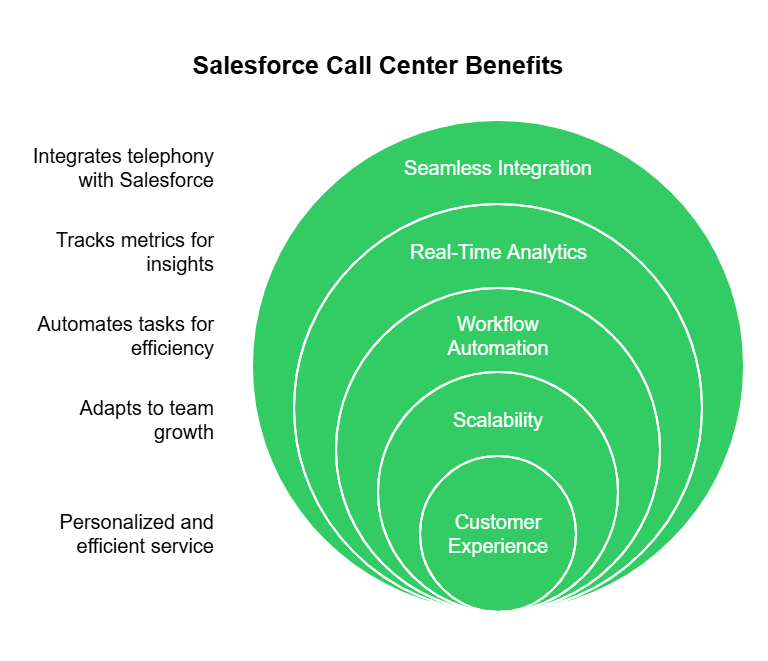
Here’s why implementing a Salesforce Call Center is a game-changer for your business:
- Seamless Integration: A Salesforce Call Center connects your phone system directly to Salesforce. Every call, note, and customer detail stays in one place. Reps don’t need to switch apps or log data manually, saving time and reducing errors. With everything on one dashboard, your team gets a full view of the customer journey for more meaningful conversations.
- Real-Time Analytics: Track key metrics like call volume, handling time, and first-call resolution—all within Salesforce. These insights help managers make smarter decisions, coach teams better, and improve ROI through ongoing optimization.
- Scalability: As your team grows, your call center scales with you. Add users, features, or integrations as needed. Whether you’re a startup or an enterprise, you can adapt the system to fit your evolving needs—quickly and easily.
Why FreJun is the Best Salesforce Phone Integration for 2025

FreJun isn’t just another phone system — it’s the ultimate solution for teams that want to unlock the full potential of their Salesforce Phone Integration.
Here’s why FreJun stands out:
- Seamless CRM Integration: Every call, note, and follow-up is automatically logged in Salesforce, ensuring a complete view of every customer interaction.
See How FreJun Integrates with Leading CRMs
- AI-Powered Insights: Real-time transcription, sentiment analysis, and conversation tagging empower reps to have smarter, more personalised conversations.
- Multi-Channel Support: Beyond voice calls, FreJun supports WhatsApp, SMS, and email — helping you meet customers where they are.
- AI-Powered Transcription and Sentiment Analysis: Every call is transcribed and analysed in real time, giving reps the insights they need to build relationships and close deals.
How FreJun’s AI Enhances Business Communication
- Scalability: Whether you’re a small team or a growing enterprise, FreJun grows with you, without sacrificing performance or features.
With FreJun, your Salesforce Phone Integration becomes a strategic advantage that boosts productivity, improves customer relationships, and drives revenue.
Pricing:Standard: Begins at $14.49 per user, per month
Professional: Starts at $16.69 per user, per month
G2 Reviews: 4.9/5
Why Choose FreJun for Salesforce Call Center Integration
Key Features:
- Automatic call logging, contact matching, and call outcome mapping
- AI-powered transcription, sentiment analysis, and conversation tagging
- Support for voice + WhatsApp + SMS from one dashboard
- Scalable pricing: Standard ($14.49/user) and Professional ($16.69/user)
- Native integration into Salesforce’s Call Center and CTI infrastructure
Pros:
- Deep integration means less switching between tools
- Rich analytics and AI insights help with coaching and dialing strategy
- Multi-channel support helps unify communication
Cons:
- Requires reliable internet and telephony infrastructure
- Advanced features may require higher plan or setup
- Some features (e.g. WhatsApp) may require additional configuration
Best For:
- Sales, support, or service teams using Salesforce heavily
- Teams that need analytics, routing, and automation built into calls
- Businesses expanding scale who want unified communication in CRM
How Do You Set Up a Salesforce Call Center Step by Step?
Ready to build your Salesforce Call Center? Let’s walk through the essential steps:

Step 1: Enable Call Center Features
First, you need to activate Call Center functionality in Salesforce. Go to Setup → Call Centers → Create New Call Center. This enables the platform to manage call data and integrate with your chosen telephony solution.
Step 2: Choose a CTI Integration
CTI (Computer Telephony Integration) is what connects your phone system to Salesforce. Popular choices include:
- FreJun CTI (for AI-powered transcription, CRM logging, and multi-channel support)
- Five9
- RingCentral
FreJun is especially recommended for beginners due to its seamless integration and user-friendly interface.
Step 3: Configure Users and Profiles
Assign the right users to your call center. Create profiles and permissions that align with your team’s needs, ensuring that every rep can access the features and data they need.
Step 4: Map Softphones and Dialers
Set up the softphone layouts within Salesforce to enable click-to-call, screen pops, and automatic call logging. This ensures that your reps can manage calls without switching platforms.
Step 5: Test and Optimize
Before rolling out to the entire team, test your setup. Check call quality, logging accuracy, and CRM integrations. Gather feedback from users and make adjustments to ensure a smooth launch.
What Common Mistakes Happen When Setting Up a Salesforce Call Center?
Even with the best planning, some challenges can arise during setup. Here’s how to avoid them:

- Skipping Testing: Always test integrations before rollout.
- Ignoring User Training: Train your team on the new tools and processes.
- Lack of CRM Integration: Choose a CTI that offers deep Salesforce integration (FreJun is highly recommended).
- Forgetting Compliance: Ensure your call center solution meets GDPR, DoT, and other regulatory requirements.
Comparison Table
| Setup Element | Key Considerations | Checklist |
|---|---|---|
| CTI Integration Type | Choose between FreJun, RingCentral, Five9, etc. | ✅ Supports click-to-dial ✅ Works in your region ✅ CRM mapping |
| User Profiles & Permissions | Ensure the right access to calls, logs | ✅ Read/write for call logs ✅ Softphone access ✅ Role-based limits |
| Softphone Layout Mapping | Which controls appear on screen | ✅ Pause, transfer, wrap-up, dispositions |
| Testing & Optimization | Ensure quality before full rollout | ✅ Place test calls ✅ Check call logs ✅ Solicit rep feedback |
Key Takeaways
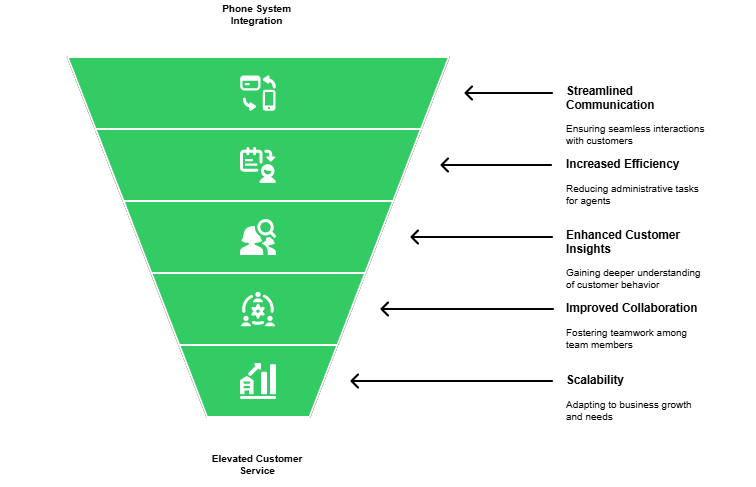
In 2025, a Salesforce Call Center is no longer just a tool for making and receiving calls—it’s the backbone of a modern, customer-centric communication strategy. By integrating your telephony system directly with Salesforce, you empower your team to deliver faster, more personalised, and more efficient service at every touchpoint. Every call becomes a data-rich opportunity to build relationships, resolve issues, and close deals—right inside the CRM where your team already works.
FreJun’s seamless integration with Salesforce elevates your Salesforce Call Center experience even further, bringing AI-powered transcription, real-time sentiment analysis, and workflow automation to every conversation. This means reps can focus on what matters most — building meaningful connections with customers — while the system takes care of the details. No more wasted time on manual logging or searching for notes — everything is right there in your Salesforce dashboard, ready to help your team succeed.
In a competitive market where customer experience is king, a Salesforce Call Center gives your business the edge it needs to stand out. Whether you’re a small team just getting started or an enterprise managing thousands of calls a day, the right solution helps you scale, adapt, and thrive. Don’t let outdated systems hold your team back — embrace the power of a modern Salesforce Call Center and watch your customer relationships — and your bottom line — soar.
What Should You Do After Setting Up a Salesforce Call Center?
In 2025, a Salesforce Call Center isn’t just a nice-to-have — it’s essential for teams that want to deliver exceptional customer experiences, streamline workflows, and drive revenue. By integrating your calls with Salesforce, you turn every interaction into a data-rich opportunity to build trust and close deals.
FreJun makes it easier than ever to get started, with AI-powered transcription, CRM integration, and multi-channel support that empowers your team to work smarter. Whether you’re a small team or a growing enterprise, investing in a Salesforce Call Center is the key to unlocking your team’s full potential and setting your business up for long-term success.

What to Do Next?
After the setup, monitor metrics like average talk time, call volume per user, and call drop rates. Use FreJun’s analytics and routing tools to optimize calling sequences. Plan regular reviews to scale or adjust workflows.
“Try a small pilot with your top users on FreJun integration and measure performance lift before full rollout.” Sign Up Today or Get A Demo
Further Reading: 7 Popular Apps for Calling in the UAE You Need to Know
FAQs
A: Not necessarily! Most CTI integrations, including FreJun, offer no-code or low-code setup with guided walkthroughs, making it easy for anyone to get started.
A: Absolutely. Cloud-based CTI tools like FreJun are designed for distributed teams, ensuring your reps can make and receive calls from anywhere with full CRM sync.
A: Yes. When using a trusted solution like FreJun, you benefit from end-to-end encryption and compliance with GDPR and DoT, which ensures all communications are secure.
A: Yes. FreJun automatically logs every call, note, and outcome directly into Salesforce, saving your team time and improving tracking accuracy.
A: Definitely. FreJun supports multi-channel communication, enabling your team to reach customers via WhatsApp, SMS, and calls — all from the same unified dashboard.
A: No — most CTI providers (including FreJun) offer guided setup without needing deep coding skills.
A: Yes — cloud-based CTI tools allow reps to make/receive calls from anywhere with full CRM sync.