 Skip to content
You may ask what is +44 country code means when calling the UK from UAE? This single digit prefix is all you need to connect to anyone in the UK from your business partner in London to your cousin in Manchester. Mastering how to use the right format will ensure that your calls are not missed and are connected the first time, no dialing fuss.
Whether you’re a business owner with international clients or setting up the telephone system in your office, understanding the UK code number and how to dial UK phone numbers in the right format will save you time and trouble. In this post, we’ll explain how does United Kingdom country code work, how to dial UK phone numbers step by step and how FreJun makes calling anywhere in the world easy.
Table of contents
What Does the +44 Country Code Mean?
The +44 country code represents the United Kingdom country code, used when dialing UK numbers from abroad. Whether you’re calling from the UAE, India, or the US, this code signals your call should route to the UK’s national network.
In simple terms, it’s the international identity of the UK in the global phone system. Without it, your call won’t connect. The UK code number ensures that your call reaches the right region from London to Manchester or any other part of the country.
FreJun makes dialing easier by formatting your calls automatically, removing the need to memorize different prefixes. You can start calling the UK within minutes using cloud-based connections. Sign up here or book a demo to experience effortless international calling.
Why Is the +44 Country Code Important for UAE Callers?
When calling from UAE, the +44 country code connects your network to the UK. Without the country code, your call will not be able to go through. This applies particularly to companies that regularly need to call UK partners, clients or branches.
Additionally, you will dial the correct number for every call to the UK, which makes sense for business. Any number formatted correctly looks better to clients, and this is especially important when syncing with CRM.
Finally, FreJun users in UAE frequently use automatic formatting, where every call to United Kingdom country code is correctly dialed, logged and tracked inside the CRM.
How to Dial the UK from the UAE Step-by-Step?
Setting up calls between the UAE and the UK can seem tricky at first, but once you understand the structure, it’s actually simple. Following the right steps ensures every call connects smoothly whether it’s for business, customer support, or personal communication.

1. Start with the UAE Exit Code (00)
The first step is to dial 00, which signals your network to begin an international connection. Without this, your call won’t leave the UAE. It’s like opening the gate to global dialing.
2. Add the +44 Country Code
Next comes the +44 country code, which routes your call to the United Kingdom country code system. This identifies the destination country and ensures your call lands in the right region.
3. Include the UK Area Code
Every city in the UK has its own unique area code for example, London uses 20 and Manchester uses 161. Just remember to drop the leading zero when dialing after the UK code number.
4. Enter the Local Number
Finally, add the recipient’s local number. This could be a business line, customer service desk, or a friend’s phone. Combine all steps, and you’ll have the perfect UK dialing format ready.
How Does the UK Dialing Format Differ for Landlines, Mobiles, and VoIP?
The UK dialing format slightly changes depending on whether you’re calling a landline, mobile, or VoIP number. For landlines, you remove the leading zero from the area code and add the +44 country code before the number. So, if you’re calling a London office with the number 020 7946 0018, you’ll dial it as 00 44 20 7946 0018 from the UAE. This ensures your call reaches the right city without routing errors.
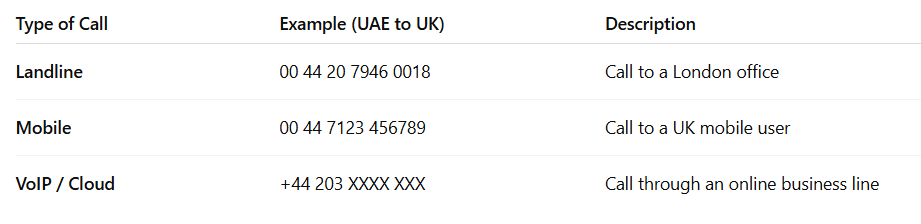
For mobiles and VoIP systems, the format works the same way you just replace the local prefix with +44. For instance, a UK mobile starting with 07123 becomes 00 44 7123. And for VoIP or cloud-based systems, the United Kingdom country code is already built in, making it effortless for international teams using tools like FreJun to connect without manual formatting.
How Can FreJun Simplify Calling the UK from the UAE?
FreJun makes international calling truly effortless. It automatically applies the right UK dialing format for every outgoing call, saving your team from manual errors or missed connections.
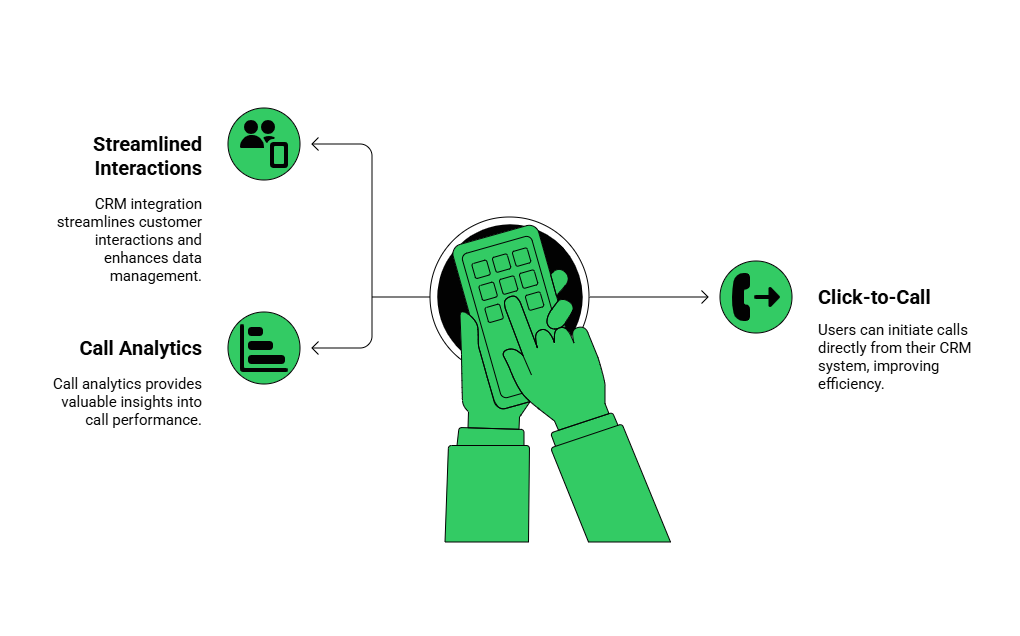
- Seamless CRM integration: All your calls and logs sync automatically with your CRM, keeping your sales and support teams fully aligned and data accurate.
- Click-to-call: Call any UK contact directly from your CRM or browser. FreJun auto-detects the right UK dialing format, so you never enter a wrong prefix again.
- Call analytics: Monitor call volume, duration, and agent performance in real time. FreJun’s reports help teams improve call efficiency and customer engagement effortlessly.
FreJun gives you complete control over communication from managing call flows and tracking analytics to recording and reviewing conversations, all in one easy dashboard. The best part? Everything is cloud-based, meaning you can go live in minutes without installing hardware or SIMs. Sign up here or book a demo to start calling the UK instantly.
Key Takeaways
Knowing the country code +44 and the correct UK dialling format will facilitate international calling. Whether you’re calling UK landlines, mobiles or cloud numbers, dialling in the right sequence format will have your calls connected instantly.
Many companies in UAE hide their local phone numbers and use UK phone numbers to seem more local, build client confidence and simplify calling their global clients. With FreJun, all of this is different. The software will take care of formatting, syncing call data and managing all interactions with your numbers. From CRM to analytics, FreJun puts an end to the guessing game and helps your team to call globally with confidence.
Final Thoughts
Mastering the +44 country code isn’t just about dialing it’s about creating reliable connections that drive business growth. For UAE companies working with UK clients, getting the details right makes a world of difference. It ensures professionalism, trust, and uninterrupted communication no matter where your team is based.
FreJun brings that reliability to life. With instant setup, automated number formatting, and built-in analytics, your business can handle global calls effortlessly. Sign up today or book a quick demo to see how FreJun simplifies cross-border communication and helps your team stay connected anytime, anywhere.
Further Reading: Review of the Best Click to Call Services in 2025 for Businesses
Book a FreJun Demo to see how FreJun can transform your business communication
FAQs
Dial 00 (UAE exit code), then 44 (UK country code), followed by the area code and local number.
No, always remove the leading zero when calling internationally.
Yes, VoIP platforms like FreJun make it easy and cost-effective.
Usually, between 12 PM and 6 PM UAE time, as business hours overlap.
It depends on your provider, but cloud-based systems like FreJun offer lower rates.
Yes, many services, including FreJun, let you set up UK virtual numbers remotely.
Your call won’t connect — the network won’t recognize the destination.
Yes, just follow the same format — include 00 or +44 before the number.
Yes, FreJun and similar platforms auto-format numbers to avoid dialing mistakes.
It’s better to keep them separate for professionalism and call tracking.