Last updated on November 6th, 2026 at 11:33 pm
Quick Answer: Making outbound calls from Pipedrive in India requires a third-party VoIP (Voice over Internet Protocol) dialer because Pipedrive’s built-in calling does not support Indian VoIP carriers or DLT (Distributed Ledger Technology) registration, which TRAI (Telecom Regulatory Authority of India) mandates for commercial outbound calls. You connect a compliant dialer through Pipedrive’s marketplace, authorize CRM access, configure call flows, and then dial directly from any contact record using click-to-call.
AI Summary: Outbound calls from Pipedrive in India require a compliant VoIP dialer because Pipedrive’s native calling does not meet TRAI’s DLT registration and DND (Do Not Disturb) registry requirements. This guide covers why native calling fails in India, the five steps to connect a VoIP dialer to Pipedrive, and the compliance and operational practices that keep outbound calling legal and effective. Teams that skip the compliance layer risk carrier blocks and regulatory penalties.
Table of contents
- Why Outbound Calling Matters in India?
- What are the Challenges with Pipedrive’s Native Calling in India?
- FreJun: The Best VoIP Solution for Pipedrive Users in India
- How to Integrate FreJun with Pipedrive for Outbound Calling?
- What are the Benefits of Using FreJun with Pipedrive?
- Why FreJun Stands Out Among Other VoIP Tools?
- What FreJun Features Can Enhance Outbound Calls in Pipedrive?
- What Are the Best Practices for Outbound Calling in Pipedrive India?
- Key Takeaways
- Final Thoughts
- FAQs
Why Outbound Calling Matters in India?
Outbound calling remains the primary channel for prospect engagement in India’s B2B sales market. Voice conversations deliver immediate feedback that email and messaging cannot match, which is why sectors such as finance, healthcare, and education depend on outbound calls for lead qualification and follow-up. For sales teams using Pipedrive as their CRM, the ability to dial directly from a contact record, log the outcome automatically, and stay within India’s telecom rules is not a convenience. It is an operational requirement.
India’s telecom regulator, TRAI, has put in place a framework that governs every commercial outbound call. Businesses that ignore it face carrier-level call blocks, not just fines. So the question for any Pipedrive team in India is not whether to add a compliant VoIP dialer, but which one to connect and how to do it correctly.
For teams already running Pipedrive, the goal is to keep call activity inside the CRM rather than switching between tools. When calls are placed and logged from within Pipedrive, deal records stay current, follow-up tasks are created automatically, and managers can review call outcomes without chasing reps for notes. That is the operational case for integrating a dedicated VoIP dialer rather than relying on Pipedrive’s native calling feature.
What are the Challenges with Pipedrive’s Native Calling in India?
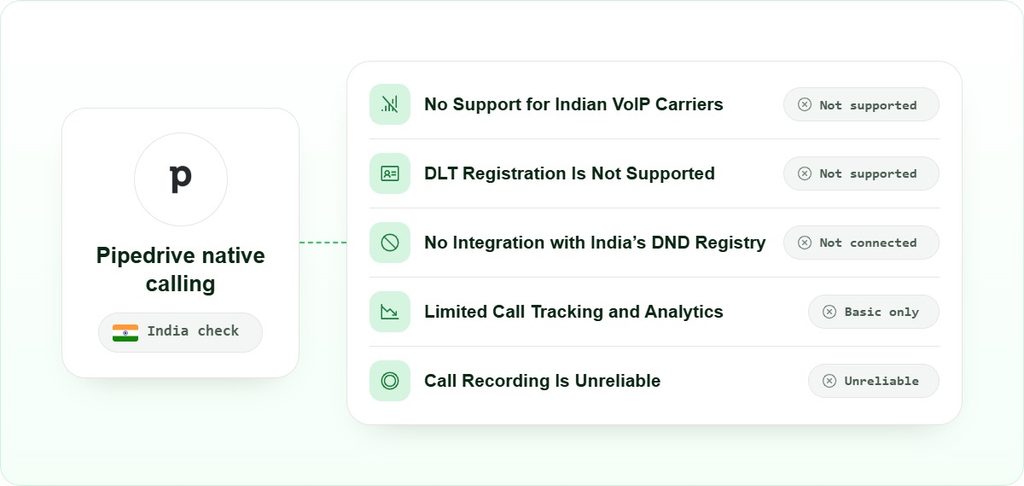
Pipedrive’s built-in calling was designed for markets where VoIP calling over standard international carriers is straightforward. India’s telecom environment is different in ways that matter operationally, and those differences cause specific, predictable failures.
For more detail on how these limitations play out in practice, see Pipedrive Calling in India: FAQs – FreJun.
No Support for Indian VoIP Carriers
Pipedrive’s native dialer routes calls through a small set of international VoIP providers. Most Indian telecom carriers are not on that list. The result is frequent call failures, poor audio quality, and high drop rates, because the call is being routed through infrastructure that was never optimized for Indian networks.
DLT Registration Is Not Supported
TRAI’s Telecom Commercial Communications Customer Preference Regulations (TCCCPR) require businesses making promotional or transactional calls to register on the DLT (Distributed Ledger Technology) platform. DLT registration ties a business’s caller identity to a verified sender record. Pipedrive’s native calling has no mechanism to carry a DLT-registered caller ID, so calls placed through it may be blocked at the carrier level before they reach the recipient.
No Integration with India’s DND Registry
TRAI maintains a National Customer Preference Register (NCPR), commonly called the DND (Do Not Disturb) registry. Businesses are required to scrub their call lists against this registry before dialing. Pipedrive’s native calling does not connect to the NCPR, which means a rep could unknowingly call a registered number. That exposes the business to regulatory complaints and potential penalties.
Limited Call Tracking and Analytics
Even when a call connects, Pipedrive’s native feature logs only basic activity. Call duration, outcome, agent-level performance, and missed call alerts are either unavailable or unreliable. Sales managers cannot review what happened on a call, identify which reps need coaching, or measure connect rates across the team. That gap makes it hard to improve outbound performance over time.
Call Recording Is Unreliable
Recording outbound calls for quality assurance and compliance purposes is standard practice for Indian sales teams. Pipedrive’s native calling does not offer reliable call recording in India, so teams lose the ability to review conversations, train new reps, or produce records for compliance audits.
FreJun: The Best VoIP Solution for Pipedrive Users in India
A VoIP dialer built for India’s telecom environment solves each of the problems above at the infrastructure level, rather than asking reps to work around them manually. The key criteria for any Pipedrive-connected dialer in India are: support for Indian VoIP carriers, DLT-registered caller IDs, DND registry scrubbing, automatic call logging inside Pipedrive, and reliable call recording.
Teams that want a deeper look at how the integration with Pipedrive works at the feature level, or a broader comparison of options, can also review the FreJun: The Best VoIP Solution for Pipedrive Users in India page for specifics.
When evaluating a VoIP dialer for Pipedrive in India, the compliance layer is the first thing to verify. A dialer that routes calls through DLT-registered numbers and checks outbound lists against the NCPR before dialing removes the two biggest regulatory risks. Beyond compliance, automatic call logging adds significant value. Pipedrive links every call to the correct contact and deal without requiring manual input from the rep. That keeps CRM data accurate and gives managers a complete picture of outbound activity.
We’d choose a dialer with native Pipedrive integration over a generic VoIP tool when the team’s primary workflow lives in Pipedrive, because the logging and analytics stay inside the CRM rather than requiring a separate dashboard. For teams whose primary CRM is not Pipedrive, or who need a contact center platform with inbound queuing and IVR (Interactive Voice Response) at scale, a broader CTI software buyers guide may be a better starting point.
How to Integrate FreJun with Pipedrive for Outbound Calling?
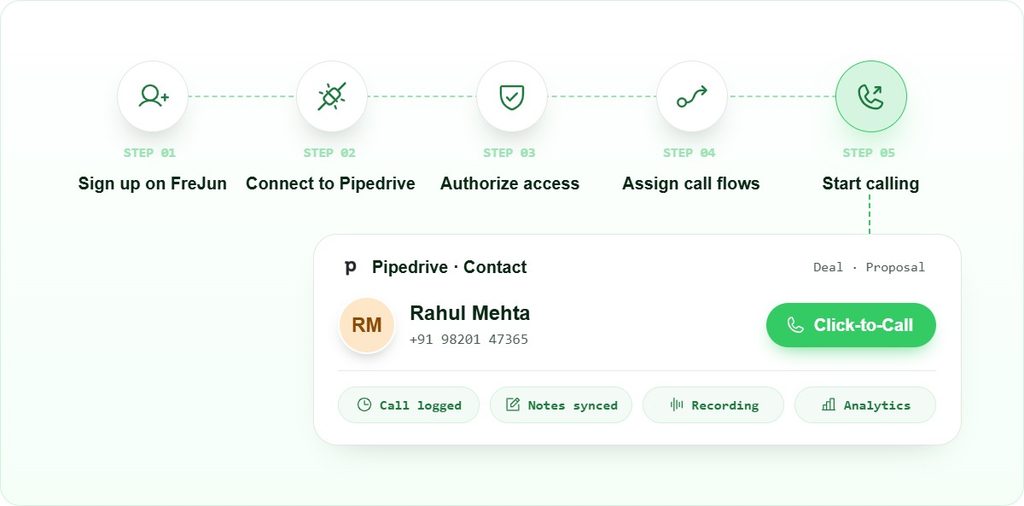
Connecting a VoIP dialer to Pipedrive follows a standard OAuth-based authorization flow. No code is required. The steps below describe the process using FreJun as the dialer, but the same sequence applies to any Pipedrive Marketplace app that uses the native connector.
1. Sign up on FreJun
- Go to frejun.com and click “Get Started” or “Sign Up”.
- Create your business account using your work email.
- Complete the basic setup to access your FreJun dashboard.
2. Connect FreJun to Pipedrive
- Head to FreJun Settings and select CRM Integration.
- Choose Pipedrive from the list of available integrations.
- Click “Connect” and log in to your Pipedrive account to authorize access.
3. Authorize FreJun to Access Pipedrive
- Grant FreJun permission to view contacts, deals, and activities.
- This step enables call data to sync with your CRM in real time.
- You’ll be redirected back to FreJun once the authorization is complete.
4. Assign Call Flows
- Map your sales agents to their respective Pipedrive accounts.
- Set up outbound call flows based on lead stages or deal pipelines.
- Define call routing, fallback rules, and availability preferences.
5. Start Calling
- Use the “Click-to-Call” button next to contacts in Pipedrive.
- FreJun automatically logs calls, notes, and outcomes in real time.
- Access recordings and analytics without leaving your CRM.
What are the Benefits of Using FreJun with Pipedrive?
Connecting a compliant VoIP dialer to Pipedrive changes how outbound calling works at the operational level. The benefits are specific and measurable, not abstract.
Calls Stay Inside the CRM
Reps dial from the contact record and never leave Pipedrive. Because the call is placed from inside the CRM, the system knows which contact and deal it belongs to. The log entry, call duration, and outcome are written automatically when the call ends. That removes the manual logging step that causes CRM data to go stale by the end of the week.
Compliance Is Handled at the Infrastructure Level
When the dialer carries DLT-registered caller IDs and checks numbers against the NCPR before dialing, the compliance burden shifts from the rep to the system. Reps do not need to manually verify whether a number is on the DND list. The dialer does it before the call is placed. That is the right place to enforce compliance, because it does not depend on individual rep behavior.
Managers Get Visibility Without Asking for It
Call analytics inside Pipedrive show duration, outcome, agent activity, and recordings for every call. A sales manager can review a rep’s calls from the previous day without asking for a summary. That visibility makes coaching conversations specific rather than general, and it lets managers spot patterns, such as a high call volume but low connect rate, that would otherwise stay hidden in a spreadsheet.
Recordings Are Linked to the Right Record
Call recordings are stored and linked to the Pipedrive contact, so anyone on the team can find the recording for a specific conversation without searching through a separate system. That matters for quality assurance, for onboarding new reps who need to hear real calls, and for compliance audits where a regulator may ask for records of specific interactions.
Why FreJun Stands Out Among Other VoIP Tools?
Most international VoIP tools target markets that do not require DLT registration or NCPR scrubbing. These tools often lack the features Indian businesses need. They cannot support DLT-registered sender IDs or check numbers against the NCPR before dialing. As a result, Indian teams face compliance gaps that basic configuration changes cannot fix.
FreJun incorporates India’s telecom regulations into its core design. DLT compliance and NCPR scrubbing form part of its standard call workflow, not optional add-ons. For businesses making calls within India, this helps improve connectivity and reduce regulatory risks.
That said, FreJun is not the right choice for every scenario. Teams that need a full inbound contact center with advanced IVR routing, or teams whose primary market is outside India and who need a tool optimized for international carrier coverage, may find a broader platform better suited to their needs. The Pipedrive-native integration and India-first compliance layer are the specific reasons to choose FreJun for outbound calling from Pipedrive in India. For a broader view of how it compares to other options, the Track and manage calls better with FreJun’s Pipedrive integration page covers the feature set in detail.
What FreJun Features Can Enhance Outbound Calls in Pipedrive?
Beyond compliance, the operational value of a VoIP dialer comes from the specific features that reduce friction in the daily calling workflow. The problems below are common on outbound teams, and each has a specific mechanism that addresses it.
Manual Dialing and Low Productivity
When a rep manually dials each number, types the outcome into the CRM, and then finds the next contact, a significant portion of their working day goes to tasks that are not conversations. An automated dialer removes the dialing and logging steps. The rep clicks a button, the call connects, and the log is written when the call ends. That changes the ratio of talk time to admin time in favor of actual selling.
Scattered Call Data Across Tools
When call logs sit outside the CRM, deal records quickly become outdated. For example, a rep may wait until Friday to log a Tuesday call in Pipedrive. By then, important details may slip through the cracks and follow-ups may arrive late. A native integration stores call data directly in Pipedrive as soon as the call ends. This keeps deal records accurate and helps reps follow up on time.
Missed Follow-Ups
Follow-up reminders tied to call outcomes, rather than manually created by the rep, reduce the chance that a warm lead goes cold because nobody scheduled the next step. When the dialer creates a follow-up task in Pipedrive automatically based on the call outcome, the rep’s next action is already in their queue when they finish the call.
Poor Call Quality or Connectivity Issues
VoIP call quality in India depends on routing through carriers that have peering agreements with Indian networks. A dialer that routes through Indian-optimized infrastructure reduces packet loss and latency compared to one routing through international carriers not built for the Indian market. For more on how routing affects call quality, see FreJun optimizes call routing and provides stable, high-quality connections.
Lack of Performance Insights
AI-driven call analytics can surface patterns that are invisible in a raw call log: which call times produce the highest connect rates, which objections come up most often, which reps have the longest average handle time. Those insights let managers make specific coaching decisions rather than general ones, and they let the team adjust outreach strategy based on what the data shows rather than what feels right.
What Are the Best Practices for Outbound Calling in Pipedrive India?
Outbound calls from Pipedrive in India work best when the team combines the right tool setup with disciplined operational habits. The practices below address the specific conditions of the Indian market.
1. Verify DLT Registration Before Launching Any Campaign
Businesses must complete DLT registration before launching commercial outbound campaigns in India. First, register your business entity on the DLT platform. Then, link the caller IDs used by your dialer to that registration. Indian carriers may block calls from unregistered numbers before they reach recipients, regardless of call quality or timing.
2. Scrub Call Lists Against the NCPR Before Dialing
India’s National Customer Preference Register (NCPR) is the DND registry maintained by TRAI. Calling a registered number exposes the business to complaints and regulatory action. Scrubbing should happen before each campaign run, not once at list creation, because registrations change. A dialer that automates this check removes the risk of human error in the scrubbing process.
3. Segment Leads by Stage Before Assigning to Reps
Pipedrive’s pipeline view makes it straightforward to filter contacts by deal stage. Assigning reps to call lists that match their stage in the sales process, rather than giving everyone the same list, means conversations are more relevant and reps spend less time on contacts that are not ready for their pitch. That segmentation also makes analytics more meaningful, because you can compare connect rates and outcomes by stage rather than across a mixed list.
4. Use CRM Data to Personalize Each Call
Because the call is placed from inside Pipedrive, the rep has the contact’s full history on screen before the call connects. Previous interactions, deal stage, company size, and any notes from earlier calls are visible without switching tabs. Reps who reference that context in the opening of a call convert at higher rates than those who open cold, because the prospect hears that the caller already knows who they are.
5. Record Calls and Review Them Weekly
Call recordings stored in Pipedrive are only useful if someone listens to them. A weekly review of a sample of calls, specifically calls where the outcome was a no or a no-answer, gives managers the material to run specific coaching sessions. That practice also helps identify script problems that are causing objections across multiple reps, which is a systemic issue rather than an individual one.
6. Track Connect Rate and Outcome Rate as Primary KPIs
Call volume is a lagging indicator. Connect rate, the percentage of dials that result in a live conversation, and outcome rate, the percentage of connected calls that advance the deal, are the metrics that tell you whether the outbound program is working. Both are available in the call analytics inside Pipedrive when a VoIP dialer is connected. Review them weekly and adjust call timing, list quality, or script based on what they show.
7. Schedule Follow-Ups Before Ending Each Call
The best time to schedule a follow-up is while the prospect is still on the line. A rep who confirms the next step verbally and creates the Pipedrive task before hanging up is far less likely to let that lead go cold than one who plans to do it later. When the dialer creates a follow-up task automatically based on the call outcome, this step happens without the rep having to remember it.
8. Follow TRAI’s Calling Hour Restrictions
TRAI’s TCCCPR specifies permitted calling hours for commercial outbound calls. Calling outside those hours is a regulatory violation, not just a best practice. Build those restrictions into your call flow configuration so the dialer does not place calls outside the permitted window, regardless of when a rep is working. This is one of the cases where the compliance burden belongs in the tool, not in the rep’s memory.
Key Takeaways
- Pipedrive’s native calling does not support Indian VoIP carriers, DLT registration, or NCPR scrubbing, so it is not suitable for compliant outbound calling in India on its own.
- A third-party VoIP dialer connected through Pipedrive’s marketplace solves the compliance gap and adds automatic call logging, recording, and analytics inside the CRM.
- The five-step integration process requires no code: sign up, connect, authorize, configure call flows, and start dialing from contact records.
- DLT registration and NCPR scrubbing are regulatory requirements, not optional features. Any dialer used for outbound calls from Pipedrive in India must handle both.
- Operational best practices, including lead segmentation, call recording review, and TRAI calling hour compliance, determine whether the technical setup translates into better sales outcomes.
Final Thoughts
Making outbound calls from Pipedrive in India is a two-part problem. The first part is technical: Pipedrive’s native calling does not meet India’s telecom requirements, so a compliant VoIP dialer must be connected through the marketplace. The second part is operational: the dialer only delivers value if the team uses it with the right practices, specifically DLT-registered numbers, NCPR-scrubbed lists, and TRAI-compliant calling hours.
When teams get both parts right, they create a reliable calling setup. Every outbound call follows compliance rules, logs automatically, and appears in Pipedrive in real time. Managers can track activity without chasing updates. This guide helps teams achieve that setup. For more details, explore FreJun’s VoIP calling integration with Pipedrive.
For teams also evaluating sales dialer software for small businesses in India or looking at broader outbound calling software options for India, those guides cover the wider market and help you compare options beyond the Pipedrive-specific use case. Teams in BFSI or EdTech may also find the DND compliance guide for India sales teams useful before configuring their first campaign.
Frequently Asked Questions
Setup and Compliance
Pipedrive’s built-in calling lacks optimisation for Indian networks. It also does not support DLT registration or NCPR scrubbing, which Indian telemarketing rules require. As a result, Indian carriers may block calls or prevent them from connecting. A dedicated VoIP dialer integrated with Pipedrive offers a more suitable setup for compliant outbound calling in India.
DLT (Distributed Ledger Technology) registration is a TRAI requirement under the TCCCPR framework. Businesses making commercial outbound calls must register their entity and caller IDs on the DLT platform. Calls placed from unregistered numbers can be blocked by carriers before reaching the recipient. A VoIP dialer that carries DLT-registered caller IDs handles this at the infrastructure level, so reps do not need to manage it manually.
The integration follows a standard OAuth authorization flow and requires no code. Most teams complete the five steps, sign up, connect, authorize, configure call flows, and start calling, within a single session. The time-consuming part is configuring call flows and mapping agents to Pipedrive accounts, which depends on team size and how many routing rules you need.
Performance and International Calling
No. The integration adds call activity to existing records rather than modifying them. Contacts, deals, and pipeline stages remain unchanged. The dialer writes call logs, duration, outcome, and recordings to the relevant contact and deal records automatically after each call. Existing data is not overwritten or restructured.
Yes, a VoIP dialer connected to Pipedrive can place calls to international numbers including the USA. The compliance requirements that apply are those of the originating country, India, for the outbound call setup, and potentially those of the destination country for the call content. DLT registration and NCPR scrubbing apply to calls originating in India regardless of the destination number.
Once a VoIP dialer is connected to Pipedrive, call analytics are available inside the CRM. You can track call duration, connect rate, outcome by agent, and recordings for every call. Managers can filter by rep, date range, or deal stage to identify patterns. That data is the basis for weekly coaching sessions and for adjusting outbound strategy based on what the numbers show.
The three most common problems are: call failures caused by unsupported Indian VoIP carriers, compliance exposure from missing DLT registration and NCPR scrubbing, and incomplete call logs because reps manually enter data after calls. All three are solved at the infrastructure level by connecting a VoIP dialer built for India’s telecom environment rather than trying to work around Pipedrive’s native calling limitations.