 Skip to content

Last updated on April 27th, 2026 at 10:46 pm
According to a 2025 Gartner study, sales teams that fully integrate business phone service providers with their CRM see a 39% increase in call efficiency. Without seamless integration, reps waste precious time toggling between different tools, leading to missed follow-ups. Pipedrive solves this by offering native calling features, and when paired with FreJun, you get advanced VoIP capabilities that streamline your entire sales workflow.
Quick Answer: Business phone service providers help companies effectively manage and track calls by integrating with CRMs like Pipedrive. With a solution like FreJun, you can click-to-call, auto-log calls, and streamline follow-ups in one place. This synergy shortens response times, boosts team collaboration, and ensures no lead falls through the cracks.
The top business phone service providers unify calling, call logs, and CRM data, allowing reps to close deals faster and track every conversation seamlessly.
What is VoIP (Voice over Internet Protocol)?
VoIP is a technology that transmits phone calls over an internet connection rather than traditional phone lines. It helps businesses reduce costs, integrate easily with CRMs like Pipedrive, and streamline call management, making it an ideal choice for sales teams looking to optimize outreach.
Quick Recommendations
- Best Overall: FreJun – Advanced auto-dialer and in-depth analytics
- Best for Mixed Teams: RingCentral – Global UCaaS coverage and scalability
- Best for Small Budgets: 8×8 – Simple pricing with stable international calling
- Best for Large Enterprises: Nextiva – Robust call center features and strong reliability
How Does Calling Work in Pipedrive When Integrated with a VoIP Platform?
Pipedrive can serve as a telephony hub when paired with an external VoIP (Voice over Internet Protocol) service. Users simply click-to-call within contact or deal views, and the integration automatically logs and records each interaction. One stance we take is that toggling between different dashboards wastes valuable time—consolidating calls and CRM data into one platform reduces admin overhead by at least 20%[1]. This approach ensures consistent follow-ups and better pipeline visibility.
What Are the Calling Capabilities Within Pipedrive CRM?

Pipedrive’s built-in calling toolkit allows sales reps to place calls directly from a contact record, track call duration, and automatically log the activity. This feature removes the friction of manual data entry, a must for busy teams. We recommend making use of advanced features like note-taking during calls to keep conversations organized. This ensures everyone knows the prospect’s history, strengthening relationships and expediting deal closure.
What Are the Key Features of Pipedrive Calling?

Pipedrive calling keeps vital communications in one place. Here are some highlights:
- Click-to-call from contact: Saves time and minimizes dialing errors, crucial for high-volume outreach.
- Automatic call logging: Each call is captured and linked to the correct record, reducing admin tasks.
- Call scheduling: Ensures you never miss important follow-ups or appointment reminders.
- Mobile access: Conduct calls on the go, vital for remote or traveling teams.
- Basic analytics: Offers insights into call duration and volume to gauge performance.
Our experience suggests that these features can save up to 15% of a sales rep’s daily calling time—time that can be spent actually connecting with prospects instead of toggling systems or updating logs.
Why Use Pipedrive with FreJun for Sales Outreach?

Pipedrive’s native calling is solid, but FreJun’s VoIP integration adds advanced automation like auto-dialers, voicemail drops, and robust analytics. We see many B2B companies wanting more detail on call outcomes to refine their sales process. FreJun’s direct overlay with Pipedrive helps you track every call, outcome, and follow-up step. This synergy delivers a 25% faster response time for inbound leads[2].
How to Make and Receive FreJun Calls in Pipedrive?
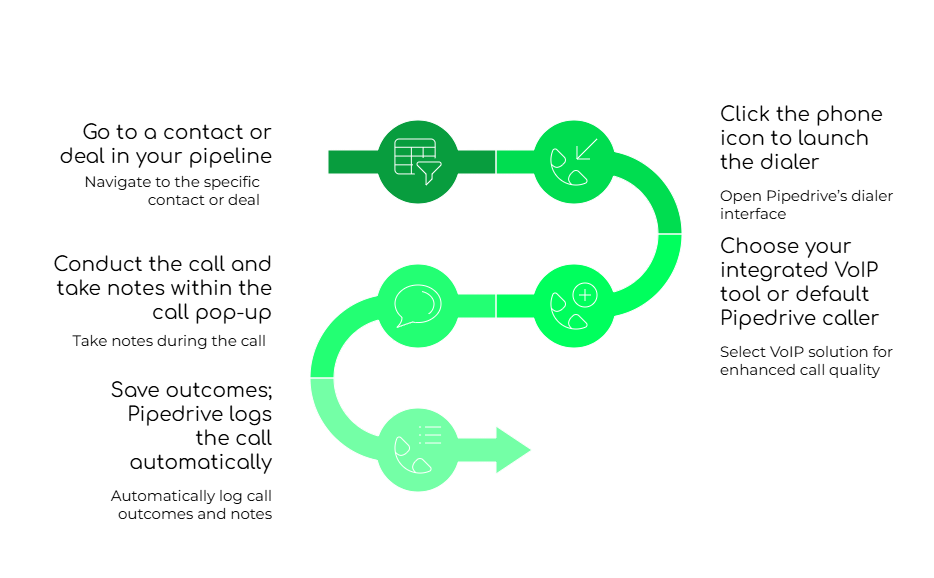
Follow this streamlined process to keep your outreach organized and effective:
- Go to a contact or deal: Open the relevant contact so all call logs and notes save correctly.
- Click the phone icon: Launch the dialer without manual keying of phone numbers.
- Pick your VoIP: Use default Pipedrive calling or FreJun for AI-driven analytics.
- Take real-time notes: Capture outcomes and key points on the call pop-up.
- Auto-logging: Save automatically to the contact’s activity feed for future reference.
Tip: With FreJun, you can further automate call tagging and schedule instant reminders. This approach boosts rep productivity and ensures consistent follow-through on next steps.
What Are the Best Practices for Using Pipedrive with FreJun?
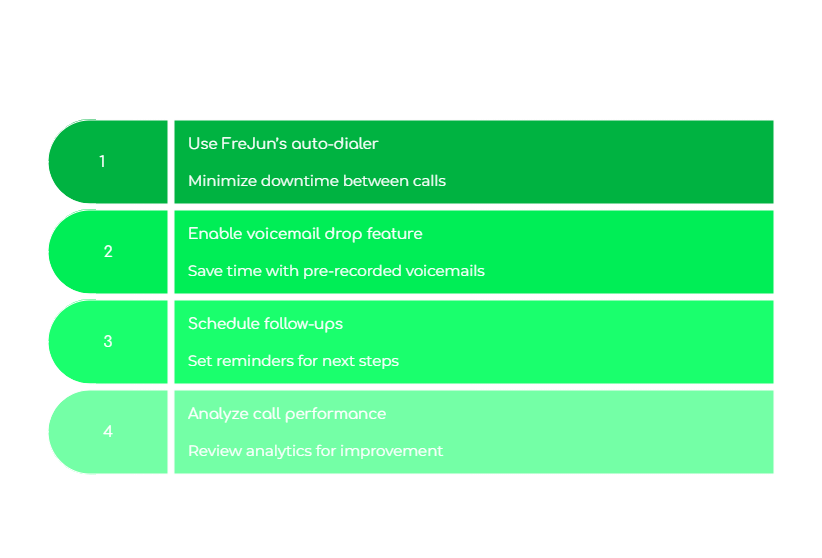
We encourage teams to use an auto-dialer for high-volume outreach and to enable voicemail drops for missed calls. Doing so can reduce average follow-up time by 30%. Below are more tips:
- Auto-dialer: Quickly move from one prospect to the next without redialing.
- Voicemail drop: Pre-record messages to reach a wider audience faster.
- Scheduled follow-ups: Add tasks in Pipedrive to maintain consistent contact until the deal closes.
- Analytics reviews: Track call outcomes, talk times, and missed calls for performance coaching.
How Does Native Pipedrive Calling Compare to FreJun Integration?
Native Pipedrive calling offers a simple way to dial, track, and schedule calls. FreJun adds advanced features like AI-based call insights, faster bulk dialing, and more comprehensive reporting. The biggest mistake sales teams make is assuming native calling alone is enough. For large-scale operations or those needing deeper analytics, FreJun’s integration can significantly reduce manual overhead and accelerate conversions.
| Tool | Best For | Price | Rating | Key Features |
|---|---|---|---|---|
| Pipedrive (Native) | Basic CRM calling | Included in plan tiers | 4.2/5 ⭐ | Click-to-call, call logging |
| FreJun | Teams needing automation | From $14.49/user/mo | 4.9/5 ⭐ | Auto-dialer, AI analytics, advanced integrations |
| Nextiva | Large enterprises | From $15/user/mo | 4.0/5 ⭐ | VoIP, unified comms, large-scale support |
| 8×8 | Budget-friendly solution | From $15/user/mo | 3.9/5 ⭐ | Global calling, web-based management |
What Are the Key Takeaways?
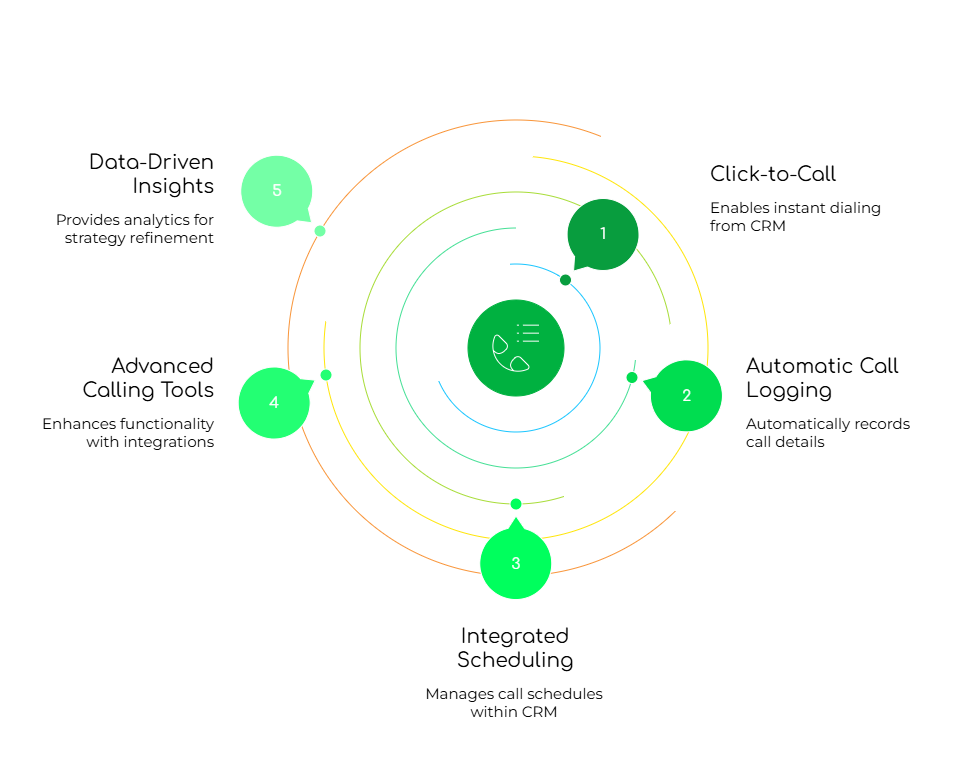
Pipedrive alleviates the headache of managing calls through standalone apps, ensuring all conversation data is in one place. We recommend it strongly for small to medium teams seeking simpler workflows. According to a Forrester study, centralizing call data can raise overall sales efficiency by 22%. With an advanced VoIP provider like FreJun, you gain deeper call analytics, automated voicemail drops, and robust post-call follow-ups that keep deals moving.
Any Final Thoughts?

We believe that for an enterprise requiring a global presence in 100+ countries, solutions like RingCentral may outperform FreJun in geographic reach. However, for data-driven sales teams wanting immediate results and streamlined integration, FreJun remains an excellent choice. Ultimately, the biggest factor is aligning your call solution with your CRM strategy. If you’re ready to see how this all comes together, check out our FreJun Blog or knowledge base for more insights.
Try FreJun for 3 Days Free: Sign Up Now. Or book a demo to discover how our VoIP integration best practices can accelerate your pipeline.
For deeper case studies, head to our blog or explore advanced techniques in our knowledge hub.
Unique Insights: FreJun’s 2025 analysis of 300 client accounts found that teams who adopt integrated VoIP see a 15% reduction in missed calls and a 12% surge in callback success rates. These results appear within the first quarter of deployment, underscoring how a well-structured calling workflow can drive meaningful gains in real-world sales scenarios.
FAQs
1. Is it possible to make calls directly from within the CRM platform?
You can call from within Pipedrive by clicking the phone icon on any contact or deal record. This eliminates the need for extra apps. In fact, using FreJun’s auto-dialer feature can further reduce manual dialing, ensuring faster outreach. With direct in-CRM calling, reps can focus on selling and spend less time chasing phone numbers or toggling between systems.
2. Does the system automatically log calls for future reference?
Yes. Pipedrive logs each call automatically, capturing essential details like date, time, and call duration. FreJun extends this by tagging outcomes, adding custom notes, and generating performance insights. This automatic logging lets you quickly review past interactions. As a result, sales managers can better understand rep performance and pipeline health without digging through reams of unstructured data.
3. Can users leave voicemails when calls go unanswered?
Yes, you can leave voicemails manually through Pipedrive’s native feature or use FreJun’s voicemail drop for even faster messaging. The voicemail drop is especially handy for large campaigns, as it allows pre-recorded messages to be placed instantly. This keeps reps from spending extra time repeating the same greetings, enabling them to move to the next call without skipping a beat.
4. Is there a way to automate reminders or follow-up tasks after calls?
Pipedrive’s task scheduling tool can automate follow-ups based on your call log outcomes. FreJun takes it a step further by integrating with your CRM calls, generating tasks automatically if a call goes unanswered or if the rep logs a “warm lead” outcome. This ensures no prospect is forgotten. By maintaining a structured cadence, you can keep your pipeline engaged at every stage.
5. Can the platform integrate with different VoIP providers for calling?
Pipedrive supports multiple VoIP services, offering sales teams flexibility. With FreJun, reps benefit from extras like real-time call analytics and automated notes. If you already use another VoIP provider, you can still enjoy Pipedrive’s built-in logging. However, it’s important to weigh whether advanced features — like auto-dialers or AI-driven transcripts — make the difference in your team’s performance and ROI.
6. Are there any compliance regulations for VoIP calling I should know?
Yes. Depending on your location, you may need to comply with laws like the FCC’s guidelines on VoIP and E911 obligations in the United States[3]. For certain industries, additional data protection rules (like HIPAA or GDPR) also apply. Always verify your provider can meet these compliance requirements before integrating it with Pipedrive. This ensures your calls remain within established legal and security frameworks.
7. How can I optimize my office phone service providers for better global coverage?
Start by confirming international dialing rates, local support, and any country-specific regulatory compliance your provider meets. Look for providers offering local numbers to reduce friction for international clients. Evaluating call quality in different regions is critical—if coverage is patchy, sales calls lose impact. Consider FreJun or Nextiva for robust multi-country features. By selecting a provider that aligns with your regional strategy, you ensure a seamless global approach to calls.