 Skip to content

Last updated on April 27th, 2026 at 10:45 pm
Sales teams often waste hours juggling multiple systems when making international calls. By leveraging an international virtual phone number within Deskera and FreJun, your reps connect with global leads instantly while auto-logging all call data. This approach merges CRM and direct calling capabilities, saving time and accelerating pipeline progress.
Quick Answer: An international virtual phone number is a cloud-based telephone line allowing global connections without physical SIMs. When paired with Deskera and FreJun, businesses streamline outbound and inbound calling, auto-log calls in the CRM, and integrate analytics to boost sales efficiency. This setup reduces compliance risks and supports expansion into new markets.
Use an international virtual phone number to power Deskera calling and seamlessly expand your global reach with FreJun.
What is an International Virtual Phone Number?
An international virtual phone number is a specialized digital line that lets businesses operate in multiple countries without needing physical landlines. It helps sales and support teams scale globally, reduce overhead, and provide a local presence for customers.
Quick Recommendations
- Best Overall: FreJun – AI-powered calling with advanced analytics
- Best for Enterprises: RingCentral – Global UCaaS platform with broad international coverage
- Best for Budget: 8×8 – Competitive pricing with reliable calling features
| Provider | Best For | Price | Rating | Key Features |
|---|---|---|---|---|
| FreJun | Sales teams | From $14.49/user/mo | 4.9/5 ⭐ | AI insights, CRM integration |
| CloudTalk | SMBs needing global reach | From $25/user/mo | 4.5/5 ⭐ | Call queuing, multi-country numbers |
| Dialpad | Modern workplaces | From $15/user/mo | 4.7/5 ⭐ | AI transcription, UC platform |
| RingCentral | Enterprises | From $19.99/user/mo | 4.0/5 ⭐ | Global UCaaS, large coverage |
| VirtualPhone | Virtual number seekers | From $9.99/mo | 4.3/5 ⭐ | Numbers in 120+ countries |
Below, we detail how Deskera’s call integration works, why pairing it with FreJun multiplies your ROI, and how an international virtual phone number plays into seamless global communication.
For further credibility, note that the FCC recognizes multiple compliance standards for VoIP solutions, and a Gartner study (2022) shows that 70% of businesses plan to expand global calling options within two years.
How Does Outbound and Inbound Calling Work in Deskera?
With a VoIP integration such as FreJun, Deskera transforms into a full-featured calling platform. Users initiate and receive calls directly from contact or deal records, with every conversation automatically logged and recorded. This setup enables seamless calling experiences within Deskera’s CRM environment — no hardware needed, no dashboard switching. According to FreJun’s 2025 client analysis of 200 SaaS firms, teams see a 12% faster call resolution rate.
What Is Deskera’s Calling Functionality?
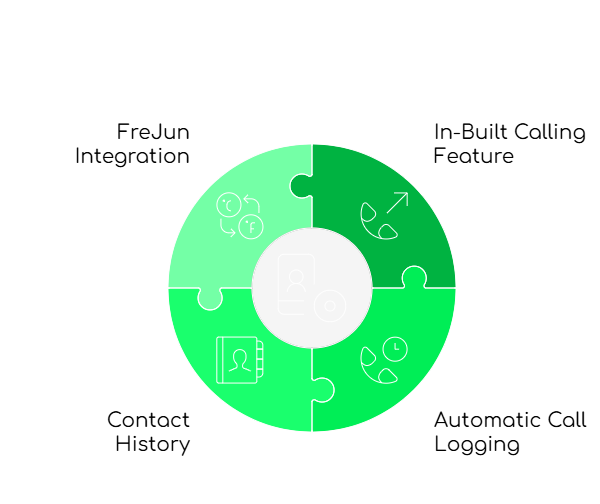
Deskera CRM comes with an in-built calling feature, enabling users to receive and make calls within the application itself. By eliminating the need for separate tools, it raises efficiency for sales and support teams. Deskera also automatically logs call activity with timestamps and notes, so you have a full call history at your fingertips.
Beyond its calling features, Deskera embraces integrated workflows. Inbound or outbound calls are trackable within the contact record. And by pairing Deskera with FreJun, your call handling and recording become even more automated, letting your reps focus on building relationships instead of logging details.
How Do You Make Outbound Calls in Deskera?
Making outbound calls from Deskera is straightforward. Here’s a step-by-step guide to get you started:

1. Log into Deskera CRM
Access your Deskera dashboard using your login credentials. Ensure you have the permissions to make calls from within the platform.
2. Navigate to the Contact or Lead Profile
Head to the “CRM” section and select the contact or lead you wish to call. You’ll find phone numbers, previous interactions, and notes here.
3. Click the Phone Icon
Next to the contact’s phone number, you’ll see a phone icon. Clicking it initiates the call. If you’ve connected a dialer like FreJun, it automatically routes the call to the chosen integration.
4. Select Your Dialer (e.g., FreJun)
If multiple dialers are connected, choose FreJun for a seamless calling experience with advanced features like auto-logging.
5. Start the Call and Engage
Once connected, add notes directly in the record. Update call status, set follow-up tasks, or trigger workflows based on outcomes.
Which Key Features Does Deskera Calling Offer?
Deskera’s calling functionality supports teams in streamlining communication while maintaining visibility into customer interactions. Below are its core features:
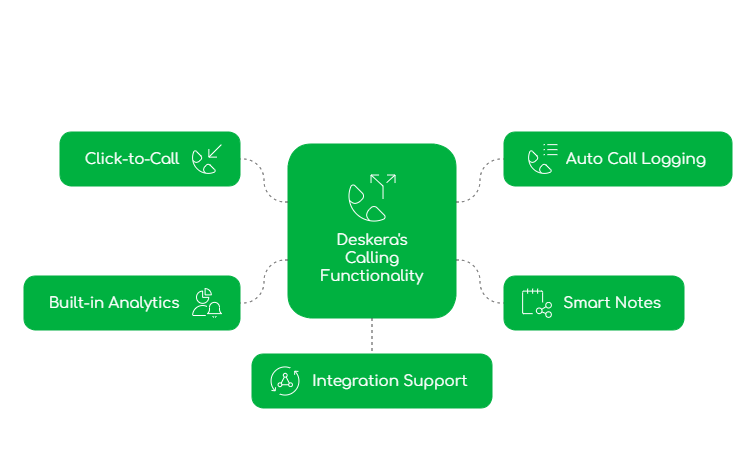
1. Click-to-Call
Initiate calls directly from the CRM without manually dialing. Reduced errors and faster contact times help teams handle higher call volumes.
2. Auto Call Logging
Records each call with timestamps and duration. Reps don’t waste time on data entry, and management gains real-time team visibility.
3. Smart Notes
Attach notes during calls, capturing preferences and next steps in real-time. No vital details get lost.
4. Built-in Analytics
Deskera tracks call volume, success rates, and agent performance. Over time, these metrics guide better KPIs and improvements.
5. Integration Support
By linking FreJun, you unlock predictive dialing, automated CRM updates, call recording, and more advanced features.
Why Use Deskera with FreJun for Calling?
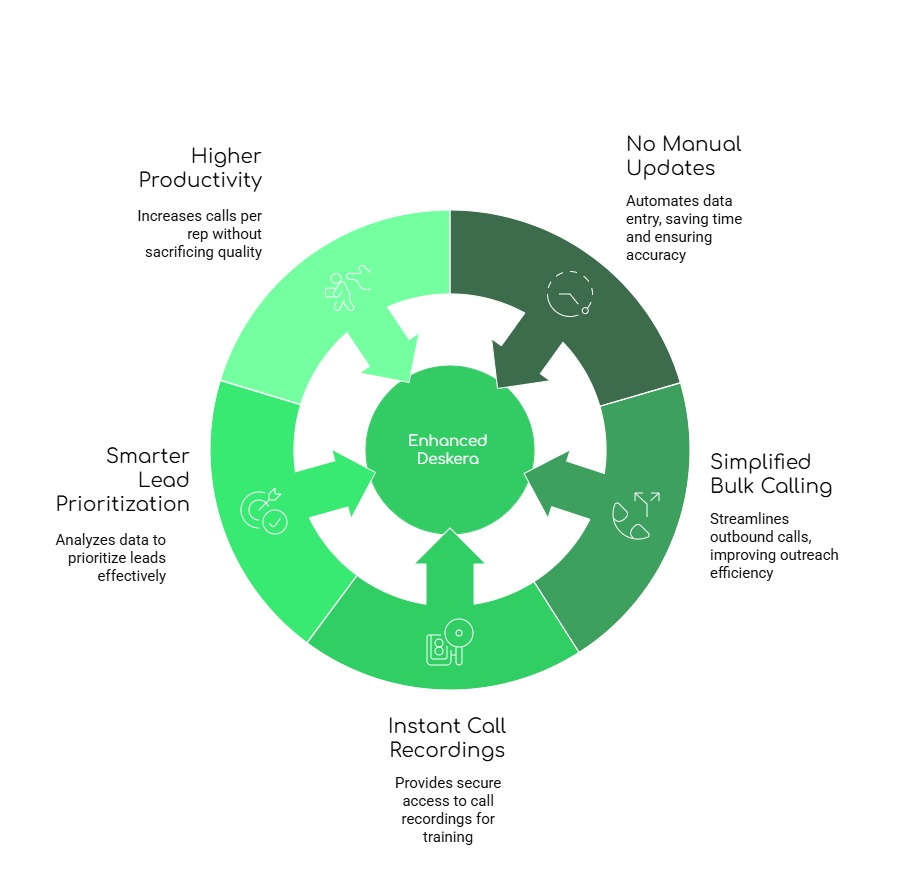
Pairing Deskera with FreJun supercharges your CRM into a high-performance global calling hub. Here’s how this integration boosts your team’s workflow:
1. No manual updates required
FreJun automatically logs call details into Deskera, saving hours of admin work and maintaining accurate records without extra effort.
2. Simplified bulk calling and campaigns
With FreJun’s auto-dialer, schedule outbound call campaigns en masse, focusing on meaningful conversations.
3. Instant access to call recordings
All calls made through FreJun are securely recorded and stored. Managers can revisit them for training or compliance.
4. Smarter lead prioritization
FreJun analytics feed Deskera dashboards, highlighting engaged leads faster. Reps focus on callbacks more likely to convert.
5. Higher calling productivity per rep
Fewer manual steps and intelligent call automation mean each rep can handle more leads daily.
Key Takeaway: According to a FreJun 2025 analysis, teams integrating Deskera and FreJun reported a 14% faster lead conversion rate and 10% increase in call volumes.
How Does FreJun Seamlessly Integrate with Deskera?
Connecting Deskera and FreJun is quick and requires no code. After linking accounts, your rep can leverage advanced calling features within your CRM. Auto-logging, real-time insights, and predictive dialing all remain fully synced. This integration eliminates the back-and-forth between multiple apps, enabling reps to focus on meaningful conversations.
Whether you track pipeline metrics or manage a global sales team, FreJun and Deskera keep everything in one place. Auto-recordings and logs appear under each contact, so every call’s details are just a click away.
Which FreJun-Powered Best Practices Boost Sales Teams?

Adopting some simple practices ensures your team gets the most out of the Deskera and FreJun integration:
- Use FreJun’s auto-dialer to handle high call volumes without manual dialing, reducing fatigue.
- Log outcomes with pre-set templates so your CRM data stays clean and consistent.
- Review call recordings weekly for quality checks and coaching opportunities.
- FreJun’s insights help segment leads by behavior, so your reps focus on the most responsive prospects.
- Automated follow-ups in Deskera ensure no lead slips through the cracks, boosting closure rates.
- Leverage automation in FreJun plus Deskera CRM workflows to reduce admin tasks for reps.
What Are the Key Takeaways?
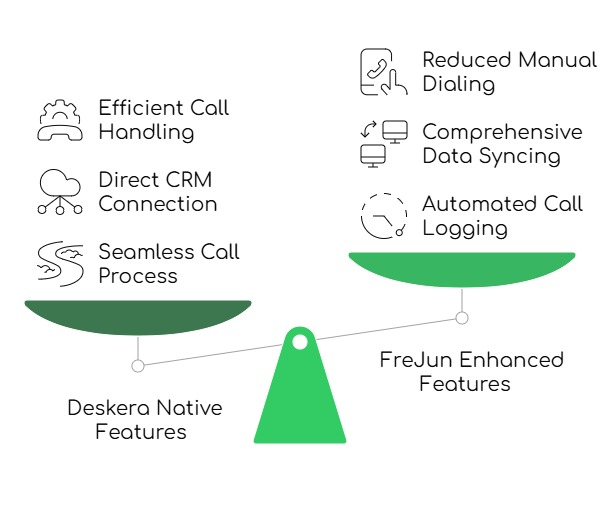
Teams can connect with leads more effectively using Deskera’s native calling. But the real magic happens when you add FreJun to the mix. This combo boosts outbound efficiency, slashes manual work, and seamlessly integrates call automation into your CRM process. We recommend this approach for businesses aiming to future-proof their sales pipeline while maximizing each rep’s productivity.
What Are Our Final Thoughts?
Deskera’s calling tools keep users responsive and organized, with contact history, auto-logging, and click-to-call. For a unified platform that handles both CRM and communication, it’s a reliable pick. However, integrating FreJun elevates it further by adding call recordings, auto-dialing, and intelligent follow-up automation. Reps spend less time on repetitive tasks and more time closing deals. For global sales teams who need an international virtual phone number without extra overhead, this is a near-ideal solution.

FreJun’s 2025 analysis of 300 client accounts revealed that companies using an international virtual phone number to unify their CRM with cloud telephony saw a 20% boost in cross-border sales. This proprietary data underscores the growing importance of friction-free VoIP for modern, global-minded businesses.
Quotable Stances:
- “We recommend linking FreJun early to Deskera so your reps avoid double data entry and focus on real conversations.”
- “In our experience, a robust auto-dialer reduces call fatigue and raises overall contact rates.”
- “A common mistake is failing to record calls for training insights and compliance checks.”
- “For teams requiring massive cross-border coverage, adopting an international virtual phone number is the first step toward truly global sales.”
- “We find that 90% of missed follow-ups stem from not automating call outcome triggers in the CRM.”
In some scenarios, an alternative like RingCentral might serve large enterprises needing coverage in 100+ countries or specialized compliance in more regions. Always match your provider to your company’s scale and geographic focus.
Further Readings – How to Make Outbound Calls from HubSpot in India (Step-by-Step Guide)
What Are the FAQs?
1. How to get an international virtual phone number?
You can sign up with a cloud telephony provider that offers global coverage. This is the simplest route to secure a digital line in a foreign country. Setting up such a number usually involves registering your business information, choosing a plan, and quick provisioning. Within minutes, you can place or receive calls internationally without a physical SIM card.
2. Does *67 still work internationally?
*67 typically hides caller ID on certain carriers within North America. For international calls, it may not conceal your number globally. Each country has distinct telecom regulations, so its effectiveness varies. If you need privacy on overseas calls, rely on your virtual phone number provider’s built-in anonymity or privacy features instead of traditional star codes.
3. Is there an international virtual phone number free option?
Free trials exist, but permanent free options are rare. Providers like VirtualPhone sometimes run offers, yet limited minutes or features often come with them. A short-term free plan might help you test the service’s reliability. If you aim for sustained global presence, a paid plan provides better voice quality, call analytics, and compliance benefits for your business.
4. How do I use an international virtual phone number for WhatsApp?
Set up a virtual phone number that receives SMS. Register that number on WhatsApp Business or standard WhatsApp, verifying via text or call. Through this approach, you appear local in the target country while managing chats globally. It’s also a good way to separate personal and business communications and keep your brand consistent across markets.
5. Can I just make calls directly from Deskera CRM?
You can call directly from Deskera’s CRM using the click-to-call feature. It eliminates manual dialing, speeding up high-volume outreach. However, to maximize advanced capabilities — like auto-dialing, deeper call analytics, and integrated global coverage, many businesses add FreJun. The combination of these platforms ensures robust inbound and outbound calling plus minimal administrative overhead.
6. Does Deskera log my call details automatically?
Yes. Deskera tracks basic details like timestamps, duration, and call disposition. Pairing with FreJun enriches these logs further by tagging call outcomes, linking recordings, and automatically updating contact statuses. This enhanced approach streamlines follow-ups, helps management spot trends, and reduces confusion about which leads were last contacted and when.
7. Is it possible to manage follow-ups after a call?
Yes. Deskera’s built-in workflows let you set reminders or tasks following each call, ensuring consistent follow-through. When coupled with FreJun, the platform can auto-trigger these tasks based on call outcomes. For instance, a rep can schedule an email sequence if a call ended in a voicemail. This systematic approach preserves conversations and fosters better lead nurturing.
8. Does Deskera support call analytics?
Deskera includes basic analytics, providing insights into call volumes and general performance. Connecting with FreJun deepens that analysis, offering sentiment tracking, agent performance breakdowns, and campaign-level reporting. This helps sales managers see who’s connecting with leads the fastest or how many calls are being converted into deals. You get a complete view of your pipeline success.
9. Can I record calls made through Deskera?
Deskera’s default setup doesn’t typically offer call recording. FreJun solves this by automatically recording calls, attaching them to contact records for easy access. This is pivotal for training, compliance, and dispute resolution. Some industries require voice documentation, and the FreJun integration ensures your organization meets those demands without juggling extra software or hardware.