 Skip to content

Have you ever been frustrated with your sales team wasting time manually dialing numbers from your CRM? With click to call with your CRM, reps can start the call by simply clicking on it, skipping those tedious steps and avoiding any errors. This direct connection gives them valuable minutes back on every call and enables them to spend more time engaging with the prospect and less time on administration.
So how does this connection actually affect my sales? Automatic call logging, analytics and real-time reporting, along with the management of CRM workflow, enables you to see what’s working in sales and adjust your follow-up accordingly to close the deal faster. Need to keep better track of your CRM calls? FreJun offers reliable CRM call integration so that you can log what’s actionable and make better decisions.
Table of contents
What Is a Click to Call CRM?
A click to call CRM eradicates that hassle. Click to call CRM enables your users to call directly from CRM contact records with a single click. Of course you can do more than just dial. This integration also logs every call for you.
FreJun for example uses CRM call integration and analytics, so that managers can see the histories, outcomes, and sales reports without lifting a finger.
Click to call CRM improves team efficiency and eliminates errors. Teams no longer spend minutes on each call handling the administrative aspects they shouldn’t and instead focus on talking to customers.
How Does Click to Call CRM Boost Sales Productivity?
By using click to call CRM, sales reps can boost their productivity by as much as 35%, studies show. Time that would otherwise be spent dialing numbers manually and switching between various devices is freed up to contact more customers per day.
All the calls are automatically logged. This includes call duration, timestamp and call notes. Not only does this help with data recording, it also provides valuable information that can be used to improve sales process. Our FreJun users who track their calls report higher call completion and improved conversion of leads due to increased productivity.
Managers can keep track of salespeople’s performance with CRM calls integration. Automated call data combined with CRM analytics allows to follow sales process and identify top sales performers, as well as track call volumes and optimize call center resourcing.
What Are the Core Features of Click to Call CRM?
Click to call CRM platforms come with several features designed to maximize efficiency:

- One-Click Dialing: Initiate calls directly from CRM records, eliminating errors from manual dialing.
- Automatic Call Logging: Log duration, outcome, and call notes in real time.
- Call Routing: Route calls to the right agent or department for optimal customer experience.
- Analytics & Reporting: Track connection rates, call volumes, and success metrics in dashboards.
How to Set Up Click to Call CRM Integration?
Following these steps ensures a seamless CRM call integration. Teams can click-to-dial from the browser or CRM, while FreJun captures all call data for reporting and analytics. Setting up click to call CRM is simple when following these steps:
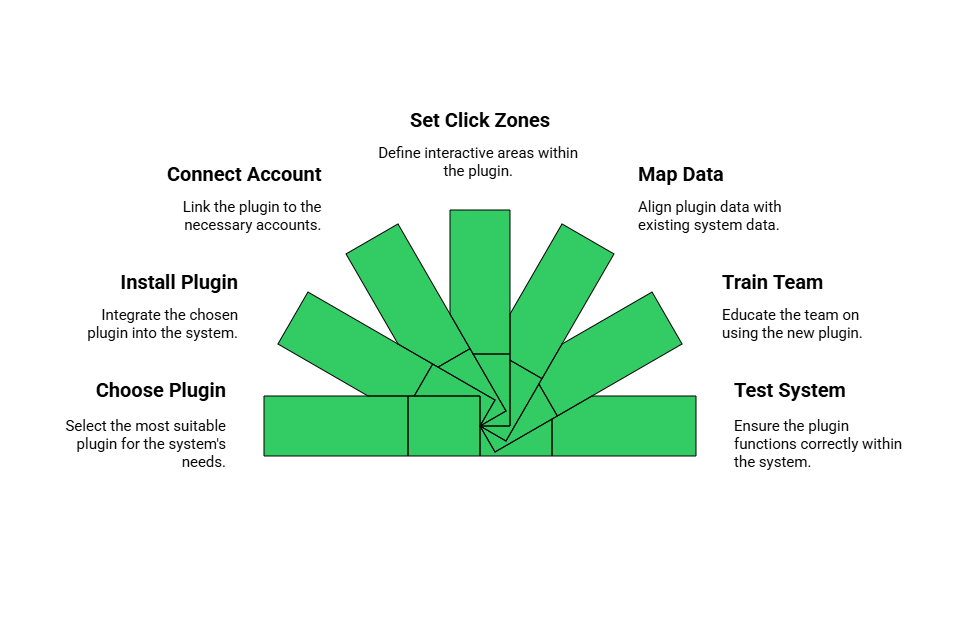
1. Choose a Compatible Plugin
Start by selecting a plugin that is fully compatible with your CRM, whether it’s Salesforce, HubSpot, or Zoho. Compatibility ensures smooth integration without errors. Choosing the right plugin sets the foundation for seamless click to call CRM functionality.
2. Install or Enable Plugin
Next, install the plugin via your CRM’s marketplace or module interface. Enabling it activates the click-to-call features within your CRM records. Proper installation ensures that all phone numbers become actionable and ready for dialing.
3. Connect Your Telephony Account
Provide the necessary SIP or WebRTC credentials, or link your FreJun account to the plugin. This connection allows the system to route calls efficiently. Once linked, every click-to-dial action is securely processed through your telephony provider.
4. Configure Click Zones
Decide which phone fields mobile, work, or home should be clickable within your CRM. You can also customize how clickable links or buttons appear. Configuring click zones ensures that calls are routed correctly every time, reducing errors.
5. Map Call Data
Set up automatic logging so that call details duration, outcome, and recordings are captured in your CRM. Accurate mapping ensures every interaction is properly recorded for reporting. This step improves data quality and supports analytics and performance tracking.
6. Train Your Team
Provide training so that reps know how to click and dial efficiently from the CRM. Clear guidance reduces errors and speeds up adoption of the new system. Well-trained teams can fully leverage CRM call integration and click to call CRM features.
7. Test the System
After setup, test the integration by dialing a few sample numbers. Verify that calls connect properly and that all data is logged automatically. Testing ensures that both the CRM and FreJun telephony system work together seamlessly before full deployment.
What Are the Best Practices for Click to Call CRM Integration?
To get the most out of click to call CRM, keep your CRM data updated, use automatic call logging, and provide brief training to your team. Following these simple practices ensures smooth workflows, accurate records, and improved productivity.

- Keep CRM Records Updated: Accurate contact info ensures smooth dialing.
- Use Automated Logging: Track all calls, durations, outcomes, and notes.
- Provide User Training: Short training sessions help reps adopt tools efficiently.
- Monitor Metrics Regularly: Check call volumes, connection rates, and call outcomes.
- Integrate with Other Tools: Use email, calendars, or workflow apps to streamline tasks.
Following these practices with FreJun ensures full utilization of CRM call integration features, increasing team efficiency and customer satisfaction.
Key Takeaways
Integrating a click to call CRM streamlines dialing and saves teams significant time by eliminating manual calls. Automatic logging ensures accurate records, reducing errors and improving reporting. Salesforce and other CRM integrations enhance workflow efficiency, letting teams focus on meaningful conversations rather than administrative tasks.
Additionally, combining CRM call integration with FreJun’s platform provides real-time analytics and actionable insights. By following best practices and leveraging automated features, organizations can boost productivity, track performance, and optimize customer engagement across all teams.
Final Thoughts
Integrating click to call CRM with your telephony system increases productivity, reduces errors, and streamlines workflows. Teams can spend more time engaging with customers and less on administrative tasks.
FreJun offers a robust platform for CRM call integration and call logging automation, making it easy for sales and support teams to maximize efficiency. Organizations adopting these solutions see measurable gains in productivity, lead conversion, and overall customer experience.
Further Reading – How Call Center Automation Improves Customer Care
Book a FreJun Demo to see how FreJun can transform your business communication
FAQs
Connect your account and begin dialing directly from your interface.
Yes, it works across desktop, laptop, and mobile devices.
Yes, all calls are logged for easy tracking.
You can select which phone fields are active for dialing.
Minimal training is needed as the system is intuitive.
Yes, dashboards show metrics like call volume and success.
Calls can usually be retried or forwarded to another number.
Yes, it supports Windows, macOS, and major browsers.
Many platforms allow CRM, email, or helpdesk integrations.
Data is encrypted and stored securely to ensure privacy.