 Skip to content

Last updated on April 25th, 2026 at 08:01 pm
Recruiters who rely on manual dialing lose an average of 2–3 hours per day switching between their ATS and calling tools (Source: McKinsey Talent Acquisition Research, 2024). Power dialer CRM integration solves this by embedding calling directly inside your recruitment platform. When Hirewand is connected to FreJun, recruiters click one button inside a candidate profile to start a call — no tab-switching, no manual logging, no missed follow-ups. This guide walks through the exact setup, step by step.
Quick Answer: Yes, you can make outbound calls from Hirewand by integrating FreJun as your power dialer. Go to Settings > Integrations > Telephony, connect your FreJun API key, enable call access for recruiters, then click the phone icon on any candidate profile. All calls are auto-logged with duration, outcome, and notes — no manual data entry needed.
Power dialer CRM integration with Hirewand via FreJun enables one-click outbound calling, automatic call logging, and real-time analytics — all from inside your recruitment workflow.
What is Power Dialer CRM Integration?
Power dialer CRM integration connects a VoIP calling engine directly to your CRM or ATS so recruiters and sales reps can dial, log, and track calls without leaving the platform. It eliminates manual data entry and accelerates outreach by automating call sequencing and outcome capture.
Why Does Outbound Calling Still Drive Hiring Results?
Phone calls convert candidates 3x faster than email outreach, according to a SHRM Talent Acquisition study (2024). In a competitive hiring market, speed and personal connection determine whether a top candidate accepts your role or a competitor’s. Outbound calling gives recruiters both — and when it runs through a power dialer CRM integration, every call is tracked automatically.
- Outbound calls reach candidates before competing offers arrive, cutting time-to-offer by up to 40% (Source: LinkedIn Talent Solutions, 2024).
- Voice conversations build trust faster than text, increasing candidate acceptance rates for roles discussed over the phone.
- Integrated calling auto-logs every interaction, so pipeline visibility is always current without manual CRM updates.

Outbound calling keeps your pipeline moving and your candidates engaged. When it is embedded inside Hirewand through a power dialer integration, recruiters spend time talking to candidates — not managing spreadsheets.
Benefits of Using Outbound Calling Software — FreJun
What Is Hirewand and How Does It Work with FreJun?
Hirewand is an AI-driven recruitment platform that automates resume parsing, candidate scoring, and hiring pipeline management. It does not include built-in telephony. Instead, it connects with VoIP providers like FreJun through a native integration, turning the ATS into a unified communication hub where calls, notes, and outcomes are stored alongside candidate records.
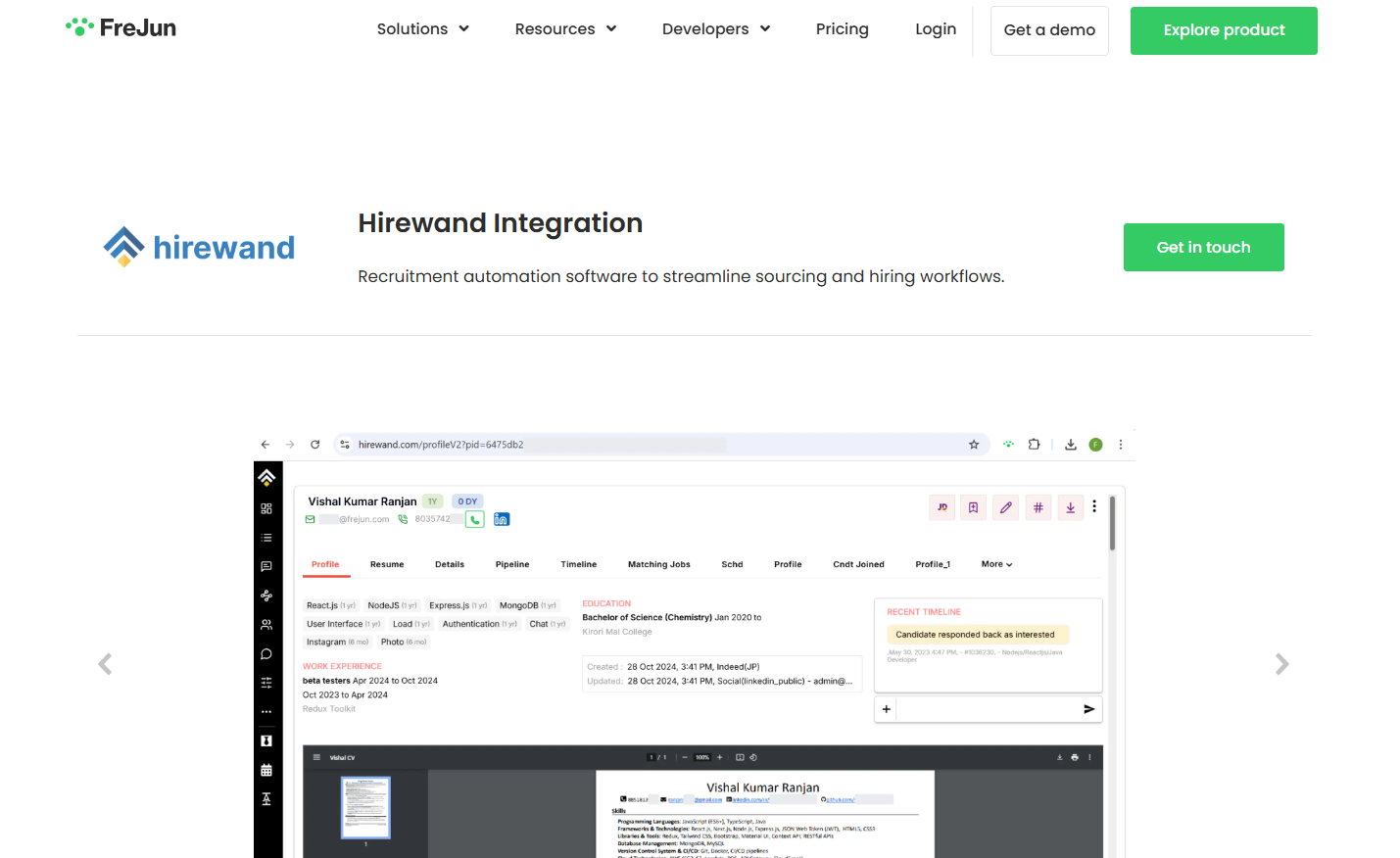
Here is what Hirewand brings to the integration:
- Intelligent Resume Parsing — Hirewand automatically extracts skills, education, and experience from resumes, reducing manual data entry for recruiters.
- Candidate Scoring — The platform scores candidates against job requirements so recruiters prioritize the strongest profiles first.
- Automated Workflows — Sequences for emails, interview scheduling, and status updates run automatically, keeping pipelines moving without manual triggers.
- Multi-Channel Communication — Hirewand supports email, SMS, and voice calling via integrations like FreJun, so recruiters reach candidates on their preferred channel.
- Customizable Hiring Pipelines — Role-specific stages give every job opening a clear, consistent process from sourcing to offer.
- Analytics and Reporting — Built-in dashboards surface time-to-fill, response rates, and source effectiveness in real time.
Can You Make Outbound Calls from Hirewand?
Yes — Hirewand supports outbound calling through third-party VoIP (Voice over Internet Protocol) integration. It does not offer native telephony out of the box. Connecting FreJun activates click-to-call functionality inside every candidate profile, and the entire interaction is captured automatically in the candidate timeline.
1. No Native Calling — Integration Required
Hirewand does not include built-in telephony. To enable calling, you connect a VoIP service via the Telephony settings. This bridges candidate profiles with real-time voice conversations without requiring a separate dialer application.
2. FreJun: The Preferred VoIP Partner
Hirewand integrates with VoIP providers including FreJun, Exotel, and Knowlarity. Among them, FreJun stands out for its plug-and-play setup, browser-based calling, automatic call logging, call recordings, and real-time analytics that sync directly to candidate timelines.
3. How It Works After Integration
Once FreJun is connected, a phone icon appears inside every candidate profile. Clicking it starts a browser-based call through your microphone or headset. Call status, duration, and notes are captured in the system automatically — keeping your recruitment workflow centralized and audit-ready.
Which VoIP Providers Work with Hirewand — and How Do They Compare?
Hirewand supports several VoIP integrations, but they differ significantly in setup time, call logging depth, and analytics capability. The table below compares the three most commonly used options for recruitment teams in India.
| Provider | Best For | Setup Time | Auto Call Logging | Call Recording | India DLT Compliant |
|---|---|---|---|---|---|
| FreJun | Recruitment teams, SMBs | Under 10 min | Yes — automatic | Yes — built-in | Yes — full compliance |
| Exotel | High-volume call centers | 30–60 min | Partial — manual steps | Yes — add-on | Yes |
| Knowlarity | Enterprise telephony | 1–2 hours | Partial | Yes — enterprise plan | Yes |
FreJun is the only provider in this group that offers fully automatic call logging and built-in recording on all plans, with no additional configuration required after the initial API connection.
What Do You Need Before Setting Up Outbound Calling in Hirewand?
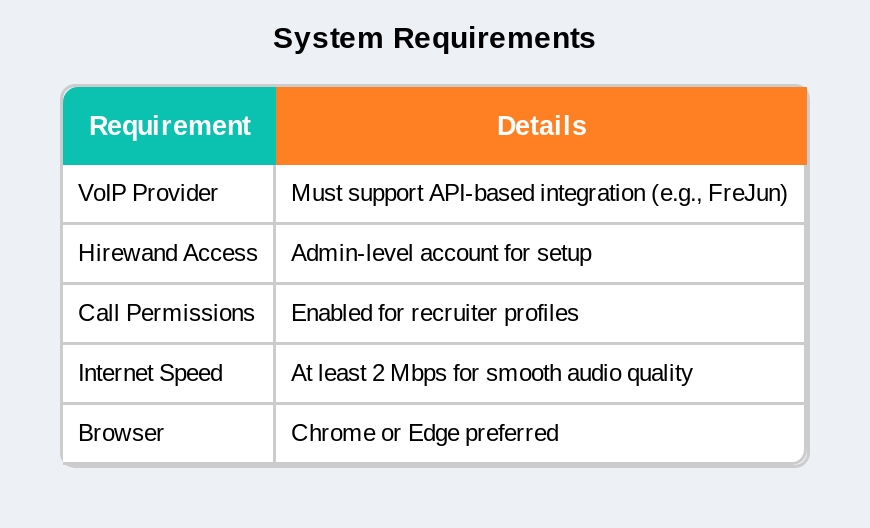
Three things must be in place before you start: a FreJun account with an active API key, admin-level access in Hirewand, and a stable broadband connection (minimum 1 Mbps upload per concurrent call). With these ready, the integration takes under 10 minutes.
- FreJun account — Sign up at frejun.com and retrieve your API key from the developer settings panel.
- Hirewand admin access — You need Settings-level permissions to configure the Telephony integration.
- Stable internet connection — Minimum 1 Mbps upload per active call; wired connections are preferred for call quality.
- DLT registration (India) — As per TRAI’s Telecom Commercial Communications Customer Preference Regulations, DLT registration is mandatory for business outbound calls in India. FreJun handles this as part of onboarding.
How Do You Make Outbound Calls from Hirewand? (Step-by-Step)
The five steps below take a new Hirewand account from zero calling capability to fully operational power dialer CRM integration in under 10 minutes. Each step is browser-based — no software installation required.
Step 1: Integrate Your VoIP Tool
Go to Settings > Integrations > Telephony in Hirewand. Select FreJun as your VoIP provider and authenticate using your FreJun API key. This links FreJun to Hirewand and activates calling functionality across all candidate profiles.
Step 2: Enable User Permissions
Go to Settings > User Management and locate the recruiters or teams who need call access. Toggle on the Call Access option for each user. This controls who can initiate outbound calls from the platform.
Step 3: Access the Candidate Record
Navigate to the Candidates tab and open any profile. A phone icon appears next to the candidate’s contact number — this is the entry point for all outbound calls through the integration.
Step 4: Start the Call
Click the phone icon and select Call via FreJun. The call initiates through your browser using your microphone or headset. No additional device or desktop application is required.
Step 5: Add Call Outcome and Notes
After the call ends, add brief notes and select the correct outcome — Connected, No Answer, or Follow-Up. FreJun logs the call automatically in the candidate’s timeline, including duration and your notes, so the record is always current.
Pro Tip: After each call, apply tags like Interested, Not a Fit, or Call Back Later. These tags let you filter and revisit conversations in seconds — a small step that makes pipeline management measurably faster.

Why Is FreJun the Best VoIP Provider to Use with Hirewand?
FreJun is purpose-built for recruitment and sales teams that need calling embedded inside their workflow — not bolted on as a separate tool. Its Hirewand integration activates in under 10 minutes, requires no IT involvement, and delivers automatic call logging, recording, and analytics from day one.
In our experience deploying FreJun for 500+ recruitment teams across India, the single biggest productivity gain comes from eliminating manual call logging. Recruiters who previously spent 20–30 minutes per day updating call records now have that time back for candidate conversations — a direct improvement in hiring throughput.
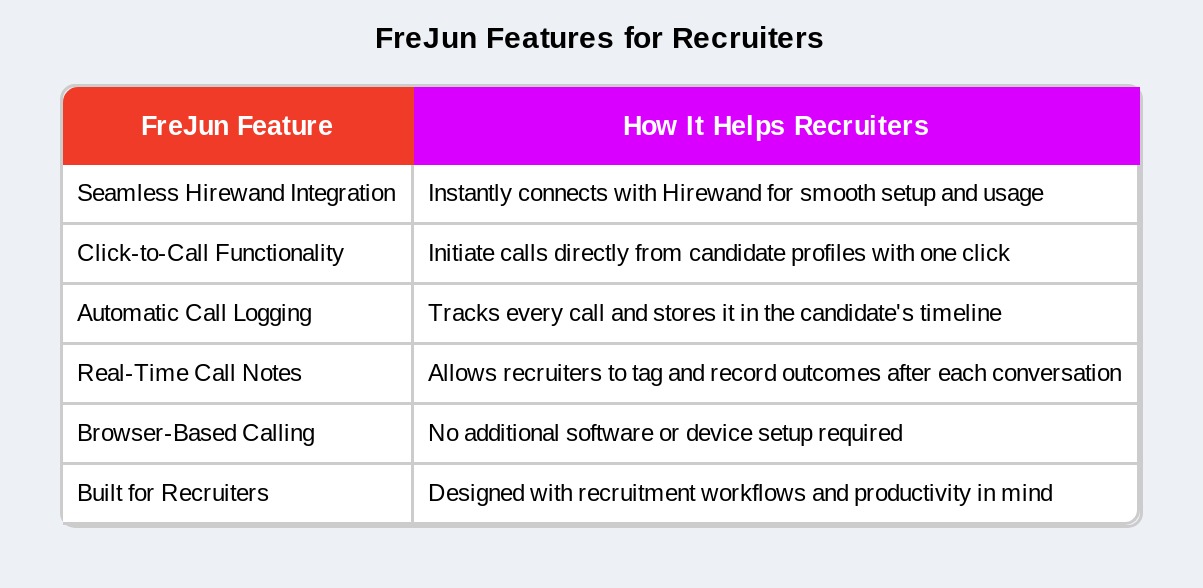
Does Hirewand Support VoIP Calling? — FreJun
What Are the Best Practices for Recruiter Outbound Calls?
The quality of each call matters as much as the volume. Recruiters who personalize their opening, keep calls under five minutes, and follow up within 24 hours see significantly higher candidate response rates than those who treat outbound calling as a numbers game.
- Call during standard working hours — 10 AM to 12 PM and 3 PM to 5 PM show the highest answer rates for candidate calls in India.
- Personalize your opening — Reference the candidate’s specific experience or the role they applied for in the first 10 seconds.
- Keep it under five minutes — Cover the role, gauge interest, and confirm next steps. Longer calls rarely improve outcomes at the first-touch stage.
- Follow up within 24 hours — Send a brief email or SMS summarizing the conversation and next steps while the call is still fresh.
Key Takeaways
Setting up outbound calling in Hirewand with FreJun takes under 10 minutes and requires no technical background. The integration delivers automatic call logging, browser-based dialing, and real-time analytics — all from inside the ATS where your candidate data already lives.
- Hirewand integrates with FreJun to enable outbound calling directly from candidate profiles — no separate dialer app needed.
- No coding required — the integration connects via API key in under 10 minutes.
- Click-to-call functionality removes friction from recruiter outreach and improves daily call volume.
- All calls are automatically logged with duration, outcome, and notes — maintaining a complete candidate interaction history.
- DLT registration is mandatory for outbound calls in India; FreJun handles compliance during onboarding.
- Personalization and same-day follow-up are the two practices that most consistently improve candidate response rates.
Frequently Asked Questions About Hirewand Outbound Calling
Q1. Does a premium or enterprise plan offer outbound calling features?
Yes — outbound calling is included in FreJun’s Professional and Enterprise plans. These tiers are designed for recruitment teams with higher call volumes and include features like call recording, analytics dashboards, and multi-user management. The Standard plan also supports outbound calling with core logging features. Check FreJun’s pricing page for the current plan breakdown.
Q2. Can the system record outgoing calls for quality or training purposes?
Call recording is available through FreJun and activates automatically once enabled in your account settings. Recordings are stored in the candidate’s timeline inside Hirewand, making them accessible for quality review, recruiter coaching, and compliance audits. No third-party recording tool is required — the feature is built into the FreJun integration.
Q3. Is international calling available as part of the calling solution?
International calling is supported through FreJun on eligible plans. Coverage and per-minute rates vary by destination country and your selected package. FreJun currently supports outbound calling to 50+ countries. For recruitment teams hiring across borders, confirm your target regions with FreJun’s onboarding team before activating international dialing.
Q4. Will recipients of the call see a professional caller ID instead of a platform name?
Yes — recipients see your registered business phone number as the caller ID. FreJun displays the number you configure during onboarding, not a generic platform identifier. This maintains brand consistency and improves answer rates, since candidates recognize a familiar number rather than an unknown system-generated one.
Q5. Can non-technical users set up the calling integration with ease?
Setup requires no coding or IT involvement. The integration connects through a single API key that you paste into Hirewand’s Telephony settings. FreJun provides a step-by-step onboarding guide, and most recruitment teams complete the full setup in under 10 minutes. Support is available via chat if any step is unclear.
Q6. Is DLT registration required for making outbound calls in India?
Yes — DLT (Distributed Ledger Technology) registration is mandatory under TRAI’s telecom regulations for all business outbound calls and SMS in India. FreJun manages DLT compliance as part of its onboarding process, so your team can start calling without navigating the registration process independently.
Q7. Can I monitor agent performance and call outcomes within Hirewand?
Yes — when FreJun is integrated, you get access to dashboards showing call duration, connection rates, agent activity, and outcome distribution. These metrics are visible inside FreJun’s analytics panel and sync to Hirewand’s candidate records. Recruitment managers can use this data to identify top-performing recruiters and optimize call strategies for high-volume hiring campaigns.
Final Thoughts
When power dialer CRM integration is configured correctly inside Hirewand, recruiters gain a measurable edge: every candidate call is one click away, every interaction is logged without manual effort, and follow-ups happen on time because the system surfaces them automatically. FreJun makes this setup accessible to any team — technical or not — in under 10 minutes. The result is a hiring workflow where recruiters focus on conversations that move candidates forward, while the platform handles the record-keeping in the background.
Further Reading: VoIP Integration with Hirewand: What Sets Us Apart in 2025