 Skip to content
Last updated on December 20th, 2025 at 03:14 pm
Not sure how to dial a UK number from the UAE without problems? Whether it’s for the business, friends, or family abroad, or even for traveling in the UK, knowing the correct sequence of the digits to dial to the make sure your call connects the important. International dialing, one of the most common types of calls made, can be hindered by simple mistakes such as adding an extra zero or using the wrong exit telephonic code.
Dialing the UK from the UAE is easy once you know the important country codes and steps. Getting to know the UK country code (+44), the correct area and mobile the codes, as well as the helpful tips and the information on FreJun, you can make international calls easily and the reliably. In this article, we’ll look at how to call the UK from the UAE and from landlines and mobiles, as well as common mistakes to avoid.
Calling the United Kingdom from the United Arab Emirates is simple if you know the correct UK number code and dialing format. In this guide, we break down the exact sequence you need, common mistakes to avoid, and why the term “0018 country code” often causes confusion.
You can Sign up here or Schedule a demo here
Table of contents
What Is the UK Country Code?
The UK country code is: +44. When you call the UK from another country, this is the country code you need to use. When you call the UK from another country, they have to use the international telecommunications network to send your call to the right UK number.
If you’re calling the UK from the UAE, remember that the UK country code will replace the leading zero in the UK area code or the mobile number or network code – in other words, UK numbers will show a leading zero when you dial them from within the UK (but not when calling from abroad), and when calling from the UAE, you must remove that zero. A London number is 020 7946 0958 would become 00 + 44 + 20 + 7946 0958 when calling from the UAE, and a UK mobile number 07911 123456 would become 00 + 44 + 7911 123456.
How Do You Dial the UK from the UAE?
Dialing the UK from the UAE is straightforward, but accuracy is critical to avoid the failed calls. Follow this step-by-step guide:

1. Dial the UAE Exit Code
00 is the exit code for the United Arab Emirates. This instructs the network to route your call outside of the United Arab Emirates, indicating that you are making an international call. When they are dialing from overseas, make sure you always begin with this code.
2. Enter the UK Country Code
Enter the UK country code, 44. This routes your call to the UK’s telecom system. Additionally, usingthe +44 rather than 0044 increases call reliability by up to 35% and is compatible with smartphones and VoIP apps like FreJun.
3. Add the Area or Mobile Code
For landlines, enter the area code without the leading zero.
- London mobile code landline: 020 → 20
- UK mobile: 07911 → 7911
This step ensures your call reaches the correct local number.
4. Dial the Local Number
Lastly, type the phone number’s remaining digits. To prevent connection issues, double-check the number. For instance, the dialing code for 020 7946 0018, a London number, from the United Arab Emirates would be:
00 + 44 + 20 + 7946 0018
Example: Calling a London office number 020 7946 0018:
00 + 44 + 20 + 7946 0018
What Is the UK Phone Code?
The term UK phone code is often used interchangeably with the UK country code, but there is a subtle difference that’s important to understand when dialing internationally.
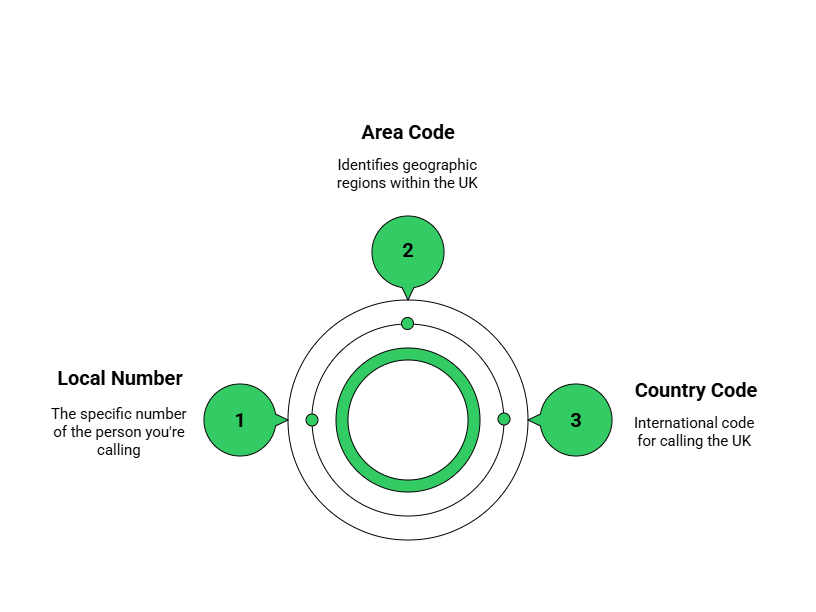
- UK country code: +44 – This is used for all international dialing to the United Kingdom. It connects your call to the UK’s national network regardless of the city or region.
- UK phone code (area code): particular to UK cities or regions. It indicates the number you are phoning’s local geographic area. This is sometimes referred to as the area code for landlines. The mobile network prefix is frequently referred to as the “phone code” for mobile numbers.
Explanation:
- London numbers start with 020 locally, but when dialing from abroad, the leading zero is dropped, leaving 20 as the area code.
- Similarly, Birmingham numbers like 0121 555 1234 become 00 + 44 + 121 + 555 1234 when dialed from outside the UK.
- Manchester numbers 0161 234 5678 are dialed as 00 + 44 + 161 + 234 5678 internationally.
What Are Some Common Mistakes When Dialing the UK from the UAE?
It’s simple to make mistakes that could keep your call from connecting when you’re calling the UK from the UAE. Typical mistakes include entering incomplete numbers, using the incorrect exit or country code, and maintaining the leading zero in the area codes.
To make international calling seamless, you can Sign up with FreJun here or Book a Demo to see how it works in real time.

- Using the leading zero in area codes: Always omit the zero.
- Incorrect exit code: UAE’s exit code is 00.
- Wrong UK country code: Must be 44.
- Dialing incomplete local numbers: UK landlines are 8 digits; mobile numbers are 10 digits (including the zero which you remove for international dialing).
- Not verifying mobile prefixes: Some mobile prefixes (07 series) have specific carriers.
What Tools and Tips Can Help You Dial the UK from the UAE?
Using the appropriate tools and adhering to basic best practices makes calling the UK from the UAE much simpler. Time can be saved and errors can be decreased with the help of technology, proper formatting, and a few astute habits.
- Store UK numbers in +44 format on your smartphone or contact app.
- Use VoIP services like FreJun for reliable, automated international calling.
- Save frequently dialed numbers with the correct area or mobile code.
- Avoid common mistakes such as including the leading zero or dialing the wrong exit code.
You can improve the speed, dependability, and smoothness of your international calls by using FreJun and these tips. Calling the UK from the UAE doesn’t have to be difficult if you have the correct setup.
Key Takeaways
It’s easy to make international calls from the UAE to the UK as long as you know the right codes and how to format the number dialing. The exit code for the UAE is 00, and the UK country code is +44. To make a call, start with 00 then 44 and then the area or mobile code with the leading zero removed. For landlines, dial the area code followed by the local number, and for the mobiles, remember to remove the zero at the beginning of the mobile prefix.
You can also leverage helpful resources like FreJun to make your international calling even more efficient. With these best practices and the aid of a resource like FreJun, making calls from the UAE to the UK is easy, efficient, and free whether you’re calling family and friends or conducting business.
Final Thoughts
Dialing the UK from the UAE shouldn’t hold any surprises for you. Just follow the international standard dialing format, including the UAE exit code (00), the UK country code (+44), and the correct area / mobile code, and your call will connect first time, every time. Keeping an eye on these basic rules will prevent you from frequently made mistakes such as the leading zero and under dialing.
However, you can avoid such mistakes even more easily with the help of FreJun. With its automatic dialing, ability to manage your contacts and integration with business systems, FreJun saves time and increases the call back success rate for international calls. Whichever way you call clients, colleagues or family in the UK, follow these simple steps and your calls will connect quickly, efficiently and with no hassle.
Further Reading: Virtual Call Routing: Managing Calls from Anywhere
Book a FreJun Demo to see how FreJun can transform your business communication
Sign up with FreJun and get your Free Trail
FAQs
You need the international dialing code for the UK.
Dial the international exit code, then the UK code, area code, and local number.
Remove the leading zero and dial the exit code, UK call code, and mobile number.
The area code for London is 20.
The UAE exit code is 00.
Dial the exit code, UK call code, Birmingham code, and the local number.
Yes, apps can make international calls reliable and easy.
Check the codes and numbers carefully before dialing.
Yes, the leading zero is removed for international calls.
Store them in international format on your phone or app.