 Skip to content
Last updated on February 16th, 2026 at 02:31 pm
Have you ever felt frustrated because your call keeps transferring from your headset to your speaker? Or why is the audio of your Bluetooth call suddenly not audible in the middle of a call? Well, that is what call audio routing is. Call audio routing is the process of determining how and where the sound of your call is delivered, whether it is through the speaker of your phone, wired headset, or Bluetooth.
Understanding call audio routing is crucial for individuals who receive business calls and virtual meetings every now and then. Properly managing the audio settings of your phone will help avoid call disruptions, keep the calls audible, and ensure that your voice reaches the other end. Even multiple devices connected to the phone can work smoothly with the help of FreJun, which will allow you to focus on the conversation rather than fixing the audio issues.
Table of contents
What Exactly Is Call Audio Routing?
Call audio routing simply means deciding where the sound from your call goes through your phone’s speaker, a wired headset, or a Bluetooth device. It’s the technology that manages how you hear and how you’re heard.
Think of it as the traffic controller for your sound. Whether you’re on a video meeting, business call, or hands-free drive, audio routing ensures your voice and audio are directed to the right place for clarity and comfort.
In short, sound management in calls is what keeps your communication seamless, no sudden switch to speaker mode mid-call or silent Bluetooth confusion. A reliable system like FreJun automatically optimizes phone audio settings for your device, minimizing disruptions during business calls.
How Does Call Audio Routing Work?
The concept is simple, but the process behind it is smart. Every time you start or receive a call, your phone or app automatically decides where to route the sound. It checks what audio devices are connected and prioritizes them based on your preferences.
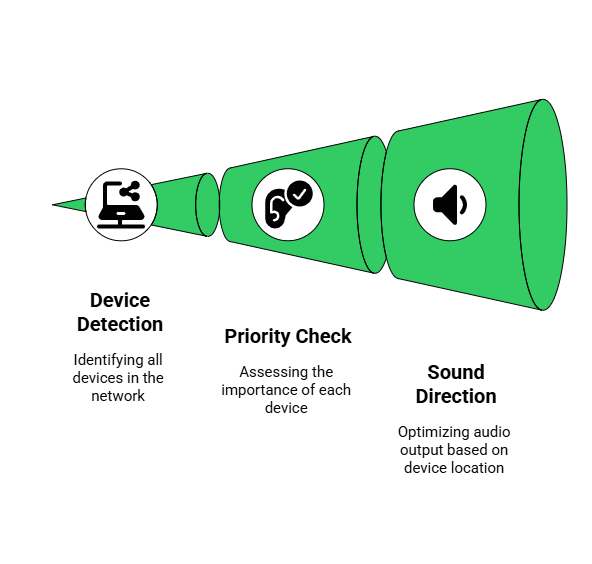
- Device Detection: Your phone detects all active audio outputs speaker, earphones, or Bluetooth.
- Priority Check: It checks your preferred phone audio settings (for instance, Bluetooth first, then speaker).
- Sound Direction: Based on that, it routes your call’s sound input/output to the selected device.
So, if your Bluetooth call audio headset is connected, your call will instantly route through it. If it disconnects mid-way, it will switch to the phone’s speaker or earpiece.
Why Does Audio Routing Matter During Calls?
Because it directly affects how professional and smooth your communication feels. Imagine joining a client meeting and your sound randomly switches to the phone speaker, not a great impression, right?

- Clarity: No muffled sound or echo.
- Consistency: Your audio stays on your chosen device.
- Control: You decide whether calls go through your headset or loudspeaker.
FreJun’s smart call features simplify all this by intelligently managing audio routing during calls, especially in business scenarios involving VoIP or CRM-connected systems.
How to Adjust and Manage Phone Audio Settings Easily?
Every smartphone or VoIP app allows you to control phone audio settings manually. Here’s how to do it:

On Android Devices:
This menu lets you control exactly where your call audio goes, giving you flexibility depending on your environment. For instance, you might prefer Bluetooth call audio while walking, but switch to the speaker when at your desk.
- Go to Settings → Sound → Call Audio Routing.
- Choose between Speaker, Bluetooth, or Headset.
- Enable Automatic Switching for smarter transitions.
On iPhones:
This lets you decide how your call audio behaves in different situations. For example, you might want calls to automatically use a Bluetooth call audio headset when connected, or switch to the speaker when you’re at home.
- Open Settings → Accessibility → Touch → Call Audio Routing.
- Pick your preferred option — Automatic, Bluetooth Headset, or Speaker.
- Toggle settings depending on your environment.
If you’re using FreJun’s cloud calling platform, it automatically optimizes these audio routing options for the clearest call experience, reducing manual setup time by up to 40%.
What Are the Best Practices for Smooth Sound Management in Calls?
Good sound management in calls depends on habits as much as technology. Follow these best practices:
1. Set Default Devices
Always define your preferred audio output so calls automatically go to the right device. This prevents interruptions and accidental speaker usage.
2. Keep Bluetooth Updated
Regularly update your phone and headset firmware to avoid lag, dropouts, or poor Bluetooth call audio quality.
3. Avoid Overlapping Connections
Disconnect unused devices to prevent random switching and ensure smooth audio routing.
4. Use Smart Tools
Platforms like FreJun automate device selection, maintaining consistent sound management in calls.
5. Regular Testing
Quick sound checks before meetings ensure your phone audio settings work correctly and your voice comes through clearly.
In corporate setups, integrating FreJun’s VoIP with CRMs ensures smoother phone audio settings, automatic device switching, and reduced downtime.
Key Takeaways
Understanding call audio routing is essential for smooth, professional communication. By managing where your calls are heard whether through speaker, headset, or Bluetooth call audio you can prevent disruptions and ensure clarity in every conversation. Proper sound management in calls also helps you stay productive and maintain a professional impression during client or team interactions.
Tools like FreJun simplify this process by automatically optimizing phone audio settings, intelligently switching between devices, and reducing manual adjustments. Implementing these best practices can improve call efficiency by up to 35%, making every interaction clearer, more reliable, and more effective.
Final Thoughts
Mastering call audio routing might sound technical, but it’s really about taking control of your communication experience. Whether you’re switching between devices, fixing phone audio settings, or managing Bluetooth call audio, small optimizations can make a big difference in clarity and comfort.
For businesses, tools like FreJun simplify everything automatically detecting devices, maintaining consistent sound management in calls, and preventing frustrating connection drops. In short, when your audio routing is set right, your conversations flow right.
Further Reading: How Remote Teams in the UAE Can Stay Connected with Cloud Calling
Book a FreJun Demo to see how FreJun can transform your business communication
FAQs
Yes, most devices allow you to change the output while the call is active.
Check the connection and make sure it’s properly paired with your device.
Make a quick test call to a friend or use the device’s built-in test feature.
Lower the volume or move away from nearby devices that might cause interference.
It’s possible, but it may cause audio conflicts or random switching.
Ensure your device is updated and positioned correctly for optimal sound.
Weak network or low battery can interrupt the connection.
Yes, most devices let you change output and volume per call.
Check the device volume and reconnect if necessary.
Keep only essential devices connected and reduce background noise.