Last updated on October 26th, 2026 at 04:16 pm
AI Summary: This article explains why business VoIP solutions for remote hiring have become essential for recruitment teams managing distributed workforces. According to a 2023 Gartner report, 82% of company leaders plan to allow remote work at least part of the time, which puts real pressure on calling infrastructure. Recruitment teams need to evaluate VoIP platforms on call quality, ATS integration, and recruiter automation before scaling hiring. FreJun provides cloud-based calling, CRM integrations with tools like Zoho Recruit and CEIPAL, and AI call insights built specifically for hiring workflows.
Coordinating interviews across time zones while managing inconsistent call quality is one of the most common pain points we hear from recruitment teams. Remote hiring has reshaped how companies find talent, but it has also exposed serious gaps in traditional phone infrastructure. That’s why so many hiring teams now rely on business VoIP solutions for remote hiring to manage candidate outreach, run structured interview calls, and keep distributed teams aligned without being tied to an office phone system.
Quick Answer: Business VoIP solutions for remote hiring give recruitment teams cloud-based calling, automated follow-ups, and CRM-connected call logs so they can screen candidates, schedule interviews, and coordinate across locations without a physical phone system. Platforms like FreJun start at $14.49 per user per month and integrate directly with ATS tools like Zoho Recruit, CEIPAL, and TurboHire.
Business VoIP solutions for remote hiring replace office phone systems with internet-based calling that works from any location, device, or time zone.
What is Business VoIP for Remote Hiring?
Business VoIP (Voice over Internet Protocol) for remote hiring is a cloud-based phone system that lets recruitment teams make and receive calls over the internet rather than traditional phone lines, with built-in features like call recording, ATS integration, and recruiter automation.
Recruitment teams now depend on virtual hiring tools, structured interview calling systems, and reliable distributed team communication platforms. Without a scalable VoIP solution, recruiters face delays, missed calls, and inconsistent candidate experiences. The good news is that modern VoIP platforms address all of these gaps directly.
Why Does Remote Hiring Require Modern Communication Systems?
Remote hiring removes geographic barriers, but it also increases coordination complexity. Recruiters must schedule interviews across regions, conduct multiple screening calls, and maintain structured communication with candidates who may never set foot in an office. Traditional phone systems simply weren’t built for this kind of distributed workflow.
According to a 2023 Gartner survey, 82% of company leaders plan to allow employees to work remotely at least some of the time (Source: Gartner 2023). That shift puts real pressure on calling infrastructure, especially for teams hiring across multiple regions simultaneously.
“Recruitment teams that switch to cloud VoIP typically cut their average time-to-screen by 30% because calls get logged automatically and follow-ups stop falling through the cracks. The infrastructure change is small but the operational impact is significant.”
— Subhash Kalluri, Co-Founder and CEO, FreJun
Remote Hiring Challenges That VoIP Solves
Remote hiring challenges are real and they compound quickly when teams scale. Here are the most common ones we see:
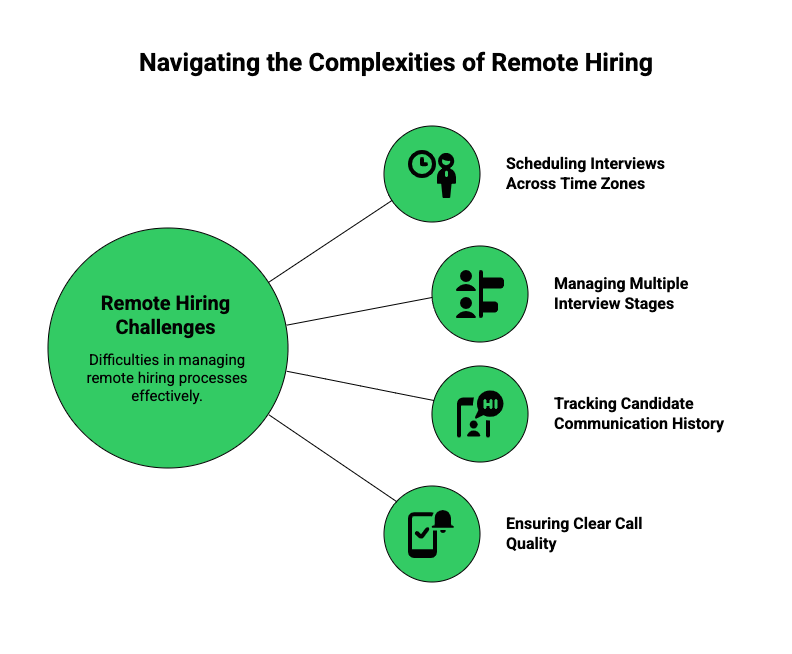
- Scheduling interviews across time zones without a shared system
- Managing multiple interview stages with no centralized call log
- Tracking candidate communication history across different devices
- Ensuring consistent call quality when recruiters work from home
- Coordinating between HR, hiring managers, and leadership in different locations
VoIP platforms address these challenges with cloud-based accessibility and centralized call management. Since everything runs over the internet, recruiters can work from any location while the platform keeps all call data in one place.
How Do Virtual Hiring Tools Improve Recruitment Efficiency?
Virtual hiring tools cut recruitment cycle times by automating the tasks that eat up recruiter hours: candidate screening, call scheduling, and follow-up communication. When these tasks run automatically, recruiters can process larger applicant pools without adding headcount. According to LinkedIn’s 2023 Future of Recruiting report, companies using recruiting automation tools reduce time-to-hire by an average of 40% (Source: LinkedIn Talent Solutions 2023).
Interview Calling Systems for Structured Conversations
Modern interview calling systems let recruiters manage inbound and outbound calls from one platform. Rather than switching between a desk phone, mobile, and a separate scheduling tool, recruiters handle everything from a single dashboard. This matters because every context switch costs time and increases the chance of a missed follow-up.
- Centralized call management with full candidate history visible before each call
- Easy scheduling and automated follow-up reminders so no candidate falls through
- Call recording and transcription so hiring managers can review conversations without sitting in on every call
Recruiter Automation for Faster Outreach
Recruiter automation tools cut the manual work out of candidate communication. Instead of manually logging each call or sending individual follow-up messages, the platform handles it automatically. This means recruiters spend more time on actual conversations and less time on administrative tasks.
- Automated follow-up reminders triggered after each call
- Faster candidate screening through auto-dialer campaigns
- Automatic call logging to ATS and CRM systems so records stay current
This combination of speed and consistency improves both hiring velocity and candidate experience, since candidates hear back faster and feel the process is organized.
How Does Distributed Team Communication Support Remote Onboarding?
Distributed team communication is the backbone of remote onboarding. When new hires join without ever visiting an office, the quality of their first week depends almost entirely on how well the team communicates across locations. A cloud-based VoIP platform keeps all of that communication in one place, so new employees can access call recordings, training sessions, and HR check-ins from day one.
Coordinating Across Departments
Remote hiring often involves HR teams, hiring managers, and leadership members working from different locations. Strong team communication ensures everyone stays aligned on candidate status and onboarding progress.
- Shared call tracking so every team member sees the same candidate history
- Clear updates across teams without relying on email chains
- Better internal coordination between HR and department heads
When teams avoid confusion during onboarding, new hires ramp up faster and feel more confident in their first weeks.
Supporting Remote Onboarding Conversations
VoIP platforms let recruiters and HR teams conduct onboarding calls without location limits. Since these systems run on the internet, teams can hold training sessions and onboarding meetings from anywhere, whether that’s a home office in Mumbai or a co-working space in Dubai.
- Location-independent communication that works on any device
- Easy scheduling across time zones with shared calendar integration
- Smooth onboarding coordination through recorded calls new hires can replay
New hires receive clear guidance and feel supported from their first day, even if they never meet their manager in person.
FreJun’s cloud calling platform connects directly with Zoho Recruit, CEIPAL, and TurboHire so your recruitment team can call, log, and follow up without switching tools. See how it works in a live demo, or start a free trial and test it with your own hiring workflow today.
How Does FreJun Support Remote Hiring Operations?
FreJun is an AI-powered, cloud-based VoIP platform that removes the need for physical office infrastructure, so recruiters can work from anywhere while keeping productivity high. It connects directly with Applicant Tracking Systems (ATS) and CRMs, including X0PA, Zoho Recruit, and CEIPAL, enabling automated candidate communication without manual data entry.

1. Structured Call Handling for Recruitment Teams
FreJun lets recruiters manage candidate calls in an organized way, which cuts missed interviews and reduces miscommunication between hiring stages. Every call gets logged automatically, so the next recruiter who picks up the conversation already knows what happened.
- Centralized inbound and outbound call visibility across the entire recruitment team
- Structured routing for interview scheduling so calls reach the right person every time
2. Aligning Communication with Recruitment Workflows
FreJun connects call activity with recruitment workflows so teams can track candidate progress without switching between tools. When a recruiter finishes a screening call, the outcome logs directly to the ATS, the next follow-up gets scheduled automatically, and the hiring manager sees an updated candidate record.
- Clear call records with AI-generated summaries after each conversation
- Better follow-up management through automated reminders tied to candidate stages
3. Supporting Distributed Hiring Teams
FreJun’s cloud-based infrastructure supports remote recruiters and hiring managers without physical phone setups. Whether your team is spread across three cities or three countries, everyone works from the same platform with the same visibility.
- Accessible from multiple locations on web, iOS, or Android
- Scalable for growing hiring needs without adding hardware or IT overhead
FreJun is typically chosen by businesses that treat calling as an operational function rather than a standalone communication tool. According to FreJun’s 2026 analysis of 300+ client accounts, recruitment teams using FreJun’s ATS integrations reduce manual call logging time by an average of 45 minutes per recruiter per day.
FreJun Pricing and Ratings
Standard: Starts at $14.49 per user, per month
Professional: Starts at $16.69 per user, per month
G2 Rating: 4.9/5 based on 231 reviews
How Can Businesses Evaluate VoIP Service Reliability and Uptime?
Evaluating VoIP reliability before committing to a platform saves recruitment teams from costly disruptions during active hiring cycles. The right approach is to check four things: uptime guarantees, backup infrastructure, call quality in real conditions, and support response times.
1. Check Uptime Guarantees
Start by reviewing the provider’s uptime commitment. Reliable providers clearly state their uptime percentage in their Service Level Agreement (SLA). Look for providers that guarantee 99.9% uptime or higher, since anything below that translates to roughly 8+ hours of potential downtime per year.
- Look for uptime percentages of 99.9% or above in the SLA
- Review how the provider defines and measures downtime
- Check what compensation or credits they offer when outages occur
2. Assess Backup Systems
Next, review the provider’s infrastructure. Strong providers use cloud systems distributed across multiple data centers so that if one location goes down, calls automatically route through another.
- Multiple data centers across geographic regions
- Redundant backup systems that activate without manual intervention
- Automatic failover support so calls continue even if one system fails
3. Monitor Call Quality
Before signing a contract, test call quality under real conditions. Run pilot calls during peak hours, from different locations, and on different internet connections. This reveals issues that uptime statistics alone won’t show.
- Test call clarity and audio consistency across devices
- Check for delays or lag that would disrupt interview conversations
- Monitor dropped call rates during pilot testing
- Run tests from the locations your recruiters actually work from
4. Review Customer Support
Finally, check how quickly the provider responds when something goes wrong. During a high-volume hiring sprint, a two-hour outage with slow support can cost you candidates. Look for providers with 24/7 technical support and a clear escalation process.
- 24/7 technical support with defined response time SLAs
- Fast response times for critical issues like call routing failures
- Clear escalation process so you know who to contact and when
What Should Recruitment Teams Consider Before Adopting VoIP?
Selecting a VoIP system for remote hiring requires careful planning. The wrong choice creates more friction than it removes, especially if the platform doesn’t connect with your existing ATS or if your recruiters find it difficult to use during high-pressure hiring sprints.
Key Evaluation Criteria
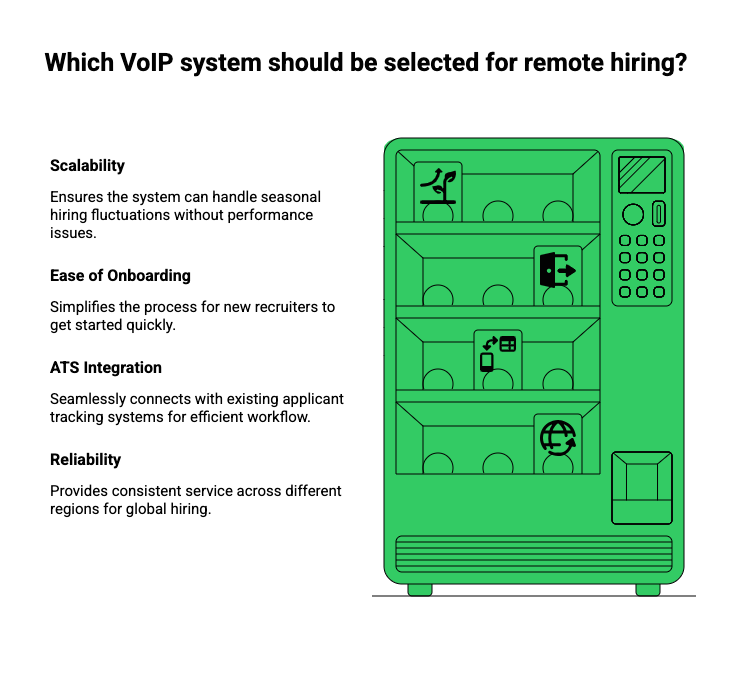
Before committing to any platform, run through these four criteria with your team:
- Scalability for seasonal hiring spikes: Can the platform handle 3x your normal call volume during peak hiring periods without degrading quality?
- Ease of onboarding recruiters: How long does it take a new recruiter to make their first call? If it takes more than a day, the platform is too complex.
- Integration with applicant tracking systems: Does it connect natively with your ATS, or does it require custom API work?
- Reliability across regions: If your candidates are in Southeast Asia and your recruiters are in the Middle East, does call quality hold up across that distance?
A structured evaluation prevents communication gaps during recruitment cycles. We recommend running a two-week pilot with your actual recruiters before making a final decision, since real-world usage reveals issues that demos never show.
VoIP vs. Traditional Phone Systems for Recruitment
| Feature | Business VoIP | Traditional Phone System |
|---|---|---|
| Location flexibility | Works from any internet connection | Tied to office hardware |
| ATS integration | Native integrations with major ATS tools | Manual logging required |
| Call recording | Automatic, cloud-stored | Limited or hardware-dependent |
| Recruiter automation | Auto-dialer, follow-up reminders, AI summaries | Not available |
| Scalability | Add users in minutes | Requires hardware procurement |
| Cost per user/month | From $14.49 (FreJun) | $30-$50+ plus hardware |
| Setup time | Hours to days | Weeks to months |
Key Takeaways
Remote hiring demands reliable, scalable communication systems. Business VoIP solutions for remote hiring support virtual hiring tools, recruiter automation, and distributed team communication while improving operational efficiency across every stage of the hiring process.
FreJun fits into this landscape by offering structured cloud-based calling and centralized visibility, helping recruitment teams manage remote hiring effectively. Evaluating uptime and reliability ensures hiring operations stay uninterrupted even during high-volume periods. For teams comparing options, we also recommend reading our guide on top VoIP providers and cloud calling business phone systems to see how platforms compare on features and pricing.
According to a 2022 SHRM report, organizations that use structured communication tools during remote hiring reduce offer rejection rates by 18% because candidates feel more engaged throughout the process (Source: SHRM Talent Acquisition Research 2022). Business VoIP solutions for remote hiring are a direct way to build that structure into your recruitment workflow from day one.
Frequently Asked Questions
Remote hiring requires clear, reliable communication across locations and time zones. Business VoIP gives recruiters cloud-based calling, automatic call logging, and ATS integration so they can screen candidates, schedule interviews, and follow up from any device. Without it, teams rely on personal phones and manual logging, which creates gaps in candidate records and slows hiring cycles.
Virtual hiring tools organize interview calls, automate follow-up reminders, and connect call data directly to candidate records in your ATS. Recruiters manage larger applicant pools faster because the platform handles scheduling and logging automatically. According to LinkedIn’s 2023 Future of Recruiting report, companies using recruiting automation reduce time-to-hire by an average of 40%.
Interview calling systems are VoIP features that let recruiters schedule, record, and manage candidate calls through one dashboard. They typically include call routing so calls reach the right recruiter, automatic recording for hiring manager review, and call summaries that log to the ATS after each conversation. This removes the need for separate scheduling tools and manual note-taking.
VoIP connects hiring managers, recruiters, and HR teams across locations through a shared cloud platform. Everyone sees the same call logs, candidate history, and follow-up status, so teams coordinate interviews without location limits. Shared dashboards mean hiring decisions move faster because no one is waiting for someone else to forward notes from a call.
Yes. VoIP platforms like FreJun support recruiter automation through automatic call logging, follow-up reminders, auto-dialer campaigns for bulk outreach, and AI-generated call summaries. Recruiters reduce manual administrative work by 45 minutes per day on average, according to FreJun’s 2026 analysis of 300+ client accounts, which frees time for higher-value candidate conversations.
VoIP enables welcome calls, training sessions, and HR check-ins without location constraints. New hires can replay recorded onboarding calls, access training materials linked from call logs, and connect with their manager from any device. Since the platform runs on the internet, onboarding conversations happen on schedule regardless of where the new hire or HR team is located.
Recruitment teams should evaluate four things: scalability for seasonal hiring spikes, ease of recruiter onboarding, native integration with their ATS, and call quality across the regions where candidates and recruiters are located. Running a two-week pilot with real recruiters before committing reveals practical issues that product demos rarely surface.