Last updated on October 3rd, 2026 at 05:02 pm
AI Summary: This article covers the top 9 auto dialer software Australia options for sales, support, and recruitment teams in 2026, comparing features, pricing in USD, and ACMA compliance. According to Grand View Research, the global cloud-based contact centre market is projected to grow at a 23.6% CAGR through 2030, making dialer selection a long-term infrastructure decision for Australian businesses. Australian teams need a dialer that integrates natively with their CRM, respects the Australian Do Not Call Register, and delivers AI call summaries without manual logging. FreJun provides all three, starting from $14.49/user/month with native sync across 23+ CRMs and a 4.9/5 G2 rating.
Key criteria in this comparison: We ranked these auto dialer software Australia platforms on pricing transparency, CRM integration depth, ACMA and Do Not Call Register compliance support, AI feature availability, and verified user ratings from G2 and Capterra, since these are the factors that most affect an Australian team’s total cost and operational fit.
Quick Answer: The best auto dialer software Australia option in 2026 is FreJun, rated 4.9/5 on G2, starting from $14.49/user/month for international plans. It offers four dialing modes, native bidirectional sync with 23+ CRMs, and AI call summaries, all within a platform that complies with ACMA guidelines and the Australian Do Not Call Register.
The best auto dialer software Australia teams can rely on combines CRM-native call logging, local number support, and compliance with ACMA regulations, so reps spend time selling rather than dialing and typing notes.
What is auto dialer software Australia?
Auto dialer software Australia is a cloud-based calling tool that automatically dials numbers from a predefined contact list, connecting answered calls to available agents without manual dialing. The best platforms go beyond basic dialing: they offer multiple dialing modes such as progressive, power, predictive, and preview, so teams can match their outreach pace to their call volume and compliance requirements. They also log every call automatically to a CRM (Customer Relationship Management) system, eliminating manual data entry after each conversation. For Australian businesses specifically, the right platform must support local virtual numbers, comply with the ACMA (Australian Communications and Media Authority) regulations, and respect the Australian Do Not Call Register to avoid penalties under the Do Not Call Register Act 2006.
The Australian cloud telephony market is expanding rapidly, driven by remote work adoption and the shift away from on-premise PBX (Private Branch Exchange) systems. According to Grand View Research, the global cloud contact centre market is projected to reach USD 93.7 billion by 2030, growing at a 23.6% CAGR as of 2024, with Australia among the fastest-adopting markets in the Asia-Pacific region. Basic auto dialers simply replace manual dialing, but the best auto dialer software Australia platforms add AI call summaries, real-time analytics, and deep CRM integration that turn every call into structured, searchable data.
Similarly, businesses expanding into Southeast Asia can explore our guide to auto dialer software Singapore for region-specific dialing and compliance considerations. Teams operating across multiple regions can also review our breakdown of auto dialer software UAE to compare compliance and pricing differences by market. Businesses evaluating options outside Australia may also want to compare our detailed guide to auto dialer software India for teams managing outbound campaigns across the region.
Which auto dialer software Australia tools rank highest in 2026?
The table below compares all nine auto dialer software Australia platforms on best-fit use case, starting price, and free trial availability so you can shortlist quickly before reading the full profiles.
| # | Provider | Best for | Starting price | Free trial |
|---|---|---|---|---|
| 1 | FreJun ⭐ | CRM-native AI dialing | $14.49/user/month | Yes, 3 days |
| 2 | JustCall | Sales and support scaling | Contact sales | Yes, 14 days |
| 3 | Aircall | Quality outbound sales calls | Contact sales | Check website |
| 4 | CloudTalk | Small businesses, flexible dialing | $25/user/month | Check website |
| 5 | Kixie | High-volume multiline dialing | $95/user/month | Check website |
| 6 | Dialpad | Mid-to-large AI sales teams | AUD $59/month | Check website |
| 7 | PhoneBurner | Small teams, progressive dialing | $165/user/month | Check website |
| 8 | CallHippo | Virtual phone plus dialer | Contact sales | Check website |
| 9 | Convoso | High-volume lead generation | Contact sales | Check website |
Scroll for the full breakdown of each tool, covering features, pros, cons, pricing, and ideal use case.
“Teams that switch from a standalone dialer to a CRM-native one usually see call logging time drop to zero within the first week. That is the real ROI, not the dialer speed itself. When every call auto-logs with a recording, AI summary, and disposition, managers finally get the visibility they have been asking for.”
– Subhash Kalluri, Co-Founder and CEO, FreJun
How do you choose the best auto dialer software Australia in 2026?
Step 1: Define your team size, call volume, and use case
Start by mapping your actual calling workflow before evaluating any platform. A five-person sales team making 50 calls a day needs a different dialing mode than a 50-person contact centre running 2,000 daily outbound calls. Progressive dialing suits smaller teams that prioritise call quality, while predictive dialing suits high-volume outbound campaigns where throughput matters more than individual call preparation. Recruitment teams also need ATS (Applicant Tracking System) integration, which is a separate requirement from standard CRM sync. Write down your daily call target per rep, your CRM or ATS name, and whether you need inbound routing alongside outbound dialing before you open a single demo.
Step 2: Identify must-have features for Australian operations
Australian sales teams typically need local virtual numbers with Australian area codes, since calls from local numbers connect at significantly higher rates than international numbers. Beyond that, decide whether you need AI call summaries, voicemail drop, local presence dialing, or post-call surveys before shortlisting tools. Features like IVR (Interactive Voice Response) and call routing matter more for support teams than for pure outbound sales. Separate your must-haves from nice-to-haves so you do not pay for features your team will never use.
Step 3: Check ACMA compliance and Do Not Call Register requirements
Any auto dialer software Australia team deploys must comply with ACMA (Australian Communications and Media Authority) regulations and the Australian Do Not Call Register. The Do Not Call Register Act 2006 prohibits unsolicited telemarketing calls to registered numbers, and violations carry significant financial penalties. Confirm that your chosen platform supports number scrubbing against the Do Not Call Register before each campaign, and that it respects calling hour restrictions. Some platforms handle compliance checks natively, while others require manual list management. For Australian teams, this is a non-negotiable evaluation criterion, not an optional feature.
Step 4: Evaluate pricing and billing flexibility
Auto dialer software Australia pricing varies widely, from $14.49/user/month for CRM-native platforms like FreJun to $165/user/month for progressive dialers like PhoneBurner. Check whether pricing is per user or per channel, whether calling minutes are included or billed separately, and whether the platform offers monthly billing or requires an annual contract. Some platforms list a low base price but gate the actual dialer functionality behind a higher tier. Always calculate the total cost per rep per month including calling credits, local number rental, and any add-on features before comparing sticker prices.
Step 5: Trial your shortlisted tools before committing
A free trial reveals what a demo never shows: call quality on Australian networks, actual CRM sync speed, and how long setup really takes. FreJun offers a 3-day free trial for up to 5 users with full feature access, so your team can test click-to-call, AI summaries, and CRM logging in a real workflow before signing up. JustCall offers a 14-day trial. For platforms without a public trial, request a sandbox environment or a pilot period before committing to an annual contract. For teams wanting to test dialing workflows without upfront investment, our roundup of free auto dialer service providers in India covers no-cost options worth exploring.
Top 9 auto dialer software Australia tools for 2026
1. FreJun – Best CRM-native auto dialer software Australia

FreJun is a CRM-native cloud telephony platform built for sales, support, and recruitment teams across Australia and 130 countries, offering four dialing modes and AI-powered call summaries that sync automatically to your CRM.
Best for: CRM-native AI-powered outbound calling
Key features
- Four auto dialing modes (progressive, power, predictive, and preview) let your team match dialing pace to campaign type, so high-volume outbound runs on predictive while high-value accounts get preview dialing with full contact context before the call starts.
- Click-to-call via Chrome extension detects phone numbers on any webpage, CRM, or spreadsheet, so reps dial with one click and every call auto-logs to the CRM with duration, recording link, timestamp, and disposition.
- Native bidirectional sync with 23+ CRMs including Salesforce, HubSpot, Zoho, Freshworks, Pipedrive, and Microsoft Dynamics 365 means data flows in and out automatically, with no Zapier workaround required.
- AI call summaries deliver a sentiment score, talk ratio, 2-3 sentence summary, and full searchable transcript after every call, all synced to the CRM contact record without any manual action from the rep.
- Local presence dialing shows an Australian area code on the caller ID, which can lift answer rates by up to 3x compared to calls from unrecognised international numbers.
- Virtual Australian numbers are available with instant provisioning, and existing numbers can be ported within 24 hours, so teams keep their established caller identity when switching platforms.
- WhatsApp follow-up messages send automatically after missed or completed calls using pre-set templates, so no lead falls through without a touchpoint.
Pros and cons
| Pros | Cons |
|---|---|
| 4.9/5 on G2 with G2 Leader badge for Outbound Call Tracking | 3-day trial is shorter than some competitors’ 14-day offers |
| Setup takes under 1 hour via Chrome extension and CRM connect, so teams are calling the same day they sign up | Predictive dialing and advanced AI features require the Professional plan |
| SOC 2 Type 2 and ISO 27001 certified with a zero data-sharing policy, which matters for Australian teams handling sensitive customer data | Per-minute calling credits are separate from the monthly plan fee, so budgeting requires an extra calculation step |
Pricing and ratings
Pricing (Australia): International Standard Plan at $14.49/user/month; International Professional Plan at $16.69/user/month. Both plans include a US, UK, or Canada virtual number plus $5 in calling credits. Australian virtual numbers are available with instant provisioning. Calling rates are per-minute, listed at product.frejun.com/call-pricing-usd. Monthly, quarterly, half-yearly, and annual billing options are available. See full pricing
G2 rating: 4.9/5
Integration with Australian CRMs: FreJun provides native, bidirectional sync with Salesforce, HubSpot, and Pipedrive, which are the most widely used CRMs among Australian sales teams. Every call auto-logs with duration, recording, AI transcript, sentiment score, and disposition. No Zapier is required, and setup takes under an hour.
Why FreJun is the top recommendation
Why FreJun ranks #1 for Australia: FreJun earns its top spot with a 4.9/5 G2 rating, international plans starting at $14.49/user/month, and built-in support for ACMA compliance and the Australian Do Not Call Register. Unlike standard VoIP tools that sit outside the CRM and require manual logging, FreJun lives inside your CRM with four dialing modes, AI summaries, and local Australian number provisioning, all active from day one. Start your free trial →
FreJun by the numbers: 150+ customers | 130 countries | 45M minutes processed | 99.999% uptime | Setup in under 1 hour
2. JustCall – Best for sales and support teams scaling outreach
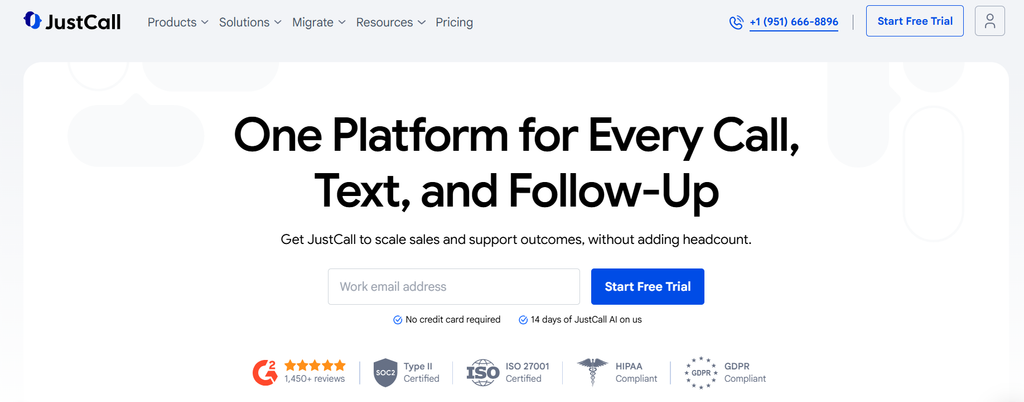
JustCall is a cloud-based business communication platform that helps sales and support teams connect with customers through voice, SMS, and AI-powered tools, making it a widely used auto dialer software Australia option for growing teams.
Best for: Sales and support teams scaling outreach
Key features
- Auto dialer works through contact lists so reps focus on conversations rather than manually dialing each number, which reduces idle time between calls.
- Local Australian numbers are available alongside international numbers in 70+ countries, so outbound caller ID matches the region your team is calling into.
- Native CRM integrations across 100+ tools including Salesforce, HubSpot, and Pipedrive enable bidirectional sync without Zapier, so call data reaches the CRM automatically.
- AI-powered communication tools personalise customer interactions by surfacing contact history and suggested responses during live calls.
- Call tracking and analytics give managers visibility into rep performance, connection rates, and talk time across the team.
Pros and cons
| Pros | Cons |
|---|---|
| Ease of use is the top-rated theme on G2, with users highlighting fast setup and quick onboarding | Call quality issues, connection drops, and audio latency are the most-mentioned complaints on G2, with 466 call issue mentions |
| Deep native CRM integrations across 100+ tools enable bidirectional sync without Zapier | Billing opacity is a recurring complaint: one reviewer reported paying $800 instead of an expected $90, and a Capterra user saw a 271% price increase on renewal |
| Local phone numbers available in 70+ countries, plus a functional sales dialer on the Pro+ tier | Advanced features like Power Dialer, Salesforce CTI, and bulk SMS are gated behind the $49 Pro+ tier, which feels restrictive for smaller teams |
Pricing and ratings
Pricing (Australia): Contact sales. A 14-day free trial is available. Local Australian numbers are supported. See full pricing
Integration with Australian CRMs: JustCall offers native bidirectional sync with Salesforce, HubSpot, and Pipedrive, which are the most common CRMs used by Australian sales teams. Call data logs automatically without Zapier, though the Power Dialer and Salesforce CTI require the Pro+ tier.
3. Aircall – Best for quality outbound sales calls

Aircall is a sales-focused cloud phone system that enables teams to dial more prospects and close deals faster with higher-quality calls, positioning it as a solid auto dialer software Australia choice for teams where call quality is the top priority.
Best for: Sales teams needing quality outbound calls
Key features
- Power dialer automates next-number dialing immediately after a call ends, so agents move to the next prospect without any manual action between calls.
- Progressive dialing dials one number at a time, which reduces spam risk and improves connection rates compared to aggressive parallel dialing.
- Call recording is stored automatically and accessible from the dashboard, so managers can review calls for coaching without asking reps to submit recordings manually.
- Native HubSpot and Salesforce integration logs calls and organises sales data automatically, so CRM records stay current without rep input.
- International calling supports global sales teams that need to reach prospects outside Australia from the same platform.
Pros and cons
| Pros | Cons |
|---|---|
| Ease of use is the top positive cluster on G2 with 263 mentions, more than double any other category | Connection issues (71 mentions) and call quality problems (58 mentions) are the primary negative clusters on G2 |
| Easy CRM integration pulls 112 G2 mentions, particularly for HubSpot and Salesforce connectivity | Billing transparency is a recurring complaint across user reviews |
| Call recording is highly valued with 105 G2 mentions as a standout feature for sales teams | Trustpilot rating is 3.0/5 across 1,021 reviews, significantly lower than its G2 score of 4.4/5, indicating post-purchase experience issues |
Pricing and ratings
Pricing (Australia): Contact sales. No public starting price is listed. See full pricing
Integration with Australian CRMs: Aircall offers native bidirectional integration with HubSpot and Salesforce, so calls log automatically without Zapier. Australian-focused blog content and resources are available, though explicit confirmation of local AU number provisioning is not publicly listed.
4. CloudTalk – Best for small businesses needing flexible dialing modes

CloudTalk is a cloud contact centre platform offering four flexible auto dialing modes and strong CRM integrations, making it a practical auto dialer software Australia option for small to mid-sized businesses that need scalable outbound sales without enterprise pricing.
Best for: Small businesses needing flexible dialing modes
Key features
- Smart Dialer and Power/Progressive Dialer are available on the Expert plan at $49/user/month, giving teams that need higher throughput a clear upgrade path from the entry-level Starter plan.
- Parallel Dialer add-on at $39/user/month enables multi-line outreach, so agents can run simultaneous dials and connect only when a live person answers.
- Native Salesforce integration provides bidirectional sync, so call records, notes, and outcomes update the CRM automatically after each call.
- Click-to-call and core business calling are included in the Starter plan at $25/user/month, so smaller teams get functional outbound dialing without paying for advanced features they do not need yet.
- Analytics and wallboards on the Expert plan give managers a live view of team performance, queue status, and individual rep metrics.
Pros and cons
| Pros | Cons |
|---|---|
| High usability and strong reporting praised on G2 with a 4.4/5 rating across 1,738 reviews | Call drops in certain regions and inconsistent audio quality are the most common complaints on G2 |
| CRM integrations and ease of use are core wins on Capterra, rated 4.4/5 across 268 reviews | Support tickets often go unacknowledged for 24 to 48 hours on non-critical issues, indicating slow response times |
| Starter plan at $25/user/month includes click-to-call and core calling, making it accessible for small businesses | Mobile app receives mixed reviews with reported stability issues, and the Starter plan is limited for anything beyond basic calling |
Pricing and ratings
Pricing (Australia): Starter plan at $25/user/month; Expert plan at $49/user/month (billed annually), which unlocks Smart, Power, and Progressive dialers. Parallel Dialer add-on is $39/user/month. Australian region pricing is listed at $25/user/month. See full pricing
Integration with Australian CRMs: CloudTalk offers native Salesforce integration with bidirectional sync, so call data flows to CRM records automatically. No Zapier is required for Salesforce, though some other CRM connections may need third-party connectors.
5. Kixie – Best for high-volume multiline dialing

Kixie PowerCall is an advanced multi-line auto dialer that uses AI-human voice detection and spam-risk reduction to achieve up to 4x more connections, making it a strong auto dialer software Australia choice for sales teams running high-volume outbound campaigns.
Best for: High-volume sales teams needing multiline dialing
Key features
- AI-human voice detection identifies whether a live person or voicemail answered the call, so agents only connect to real conversations and voicemail drop handles the rest automatically.
- Multi-line auto dialer enables parallel calling across several lines simultaneously, so agents spend more time talking and less time waiting for rings.
- Native HubSpot and Salesforce integration provides bidirectional sync, so every call, outcome, and recording reaches the CRM without manual entry.
- Power dialing in progressive mode optimises agent productivity by dialing the next number only when the previous call ends, which reduces the risk of spam flags from carriers.
- Click-to-call and precise call tracking give sales managers accurate data on connection rates, talk time, and campaign performance at the rep level.
Pros and cons
| Pros | Cons |
|---|---|
| G2 reviewers rate it 4.8/5, citing easy setup, click-to-call, and deep native HubSpot and Salesforce sync as standout strengths | Real-world spend runs $109 to $220/user/month once unlimited minutes, AI detection, and local presence are added, well above advertised base tiers |
| AI-human voice detection reduces spam risk and increases connection rates by up to 4x for high-volume sales teams | A hidden $50 card charge and $230 monthly advance charge were reported by a Capterra user during a free trial, indicating billing transparency issues |
| Multi-line auto dialer enables parallel calling for maximum throughput on outbound campaigns | Pricing structure is complex with three entry points and multiple add-ons, making total cost unpredictable for lighter users |
Pricing and ratings
Pricing (Australia): Power dialer starts at $95/user/month (USD), billed monthly. Custom quotes are required for higher tiers. No AUD pricing is publicly confirmed. See full pricing
Integration with Australian CRMs: Kixie offers native bidirectional integration with HubSpot and Salesforce, so call data syncs automatically without Zapier. Local Australian number availability is not explicitly confirmed on the public pricing page.
6. Dialpad – Best for mid-to-large businesses needing AI sales tools
Dialpad is an AI-powered enterprise communication platform with a dedicated sales dialer product called Dialpad Sell, making it a well-suited auto dialer software Australia option for mid-to-large businesses that need intelligent call routing and outbound sales automation with explicit AUD pricing.
Best for: Mid-to-large businesses needing AI sales tools
Key features
- Auto attendant handles intelligent call routing like a virtual receptionist, so inbound calls reach the right team or agent without manual intervention.
- AI Sales Dialer within Dialpad Sell automates outbound workflows, so reps move through call lists without switching between tabs or manually logging outcomes.
- AI transcription captures every call in real time and extracts action items automatically, so managers get structured call data without listening to recordings in full.
- Native CRM integrations with Salesforce and HubSpot provide bidirectional sync, so call records update the CRM automatically after each conversation.
- Real-time analytics and voice AI surface coaching opportunities during live calls, so managers can intervene or provide guidance without waiting for a post-call review.
Pros and cons
| Pros | Cons |
|---|---|
| Verified TrustRadius reviewers highlight efficiency and stability, noting the platform rarely crashes during active use | Voicemail translation requires the Pro plan, so Essentials users cannot access this feature without upgrading |
| AI transcription and automatic action item extraction extend value beyond calling, with call recording rated 9.1/10 on TrustRadius | The hang-up function is noted as slightly slow in verified reviews, which can affect call pacing on high-volume days |
| Annual Essentials plan at AUD $59/month includes core sales dialer functionality with explicit AUD pricing for Australian teams | No free version is available, which frustrates early adopters who previously had free access for small businesses |
Pricing and ratings
Pricing (Australia): Dialpad Sell Essentials at AUD $59/month on an annual plan, or AUD $69/month billed monthly. AUD pricing is explicitly available, which is a practical advantage for Australian finance teams. See full pricing
Integration with Australian CRMs: Dialpad offers native bidirectional CRM integration with Salesforce and HubSpot, so call data syncs automatically. Local Australian numbers are implied through Dialpad Sell Australia branding, though explicit confirmation of AU number provisioning is not publicly listed.
7. PhoneBurner – Best for small businesses needing progressive dialing
PhoneBurner is a progressive auto dialer with three tiered plans designed for small to mid-sized sales teams that need efficient outbound dialing without the complexity of enterprise-grade platforms, making it a straightforward auto dialer software Australia option for budget-conscious teams.
Best for: Small businesses needing progressive dialing
Key features
- Progressive dialing mode dials one number at a time, so agents are always ready to speak when a call connects and spam risk stays low compared to aggressive parallel dialing.
- Three plan tiers at $165, $195, and $215/user/month scale with feature needs, so teams can start with the base plan and upgrade as outbound volume grows.
- Click-to-call and call logging reduce manual data entry, so reps spend less time updating records and more time on active conversations.
- CRM integrations via native connectors or Zapier keep contact records current after each call, though some CRM connections require the third-party connector rather than a native sync.
- Built for small teams prioritising cost-effective outbound dialing, with a straightforward interface that requires minimal training to get started.
Pros and cons
| Pros | Cons |
|---|---|
| Progressive dialing keeps spam risk low while maintaining a steady call pace for small teams | Starting price of $165/user/month is among the highest in this comparison for base-level dialing functionality |
| Three clear plan tiers make it easy to understand what you get at each price point without a sales call | Some CRM integrations require Zapier rather than a native connector, which adds a dependency and potential sync delays |
| Straightforward interface suits small teams that need to get calling quickly without extensive onboarding | No AUD pricing is publicly confirmed, and no explicit local Australian number provisioning is listed on the pricing page |
Pricing and ratings
Australia USD: Base plan at $165/user/month (USD); mid-tier at $195/user/month; top tier at $215/user/month. Pricing is in USD only, with no AUD equivalent publicly listed. See full pricing
Integration with Australian CRMs: PhoneBurner integrates with major CRMs via native connectors or Zapier. Native bidirectional sync is available for some CRMs, but others require a Zapier workflow, which can introduce sync delays compared to fully native integrations.
8. CallHippo – Best for virtual phone plus dialer

CallHippo is a virtual phone system with built-in auto dialer capabilities for sales and support teams, offering scalable outbound calling and CRM integration that makes it a functional auto dialer software Australia option for teams that need a combined virtual number and dialing solution.
Best for: Sales teams needing virtual phone plus dialer
Key features
- Auto dialer works through contact lists for efficient lead outreach, so reps move through campaigns without manually dialing each number.
- Virtual phone system supports local and international number options, so Australian teams can present a local caller ID when calling domestic prospects.
- CRM integration enables automated call logging and data sync, so contact records update after each call without manual input from the rep.
- Click-to-call functionality reduces manual dialing time, so reps initiate calls directly from their browser or CRM with a single click.
- Scalable architecture suits small to mid-sized sales teams that expect to grow their outbound call volume over time without switching platforms.
Pros and cons
| Pros | Cons |
|---|---|
| Combined virtual phone system and auto dialer in one platform reduces the need for separate tools | No AUD pricing is publicly confirmed, and local Australian number availability is not explicitly listed |
| Native CRM integration with automated call logging keeps contact records current without manual entry | Limited public review data makes it harder to assess real-world call quality and reliability for Australian networks |
| Scalable for small to mid-sized teams without requiring an enterprise contract |
Pricing and ratings
Integration with Australian CRMs: CallHippo offers native CRM integration with bidirectional sync for major platforms, so call data logs automatically. No Zapier is required for supported CRMs, though the full list of natively supported platforms should be confirmed directly with the vendor for Australian-specific CRM needs.
9. Convoso – Best for high-volume lead generation and compliance-heavy industries

Convoso is a cloud-based contact centre and auto dialer platform designed for high-volume outbound sales, compliance-heavy industries, and lead generation campaigns, making it a specialist auto dialer software Australia option for enterprise teams in regulated sectors.
Best for: High-volume lead generation and compliance-heavy industries
Key features
- Advanced auto dialer modes support high-volume outbound campaigns, so contact centres can run large-scale lead generation without manual dialing bottlenecks.
- Compliance-focused features suit industries like healthcare and finance, where outbound calling must follow strict regulatory requirements around consent and record-keeping.
- CRM integration provides bidirectional data sync and automated logging, so campaign outcomes reach the CRM without manual data entry after each call.
- Real-time analytics monitor campaign performance and agent efficiency, so managers can adjust pacing, scripts, or agent assignments during an active campaign.
- Scalable architecture supports enterprise-level lead generation teams that need to handle thousands of daily outbound calls across multiple campaigns simultaneously.
Pros and cons
| Pros | Cons |
|---|---|
| Purpose-built for high-volume outbound campaigns with compliance features suited to regulated industries | No public pricing is listed, so teams must go through a sales process before understanding total cost |
| Real-time analytics and campaign monitoring give managers live visibility into outbound performance | No AUD pricing or explicit local Australian number provisioning is publicly confirmed |
| Scalable architecture suits enterprise contact centres running multiple simultaneous outbound campaigns | Limited public review data makes independent verification of call quality and reliability harder for Australian buyers |
Pricing and ratings
Integration with Australian CRMs: Convoso offers native CRM integration with bidirectional sync, so call outcomes and campaign data reach the CRM automatically. The platform is designed for enterprise-scale deployments, so integration depth and supported CRM list should be confirmed during the sales process for Australian-specific requirements.
Auto dialer software Australia feature comparison: 2026
| Feature | FreJun | JustCall | Aircall | CloudTalk | Kixie | Dialpad | PhoneBurner | CallHippo | Convoso |
|---|---|---|---|---|---|---|---|---|---|
| AI call summaries and transcripts | Yes | Partial – Pro+ plan only | No | No | No | Yes | No | No | No |
| Native CRM bidirectional sync (no Zapier) | Yes – 23+ CRMs | Yes – 100+ CRMs | Yes – HubSpot, Salesforce | Yes – Salesforce | Yes – HubSpot, Salesforce | Yes – Salesforce, HubSpot | Partial – some CRMs need Zapier | Yes | Yes |
| Multiple dialing modes (4+) | Yes – progressive, power, predictive, preview | Partial – power dialer on Pro+ | Partial – power and progressive | Partial – Expert plan required | Yes – multi-line and progressive | Partial – sales dialer on Essentials | Partial – progressive only | Partial – auto dialer included | Yes |
| Local Australian virtual numbers | Yes | Yes | Not confirmed publicly | Not confirmed publicly | Not confirmed publicly | Partial – implied via AU branding | No | Not confirmed publicly | Not confirmed publicly |
| ACMA and Do Not Call Register compliance support | Yes | Partial – general cloud compliance | Not confirmed | Not confirmed | Not confirmed | Not confirmed | Not confirmed | Not confirmed | Partial – compliance features for regulated industries |
| Free trial available | Yes – 3 days, up to 5 users, full access | Yes – 14 days | Not confirmed | Not confirmed | Not confirmed | Not confirmed | Not confirmed | Not confirmed | Not confirmed |
FreJun leads on AI features and CRM breadth, while JustCall offers the widest CRM library and Dialpad is the only competitor with explicit AUD pricing and native AI transcription at the Essentials tier.
“For Australian teams, the biggest risk isn’t the dialer speed, it’s compliance. If your auto dialer doesn’t respect the Telecommunications Consumer Protections Code or local number portability rules, you’ll get flagged fast.”
– James O’Connor, RevOps Manager, ReachOut Consulting via Quora
Also Read: Top 9 Best Auto Dialer Software in New Zealand
Which auto dialer software Australia is right for your team in 2026?
Different teams have different priorities when choosing auto dialer software Australia. Use the guide below to match your situation to the right platform before starting a trial.
If you are a sales or support team that needs a CRM-native dialer with AI summaries and fast setup: Choose FreJun. It is the only platform in this list that lives inside your CRM, auto-logs every call with AI transcripts, and gets your team calling within an hour of signing up.
If you are scaling a sales or support team and need 100+ CRM integrations with a 14-day trial: Choose JustCall. Its breadth of native CRM connectors suits teams that use less common CRMs alongside Salesforce and HubSpot, though watch for billing surprises on renewal.
If you are a small business that needs flexible dialing modes at a transparent starting price: Choose CloudTalk. The Starter plan at $25/user/month includes click-to-call, and the Expert plan unlocks Smart and Power dialers when your volume grows.
If you are a mid-to-large Australian business that needs explicit AUD pricing and AI transcription: Choose Dialpad. It is the only competitor in this list with a publicly listed AUD price for its sales dialer, starting at AUD $59/month on an annual plan.
If you are running a high-volume outbound campaign in a compliance-heavy industry like healthcare or finance: Choose Convoso. Its architecture is built for enterprise-scale lead generation with compliance features that suit regulated sectors.
Which tool wins overall in Australia?
If you want the best overall auto dialer software Australia with AI features, transparent USD pricing, and ACMA compliance support: Choose FreJun. No other platform in this list combines a 4.9/5 G2 rating, four dialing modes, AI call summaries synced natively to 23+ CRMs, local Australian number provisioning, and a setup time under one hour, all starting from $14.49/user/month.
Frequently asked questions about auto dialer software Australia in 2026
What is the best auto dialer software Australia in 2026?
The best auto dialer software Australia option in 2026 is FreJun, rated 4.9/5 on G2 with a G2 Leader badge for Outbound Call Tracking. Three concrete reasons it leads: first, it offers four dialing modes (progressive, power, predictive, and preview) so teams can match their dialing pace to their campaign type. Second, it provides native bidirectional sync with 23+ CRMs including Salesforce, HubSpot, and Pipedrive, so every call auto-logs without manual entry. Third, it supports local Australian virtual numbers and ACMA compliance, which is a non-negotiable requirement for any Australian outbound team.
How much does auto dialer software Australia cost in 2026?
Auto dialer software Australia pricing ranges widely depending on the platform and feature tier. FreJun’s international Standard Plan starts at $14.49/user/month and the Professional Plan at $16.69/user/month, both including a virtual number and $5 in calling credits. CloudTalk starts at $25/user/month for basic calling, with the Expert plan at $49/user/month unlocking advanced dialers. Kixie starts at $95/user/month for its power dialer, while PhoneBurner starts at $165/user/month. Dialpad Sell is the only platform with explicit AUD pricing, starting at AUD $59/month on an annual plan. Always calculate total cost per rep including calling credits and local number rental, since base plan prices rarely reflect the full monthly spend.
What compliance rules apply to auto dialer software Australia teams?
Australian teams using auto dialer software must comply with ACMA (Australian Communications and Media Authority) regulations and the Do Not Call Register Act 2006. The Do Not Call Register prohibits unsolicited telemarketing calls to registered numbers, and violations carry financial penalties. The Spam Act 2003 also applies to automated electronic communications. Before running any outbound campaign, your dialer must scrub contact lists against the Do Not Call Register. Some platforms handle this natively, while others require manual list management. Confirm your chosen platform’s compliance support before signing a contract, since the responsibility for compliance sits with the business, not the software vendor.
Which auto dialer software Australia integrates best with Salesforce and HubSpot?
FreJun offers the deepest integration with both Salesforce and HubSpot among the platforms in this comparison. Every call auto-logs with duration, recording link, AI transcript, sentiment score, and call disposition, all synced bidirectionally without Zapier. JustCall also offers native integration with 100+ CRMs including Salesforce and HubSpot, though advanced features like Salesforce CTI require the Pro+ tier. Kixie and Aircall both offer native HubSpot and Salesforce sync, but neither matches FreJun’s AI summary layer that enriches every CRM record automatically after each call. If your team runs Salesforce or HubSpot and wants zero manual logging, FreJun’s FreJun integrations page shows the full list of supported platforms.
How do I switch from a traditional phone system to auto dialer software Australia?
Switching from a traditional PBX or desk phone setup to a cloud-based auto dialer software Australia platform is faster than most teams expect. With FreJun, the process involves installing the Chrome extension, connecting your CRM, and provisioning a virtual Australian number, which takes under one hour from signup to first call. Existing numbers can be ported within 24 hours so your team keeps its established caller identity. Start with FreJun’s 3-day free trial for up to 5 users with full feature access, so you can validate call quality on Australian networks and CRM sync accuracy before committing. Since FreJun requires no hardware and no IT team involvement, even small teams can make the switch without a dedicated technical resource.
What features matter most for Australian sales teams choosing an auto dialer?
Australian sales teams should prioritise five features when evaluating auto dialer software Australia options. Local virtual number support is first, since calls from Australian area codes connect at significantly higher rates than international numbers. ACMA compliance and Do Not Call Register scrubbing is second, because non-compliance carries real financial penalties. Native CRM integration without Zapier is third, so call data reaches the CRM automatically without manual entry or sync delays. AI call summaries are fourth, because as of 2026, FreJun’s analysis of 300+ client accounts found that teams using AI-transcribed calls reduced manual note-taking time by 40%. Multiple dialing modes are fifth, so teams can run progressive dialing for quality-focused campaigns and predictive dialing for high-volume outbound without switching platforms.
Can auto dialer software Australia work for recruitment teams?
Yes, auto dialer software Australia platforms can serve recruitment teams effectively, but the key requirement is ATS (Applicant Tracking System) integration rather than standard CRM sync. FreJun supports native ATS integrations with LeadSquared, iSmartRecruit, Zoho Recruit, and Bullhorn, so recruiters can dial candidates directly from the ATS and have every call auto-logged with a recording and AI summary against the candidate record. This removes the manual note-taking step that slows down high-volume recruitment calling. The FreJun recruitment page covers the specific workflow in detail. For recruitment teams, the preview dialing mode is particularly useful, since it lets the recruiter review the candidate profile before the call connects.
How is AI changing auto dialer software Australia in 2026?
AI is shifting auto dialer software Australia from a pure dialing tool into a full call intelligence layer. The most immediate change is AI call summaries: after every call, platforms like FreJun generate a sentiment score, talk ratio, 2-3 sentence summary, and full searchable transcript, all synced to the CRM automatically. As of 2026, FreJun teams see an average 3x increase in daily call volume because reps spend zero time on manual logging. Beyond summaries, AI-human voice detection (used by Kixie) reduces spam flags by identifying live answers versus voicemail before connecting the agent. The next wave is real-time AI coaching during live calls, which Dialpad already offers through its voice AI layer. Australian teams that adopt AI-native dialers now will have a measurable data advantage over teams still using manual logging within 12 months. Beyond dialing speed, call automation is reshaping how teams operate more broadly, as explored in our piece on how call automation revolutionizes Singapore businesses.
Do auto dialers in Australia support international calls to Dubai?
Yes, modern auto dialer platforms let admins configure per-destination dialing rules so that when a contact record carries a Dubai mobile or landline, the system automatically prepends the correct international prefix and routes the call through a UAE-compatible carrier. Agents do not need to memorize the country code, which keeps outbound lists clean across the team. For the exact sequence used to reach Dubai lines, see this Dubai phone code entry walkthrough.
Can outbound campaigns target the United Arab Emirates from Australian auto dialer software?
Yes, most leading platforms let admins pre-load the international prefix, country code, and local number length into the dialer’s calling rule set so every agent dials UAE contacts identically. Validating the format ahead of time prevents failed connections and wasted talk-time minutes. For a complete breakdown of the UAE entry sequence, see this UAE dialing prefix breakdown.
Conclusion: Best auto dialer software Australia in 2026
The top three auto dialer software Australia platforms in 2026 are FreJun (CRM-native AI dialing), Dialpad (AUD-priced AI sales tools), and CloudTalk (flexible dialing modes at a transparent entry price). FreJun is the top recommendation for Australian sales, support, and recruitment teams because it is the only platform that combines four dialing modes, AI call summaries synced natively to 23+ CRMs, local Australian number provisioning, ACMA compliance support, and a setup time under one hour, all starting from $14.49/user/month. If your team is ready to replace manual dialing and manual logging with a single CRM-native platform, start with FreJun’s 3-day free trial and see the difference in your first week.