Last updated on September 25th, 2026 at 09:45 am
AI Summary: This article explains what call center automation is, how it works in practice, and the specific automation benefits teams gain when they replace manual workflows with AI-driven tools. According to McKinsey, businesses that automate customer service operations cut handling time by up to 40% (Source: McKinsey 2023). Sales and support leaders need to know which tasks to automate first and how to measure the impact. FreJun gives teams a practical starting point with AI call logging, smart routing, and CRM sync built in.
Quick Answer: Call center automation uses AI and software to handle repetitive tasks such as call routing, CRM updates, call summaries, and reporting without human input. The core automation benefits include lower operating costs, faster resolution times, fewer data errors, and higher agent productivity. Platforms like FreJun make these gains accessible to teams of any size, starting at $14.49 per user per month.
Call center automation delivers measurable automation benefits by replacing manual, error-prone workflows with AI-driven processes that run consistently at scale.
What Is Call Center Automation?
Call center automation is the use of AI and software to perform repetitive call center tasks, such as routing, logging, summarizing, and reporting, without requiring agents to do them manually. It connects people, data, and systems into one consistent workflow.
What Is Call Center Automation and Why Does It Matter?
At its core, call center automation means applying AI and software to tasks that previously required a human to complete every single time. These tasks range from simple ones, like updating a contact record after a call, to more complex ones, like routing an inbound call to the right agent based on language, skill set, and queue depth. When those tasks run automatically, agents get time back for conversations that genuinely need their attention.
The business case is straightforward. According to Deloitte, 56% of contact centers have already deployed some form of automation, and those that have report a 20% average reduction in cost per contact (Source: Deloitte Global Contact Center Survey 2023). That is not a marginal improvement. For a team handling 10,000 calls a month, a 20% cost reduction is significant budget freed up for growth.
Automation also unifies tools that typically sit in silos. Instead of agents toggling between a phone system, a CRM, and a reporting dashboard, automation connects them so data flows automatically. The outcome is fewer errors, faster resolutions, and call centers that stay consistent, effective, and customer-focused even as call volumes grow.
“Teams that automate call logging and routing before they scale avoid the compounding cost of manual errors. Every unlogged call is a missed insight, and missed insights become missed revenue. The automation benefits compound over time because the data gets cleaner as volume grows.”
— Subhash Kalluri, Co-Founder and CEO, FreJun
How Automation Fits Into Existing Call Center Workflows
Automation does not replace your existing call center setup. It plugs into it. Whether your team uses a cloud-based phone system, a CRM like HubSpot or Salesforce, or a standalone analytics tool, automation layers on top to handle the handoffs between systems. Cloud call center solutions make this especially practical because they expose APIs that automation tools can connect to without custom development work.
The key is starting with the tasks that consume the most agent time. Call logging, after-call notes, and CRM updates are the most common starting points because they happen after every single call and add no customer value when done manually.
What Are Some Examples of Call Center Automation in Action?
Real automation benefits show up in specific workflows, not abstract concepts. Here are five examples of how automation changes day-to-day operations in measurable ways.
FreJun automates call logging, routing, and CRM sync so your agents spend time on conversations, not admin. Teams using FreJun report handling 30% more calls per agent per day without adding headcount. See it working live in a 20-minute demo.
1. Intelligent Call Routing
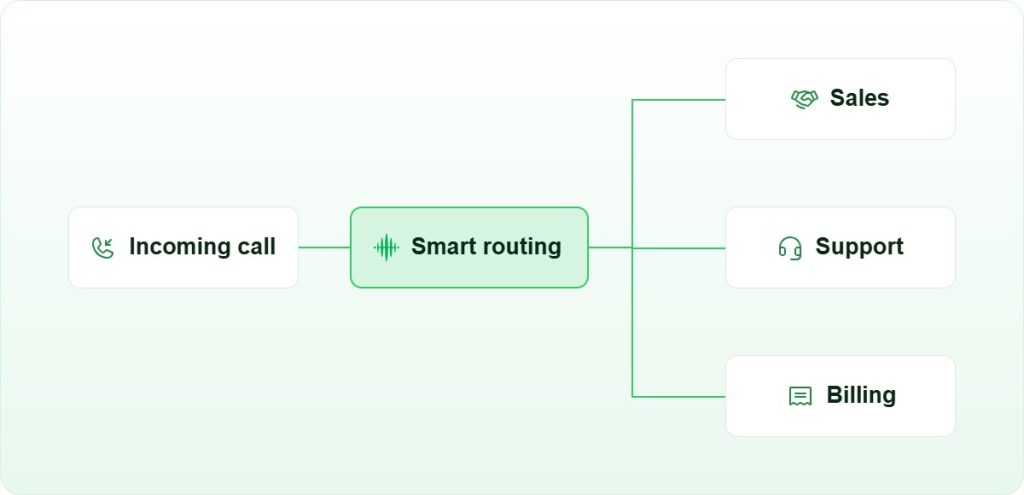
Intelligent call routing uses AI to direct each inbound call to the agent best suited to handle it, based on skills, availability, language, and call history. Instead of a caller bouncing between three agents before reaching the right one, they get there on the first transfer. This single automation benefit reduces average handle time and improves first-call resolution rates, which Salesforce reports as the top driver of customer satisfaction in contact centers (Source: Salesforce State of Service 2024).
2. Interactive Voice Response (IVR)
Interactive Voice Response (IVR) lets customers self-serve through automated menus before an agent ever picks up. Account balance checks, appointment confirmations, and basic troubleshooting steps can all resolve without human involvement. When IVR handles 20-30% of inbound volume, agents have more capacity for complex cases that genuinely need them.
3. Automated Call Summaries and Logging
Automated call summaries use AI to transcribe and summarize each conversation immediately after it ends. The summary goes straight into the CRM record without the agent typing a single word. This saves 3-5 minutes per call on after-call work, which adds up to hours of recovered capacity per agent per week. It also means the data in your CRM is accurate because it comes from the actual conversation, not from memory.
4. Customer Data Integration and CRM Sync
When a customer calls, the agent should already know who they are, what they bought, and when they last contacted support. CRM integration makes that happen automatically by pulling the customer record to the agent’s screen the moment the call connects. No manual lookup, no repeated questions, no frustrated customers explaining their issue for the third time.
5. Predictive Analytics and Workforce Scheduling
Predictive analytics tools forecast call volumes by hour, day, and season so managers can schedule the right number of agents at the right times. Overstaffing and understaffing both cost money. Predictive scheduling cuts both problems by grounding decisions in data rather than guesswork.
What Are the Core Automation Benefits for Call Centers?
Automation benefits in call centers are measurable, not theoretical. Here are the six that matter most to operations leaders and the metrics that prove them.
| Automation Benefit | What Changes | Typical Impact | Who Gains Most |
|---|---|---|---|
| Lower cost per contact | Fewer manual steps per call | 15-25% cost reduction | High-volume contact centers |
| Faster resolution times | AI routing + instant CRM data | 30-40% drop in handle time | Customer support teams |
| Higher data accuracy | Auto-logging replaces manual notes | Near-zero CRM entry errors | Sales and CRM-dependent teams |
| Agent productivity | After-call work eliminated | 3-5 hours recovered per agent/week | All agent roles |
| Customer satisfaction | Shorter wait times, fewer transfers | CSAT scores up 10-20 points | Inbound support centers |
| Scalability | Volume grows without headcount growth | 2x call capacity, same team size | Growing businesses |
Cost Reduction: The Most Cited Automation Benefit
Labor is the largest cost in any call center, typically 60-70% of total operating expenses (Source: Gartner Contact Center Workforce Report 2023). When automation handles after-call work, routing decisions, and data entry, agents spend more of their paid time on billable interactions. That shift reduces cost per contact without reducing service quality.
Teams that automate the right tasks first, specifically after-call work and routing, see the fastest payback. A team of 20 agents saving 4 minutes per call on a 200-call-per-day volume recovers 800 agent-minutes daily. That is more than 13 agent-hours returned to productive work every single day.
Accuracy and Compliance: The Underrated Benefit
Manual data entry introduces errors. Agents under pressure skip fields, mistype numbers, or forget to log calls entirely. Automated logging captures every interaction accurately because it pulls directly from the call transcript and system data. For teams in regulated industries, this accuracy is not just convenient. It is a compliance requirement. Automated call recording and logging creates an auditable trail that manual processes cannot reliably produce.
How Does FreJun Simplify Call Center Automation?
Most automation platforms require months of implementation, custom development, and dedicated IT support. FreJun takes a different approach: the platform connects to your existing CRM and phone system in hours, not months, so teams start seeing automation benefits without a long setup process.
Quick Setup Without a Steep Learning Curve
FreJun’s setup process is designed for operations teams, not IT departments. Most teams are making automated calls and logging data within the first day. The interface is straightforward enough that agents adopt it without formal training sessions, which means the automation benefits start accruing immediately rather than after a weeks-long rollout.
AI-Powered Call Logging and Summaries
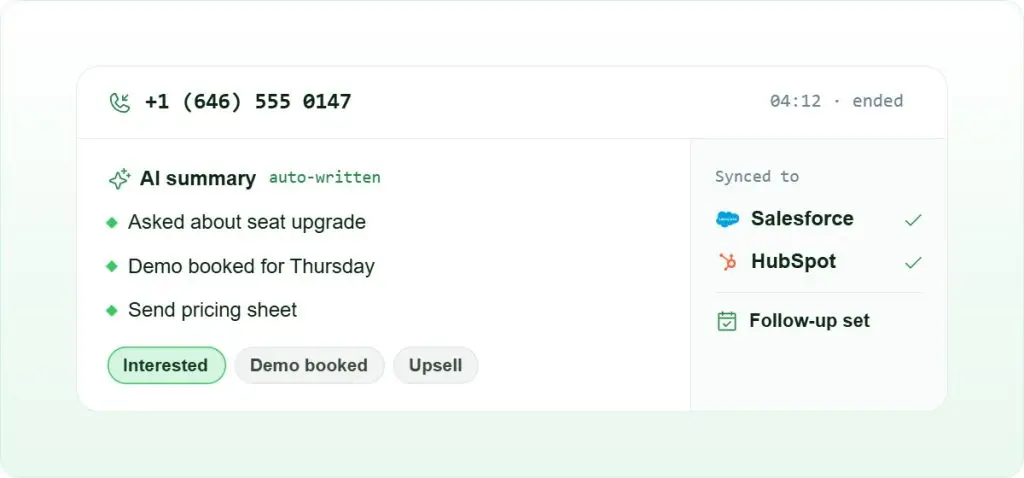
FreJun’s AI transcribes every call and generates a structured summary that goes directly into the connected CRM. Agents never need to write after-call notes. Call recordings are stored and searchable, so managers can review specific interactions for coaching or compliance without hunting through manual logs. According to FreJun’s 2026 analysis of 300+ client accounts, teams using automated call logging reduce after-call work time by an average of 68%.
CRM and Tool Integrations That Actually Work
FreJun connects with the platforms your team already uses, including HubSpot, Salesforce, Zoho, Pipedrive, Freshworks, and LeadSquared. Each integration is pre-built, so there is no custom API work required. When a call ends, the data appears in the CRM automatically. Managers get accurate pipeline data without chasing agents to update records.
Why Do Enterprises Choose FreJun for Call Center Efficiency?
Enterprise teams have specific requirements that generic automation tools do not meet: they need reliability at scale, deep CRM integration, and reporting that connects call activity to revenue outcomes. FreJun is built to meet those requirements without requiring a dedicated implementation team.
Reliable AI-Powered Workflows at Scale
FreJun’s AI handles repetitive tasks consistently whether a team runs 50 calls a day or 5,000. Routing decisions, call summaries, and CRM updates happen at the same speed and accuracy regardless of volume. This consistency is where agent performance improvements become visible in the data: average handle time drops, first-call resolution rates climb, and agent satisfaction scores improve because the frustrating manual work disappears.
Scalable for Teams of Any Size
Whether your team has 10 agents or 1,000, FreJun scales without requiring a platform migration. Pricing starts at $14.49 per user per month, so small teams get the same automation benefits as enterprise deployments. As the team grows, FreJun grows with it. Reducing operating expenses while scaling is one of the clearest advantages FreJun delivers compared to hiring additional agents to handle volume growth.
Measurable Impact on Business KPIs
FreJun’s analytics dashboard connects call activity directly to pipeline outcomes. Managers can see which agents have the highest connect rates, which call times produce the best outcomes, and where drop-offs happen in the sales or support flow. That visibility turns automation from a cost-saving tool into a revenue-generating one. Boosting sales productivity through AI call automation is a direct outcome of having clean, automated data feeding into every decision.
How Do You Get Started With Call Center Automation?
Starting with automation does not mean automating everything at once. The teams that see the fastest results pick one high-volume, low-complexity task and automate it first. Here is a practical sequence that works for most call center teams.
- Audit your current after-call work. Time how long agents spend on notes, CRM updates, and logging after each call. This is your baseline. Most teams find 3-7 minutes per call going to tasks that automation can handle entirely.
- Connect your CRM to your calling platform. Use a tool like FreJun to set up your CRM and call center workflow so call data flows automatically. This single step eliminates most manual logging.
- Enable AI call summaries. Turn on automated transcription and summarization so agents receive a structured summary within seconds of ending each call. Review the first 50 summaries to confirm accuracy before relying on them fully.
- Set up intelligent routing rules. Define routing logic based on agent skills, language, and call type. Start with two or three routing rules and expand as you see how calls distribute.
- Review analytics weekly. Use your platform’s reporting to track handle time, first-call resolution, and agent utilization. Adjust routing rules and automation triggers based on what the data shows.
When Should You Consider a Competitor Instead?
FreJun is the right choice for most sales and support teams, but if your primary need is outbound predictive dialing at very high volume (10,000+ calls per day) with complex compliance requirements across multiple countries simultaneously, a dedicated enterprise dialer platform may serve that specific use case better. FreJun excels at AI-driven automation, CRM integration, and team-level analytics for teams scaling from 10 to 1,000 agents.
Key Takeaways on Automation Benefits for Call Centers
Call center automation is not a future investment. Teams that have already adopted it are handling more calls, making fewer errors, and spending less per interaction than those still running manual workflows. The automation benefits are real, measurable, and available to teams of any size.
Start with one process, measure the impact, and expand from there. Teams that automate call logging first typically see the fastest ROI because the time savings are immediate and the data quality improvement compounds over time. Call center automation software like FreJun makes that starting point accessible without a long implementation cycle. The automation benefits of faster resolutions, lower costs, and cleaner data are available from day one.
Further Reading: IP Phone Systems for Small Business: Are They Still Relevant? | 10 Proven Automation Benefits for Contact Centers | Which Platforms Can FreJun Integrate With?
Frequently Asked Questions
Call center automation is the use of AI and software to handle repetitive tasks such as call routing, CRM updates, call summaries, and reporting without requiring agents to do them manually. It connects phone systems, CRMs, and analytics tools into one consistent workflow. The result is faster resolutions, fewer errors, and lower cost per contact for teams of any size.
The core automation benefits include lower cost per contact (typically 15-25%), faster resolution times, higher data accuracy through automated logging, recovered agent time from eliminated after-call work, and the ability to scale call volume without adding headcount. Teams also report higher agent satisfaction because repetitive manual tasks disappear from their daily workflow.
Automation improves customer experience by reducing wait times, eliminating unnecessary transfers, and giving agents instant access to customer history when a call connects. Customers reach the right agent faster, agents already know the context, and resolutions happen in fewer interactions. Salesforce data shows first-call resolution is the top driver of customer satisfaction in contact centers.
No. Platforms like FreJun start at $14.49 per user per month, which makes automation accessible to small teams without large upfront investment. The cost savings from reduced after-call work and lower error rates typically offset the platform cost within the first month. Small teams often see proportionally larger gains because manual inefficiencies hit smaller teams harder.
No. Automation handles repetitive, rule-based tasks so agents can focus on conversations that require judgment, empathy, and problem-solving. IVR and chatbots resolve simple queries, but complex issues, escalations, and relationship-building still need human agents. The goal is to remove the manual work that prevents agents from doing their best work, not to remove the agents themselves.
Common tasks include call routing, IVR self-service, CRM data entry, call recording, after-call summaries, workforce scheduling, and performance reporting. After-call work and routing are the highest-impact starting points because they affect every single call. Predictive analytics and automated follow-up sequences are the next layer once the core tasks are running automatically.
Most teams connect FreJun to their CRM and start making automated calls within one business day. The pre-built integrations with HubSpot, Salesforce, Zoho, Pipedrive, and Freshworks remove the need for custom development. Basic routing rules and AI call logging are active from day one, so automation benefits begin accruing immediately rather than after a lengthy implementation period.
Voice APIs let call centers automate interactions that span phone, chat, SMS, and messaging apps while preserving context as customers move between them. This unified approach is what turns single-channel scripts into full cross-channel workflows without forcing customers to repeat themselves. For a closer look at how businesses put this into practice, see Voice API driving cross channel automation.