Last updated on November 13th, 2026 at 02:42 pm
Quick Answer: To make outbound calls from Salesforce in India, you connect a cloud calling integration to your Salesforce org. The integration adds a click-to-call button on every lead and contact record, routes the call through a VoIP (Voice over Internet Protocol) layer, and automatically logs the call, duration, outcome and any notes back into Salesforce without the rep touching a keyboard.
AI Summary: Outbound calls from Salesforce require a third-party calling integration because Salesforce’s native dialer lacks automated logging, real-time transcription and post-call workflow triggers. This guide covers why native calling falls short, what a cloud dialer integration adds, and the six configuration steps to go live. It also compares integration approaches and maps the use cases where each approach fits best.
Table of contents
- Why Salesforce Needs Smart Calling Capabilities
- Limitations of Native Calling in Salesforce
- How FreJun Enhances Salesforce Communication
- FreJun Features That Transform Your Salesforce Workflow
- How to Integrate FreJun with Salesforce (Step-by-Step)
- FreJun vs Traditional Dialers for Salesforce Users
- Use Cases Where FreJun Delivers Impact Inside Salesforce
- Key Takeaways
- Final Thoughts
- FAQs
Why Salesforce Needs Smart Calling Capabilities
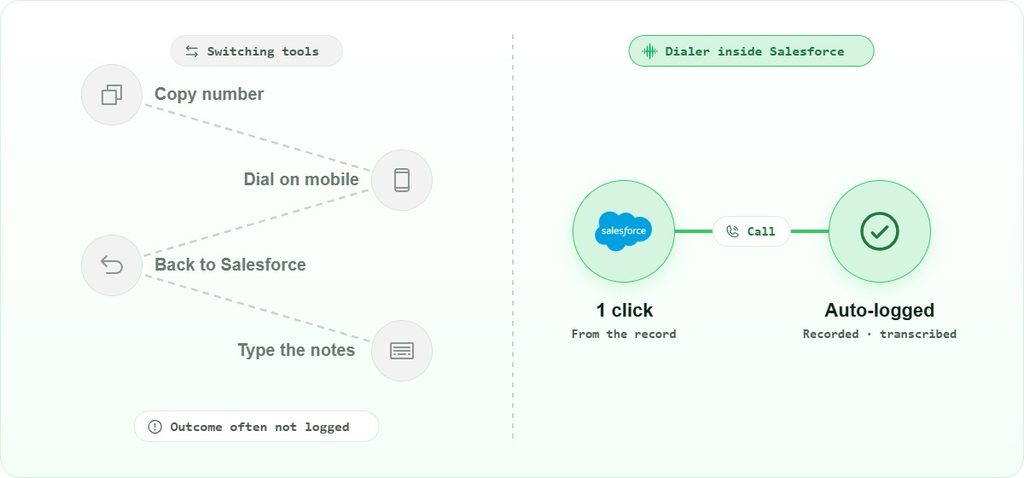
Salesforce is a leading CRM (Customer Relationship Management) platform built to capture leads, track deals and manage customer relationships. But for sales teams making outbound calls in India, it has a structural gap: the platform was designed around data management, not voice communication. Reps working a call list in India typically copy a number from a Salesforce lead record, dial it on a mobile phone or a separate VoIP app, then return to Salesforce to type in what happened. That context switch happens dozens of times a day.
The problem is not just friction. It is data loss. When a rep switches tools to dial, the call sits outside Salesforce entirely. Follow-ups get missed, call outcomes go unlogged, and managers have no visibility into what their team actually said on calls. For high-velocity sales environments where a rep might work through fifty leads in a day, that gap compounds quickly.
A calling integration solves this by embedding the dialer directly inside Salesforce. The rep never leaves the CRM. The call is placed, recorded, transcribed and logged against the right record automatically. That is the operational case for adding a calling layer to Salesforce, and it applies whether your team is in Mumbai, Bengaluru or anywhere else in India.
Limitations of Native Calling in Salesforce
Salesforce does offer native calling options, including Lightning Dialer and Salesforce Voice, but these have real constraints that matter for Indian sales teams. Understanding where they fall short helps you decide what a third-party integration actually needs to provide.
Manual Dialing Slows Reps Down
Without an embedded dialer, reps copy contact numbers from Salesforce and dial them manually through a mobile phone or a separate VoIP (Voice over Internet Protocol) app. This interrupts their workflow, adds unnecessary clicks and reduces the number of calls they can complete in a day. According to Salesforce’s own Voice Best Practice Guide, placing outbound calls through the native interface still requires reps to navigate to the contact record and initiate the call manually, with no bulk or one-click dialing from a list view. A click-to-call integration removes that friction entirely.
Logging Is Inconsistent Without a Third-Party Tool
Salesforce does not automatically capture call metadata unless you configure a third-party tool or build a custom solution. Reps must manually log each call, filling in duration, outcome and notes after every conversation. That manual step is prone to omission, especially late in a busy calling session. Inconsistent logging breaks pipeline reporting and makes follow-up accuracy unreliable. According to Salesforce’s developer documentation on outbound dialers, even configuring a preview dialer requires custom Lightning components and API calls, meaning any automated logging capability has to be built or bought separately.
No Native Transcription or Sentiment Analysis
Salesforce Voice records calls, but it does not transcribe them in real time or apply sentiment scoring. Managers who want to review what was said on a call have to listen to recordings manually. That is not scalable when a team is making hundreds of calls per week. Real-time transcription and sentiment detection are capabilities that have to come from a third-party integration.
No Automated Post-Call Follow-Up
Native Salesforce calling has no built-in mechanism to trigger a WhatsApp message or SMS after a call ends based on the call outcome. That means reps who want to send a follow-up confirmation or a meeting invite after a call have to do it manually, in a separate app, after leaving Salesforce. Each of these gaps is a place where data leaks out of the CRM and rep time gets consumed by tasks that could be automated.
How FreJun Enhances Salesforce Communication
A cloud calling integration connects a VoIP dialer directly to Salesforce so that every call a rep makes originates from inside the CRM. The integration sits between Salesforce’s data layer and the carrier network, translating a click on a phone number into a routed call, then writing the result back to the Salesforce record when the call ends.
The mechanism works in three stages. First, the rep clicks a phone number on any lead, contact or opportunity record. Second, the call is placed through the cloud dialer’s VoIP infrastructure, which handles routing, recording and transcription in real time. Third, when the call ends, the integration pushes the call log, duration, recording link, transcript and any outcome tag back to the associated Salesforce record automatically. The rep never leaves Salesforce and never types a call log manually.
For teams in India, this also means calls can be placed using local Indian virtual numbers, which improves answer rates compared to calls from unrecognised international numbers. To see how AI-powered call analysis works inside this workflow, explore FreJun’s AI Insights.
FreJun Features That Transform Your Salesforce Workflow
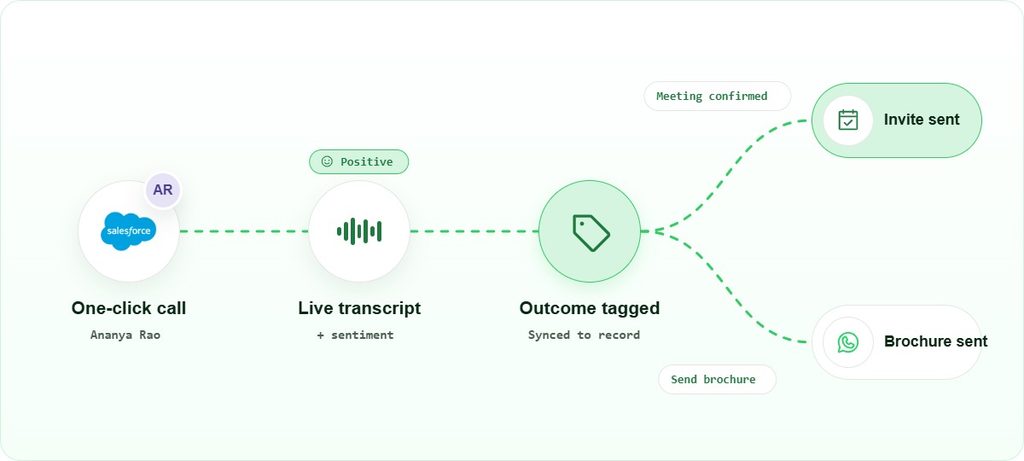
When a cloud dialer integrates with Salesforce, it adds a set of capabilities that address each of the native gaps described above. Here is how those capabilities work in practice for a sales or support team in India.
One-Click Calling from Any Record
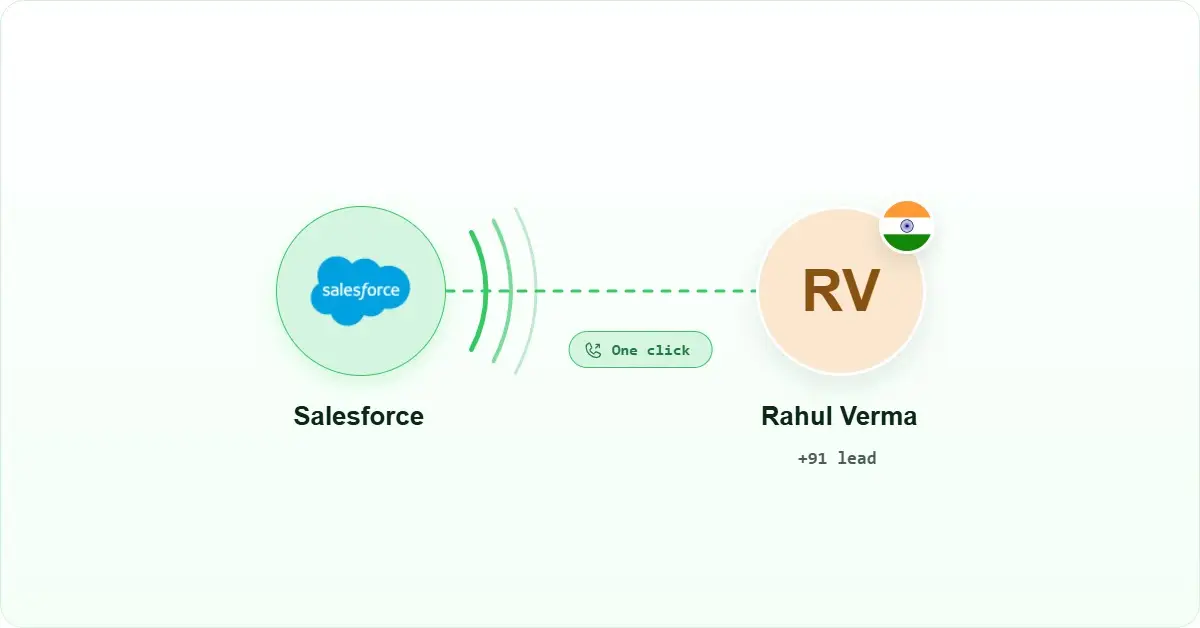
Reps can launch outbound calls directly from any lead, contact or opportunity record in Salesforce with a single click. There is no need to switch apps, use an external phone or copy a number. This click-to-call functionality simplifies daily operations and reduces the time between deciding to call someone and actually reaching them. To see how this fits into a broader sales workflow, visit FreJun’s sales automation features.
Auto-Logging with Outcome Tags
Every call placed through the integration is automatically logged into the associated Salesforce record. Call duration, timestamp, recording link and outcome tags such as “Interested”, “Callback Requested” or “No Answer” are written to the record in real time. The rep does not type anything. Learn more about how FreJun handles automated call logging.
Real-Time Transcription and Sentiment Detection
The integration transcribes calls as they happen and applies AI to detect whether the conversation was positive, neutral or negative. Managers can review transcripts instead of listening to recordings, which makes quality assurance and coaching far faster. Sentiment scores also give managers a signal about which calls to review first, since a negative sentiment flag on a key account is more urgent than a neutral one on a cold lead.
Automated WhatsApp and SMS Follow-Ups
After each call, the integration can automatically send a personalised WhatsApp or SMS message based on the call outcome and a pre-configured template. If the outcome tag is “Meeting Confirmed”, the system sends a calendar invite. If it is “Send Brochure”, it sends the document link. The rep does not need to act. This is especially useful for Indian sales teams where WhatsApp is a primary business communication channel. Explore how this automation works through FreJun’s Conversive Calling Integration.
How to Integrate FreJun with Salesforce (Step-by-Step)
The integration is no-code, meaning no developer is required. An admin with Salesforce credentials and a FreJun admin account can complete the setup. Before you start, confirm you have admin-level access to both platforms and that your Salesforce org is on a plan that supports third-party CTI (Computer Telephony Integration) connectors.
Step 1: Log in to FreJun
Go to the official login page and sign in with admin-level credentials. Only administrators can configure integrations and assign user roles. Once inside, you land on the FreJun dashboard, which is where you manage settings, monitor reports and control user access. Non-admin accounts will not see the Integrations tab in the next step, so confirm your permission level before proceeding.
Step 2: Navigate to Integrations
From the dashboard, click the “Integrations” tab in the navigation menu. This page lists all supported platforms. Locate Salesforce from the CRM list and click it to open the Salesforce-specific setup page. For a full list of supported platforms, visit the FreJun integrations page. If Salesforce does not appear in your plan’s integration list, contact your account manager before continuing.
Step 3: Authenticate Access
Connect FreJun to Salesforce using OAuth, which is the standard Salesforce authorisation method. When you click “Connect”, Salesforce opens a permission screen asking you to grant FreJun access to read and write contact records, call logs and activity data. Approve the permissions. FreJun then syncs your Salesforce contact records, lead details and custom fields into its calling interface. This sync is what makes click-to-call work: the dialer reads the phone number directly from the Salesforce record rather than requiring the rep to copy it.
Step 4: Map Reps
After authentication, map each Salesforce user to their corresponding FreJun profile. This step is critical because it is what ties call activity to the right rep. When a call is logged, Salesforce needs to know which user made it so the activity appears on the correct record and in the correct rep’s activity report. Without mapping, calls log against a generic admin account and individual rep analytics become meaningless. You manage user mapping and permission levels from the FreJun Manager Dashboard.
Step 5: Configure Triggers
With users mapped, define the automation rules that fire after each call. Triggers are tied to call outcome tags. For example, when a rep tags a call as “Interested”, the trigger sends a WhatsApp message with a meeting link. When the tag is “No Answer”, the trigger schedules a callback task in Salesforce for the next business day. When the tag is “Call Back Later”, it creates a follow-up reminder at the time the rep specified. Each trigger runs without the rep doing anything after tagging the call. A step-by-step guide to building these rules is available in FreJun’s automation and trigger documentation.
Step 6: Go Live
Once triggers are configured, activate the integration with a single click. The system syncs in real time. Reps can now place calls directly from Salesforce lead records, contact views and opportunity pages. Every call is tracked, transcribed and logged automatically. Managers can monitor all activity from the FreJun analytics dashboard, which shows call volumes, outcome distributions, sentiment trends and rep-level performance without requiring any manual reporting.
FreJun vs Traditional Dialers for Salesforce Users
Not every calling approach works the same way inside Salesforce. The table below compares three common setups: Salesforce’s native calling, a traditional standalone dialer connected via manual export, and a native CRM calling integration. We’d choose a native integration for teams where CRM data hygiene and post-call automation matter. A standalone dialer may suit very small teams that only need basic call volume and do not require automated logging or sentiment analysis.
| Approach | Best For | Key Features | Setup Effort | Pricing & Free Trial |
|---|---|---|---|---|
| Native Salesforce Calling (Lightning Dialer) | Teams already on Salesforce Voice with simple inbound needs | Basic click-to-call, manual call logging, call recording | Configured inside Salesforce Setup, admin required | Check pricing & trial |
| Standalone dialer (manual export) | Very small teams with low call volume and no automation needs | Outbound dialing, basic call recording, manual CSV import to CRM | Separate tool, manual data sync required | Varies by provider |
| Native CRM calling integration | Teams running high-volume outbound calling with CRM data hygiene requirements | Click-to-call, auto-logging, real-time transcription, sentiment detection, post-call WhatsApp or SMS triggers | Native CRM connector, no code, OAuth authentication | Check pricing & trial |
The honest trade-off: a native integration adds a dependency on the calling platform’s uptime and pricing. If your team is very small, makes fewer than twenty calls per day, and does not need automated logging or follow-up workflows, the native Salesforce dialer or a simple standalone tool may be sufficient. The integration approach pays off when call volume is high, CRM data accuracy matters for reporting, and managers need visibility into call quality without listening to recordings manually. For a deeper look at how CRM calling best practices apply across different team sizes, that guide covers the decision criteria in detail.
Use Cases Where FreJun Delivers Impact Inside Salesforce
The integration produces different outcomes depending on how a team uses Salesforce. Here are three scenarios where the calling layer changes what is actually possible.
Outbound Sales Acceleration
A B2B sales rep working a Salesforce lead list can move through contacts faster because every call starts with a single click and ends with an automatic log. There is no manual data entry between calls. The rep’s time goes to conversations, not administration. Outcome tags also feed directly into Salesforce pipeline views, so managers see deal stage changes in real time rather than waiting for end-of-day updates. For teams focused on outbound sales calling best practices in India, this workflow removes the most common source of CRM data staleness.
Customer Engagement and Support
Support teams can review call transcripts to resolve issues faster, track sentiment across a customer’s call history and deliver more personalised service. Because transcripts are stored against the Salesforce contact record, any agent picking up a follow-up call can read what was discussed previously without asking the customer to repeat themselves. That context continuity is the difference between a support interaction that feels managed and one that feels reactive.
Post-Call Automation for Nurturing
After a discovery call, the integration can automatically send a WhatsApp message with a demo invite, a confirmation of the next step or a feedback request, based on the outcome tag the rep selected. This keeps prospects engaged between calls without requiring the rep to remember to follow up manually. For financial services and insurance teams in India, where follow-up timing directly affects conversion, this automation removes a common failure point in the sales process.
Key Takeaways
- Salesforce’s native calling options require manual logging and do not include real-time transcription, sentiment analysis or automated post-call follow-up workflows.
- A cloud calling integration adds click-to-call, auto-logging, transcription and WhatsApp or SMS follow-ups directly inside Salesforce, so reps never leave the CRM during a calling session.
- The six-step setup process is no-code: log in, navigate to integrations, authenticate via OAuth, map reps, configure outcome triggers, then go live.
- Managers gain visibility into call performance, sentiment trends and rep-level activity through a centralised analytics dashboard, without listening to recordings manually.
- The integration approach suits high-volume outbound teams where CRM data accuracy and post-call automation matter. Very small teams with low call volume may not need it.
Final Thoughts
Making outbound calls from Salesforce in India is straightforward once you understand the gap between what Salesforce provides natively and what a calling integration adds. The native platform handles data well. It does not handle voice well. A cloud calling integration fills that gap by embedding the dialer, the logger and the follow-up engine directly inside the CRM, so the rep’s workflow stays in one place from the first click to the post-call message.
The six-step setup described in this guide requires no development work and no custom Salesforce configuration. An admin can complete it in a single session. After that, every outbound call from Salesforce is automatically tracked, transcribed and followed up, which is the operational foundation that makes outbound calling from Salesforce genuinely scalable for Indian sales teams.
Further Reading: How to Make Outbound Calls from LeadSquared in India Using FreJun
Frequently Asked Questions
Setup and Integration
Yes, but only with limitations. Salesforce’s native Lightning Dialer supports basic click-to-call from contact records, but it does not include automated logging, real-time transcription or post-call workflow triggers. For those capabilities, a third-party calling integration is required. Once integrated, reps initiate calls from any lead or contact record through an embedded click-to-call interface without leaving Salesforce.
No custom development is required. The integration uses OAuth to authenticate with Salesforce, which is a standard no-code connection method. An admin with Salesforce credentials and access to the calling platform’s integration settings can complete the full setup, including user mapping and trigger configuration, without writing any code or involving a developer.
Yes. Post-call follow-up messages are triggered by the outcome tag the rep selects at the end of a call. For example, tagging a call as Interested can automatically send a WhatsApp message with a meeting link, while a No Answer tag can schedule a callback task in Salesforce. The rep selects the tag and the system handles the rest, with no manual follow-up step required.
Analytics and Scale
Yes. A calling integration surfaces call logs, sentiment scores, outcome tag distributions and rep-level activity data through a centralised analytics dashboard. Managers can filter by rep, date range or outcome to identify coaching opportunities without listening to recordings. Transcripts are stored against the Salesforce contact record, so any team member can review what was discussed on a previous call before making a follow-up.
Yes. The integration scales across teams because user mapping, role-based access and reporting are managed centrally. Each rep’s calls are logged against their own Salesforce user profile, so analytics remain accurate as the team grows. Admins can add new users, adjust permissions and update trigger configurations from the manager dashboard without reconfiguring the integration itself.