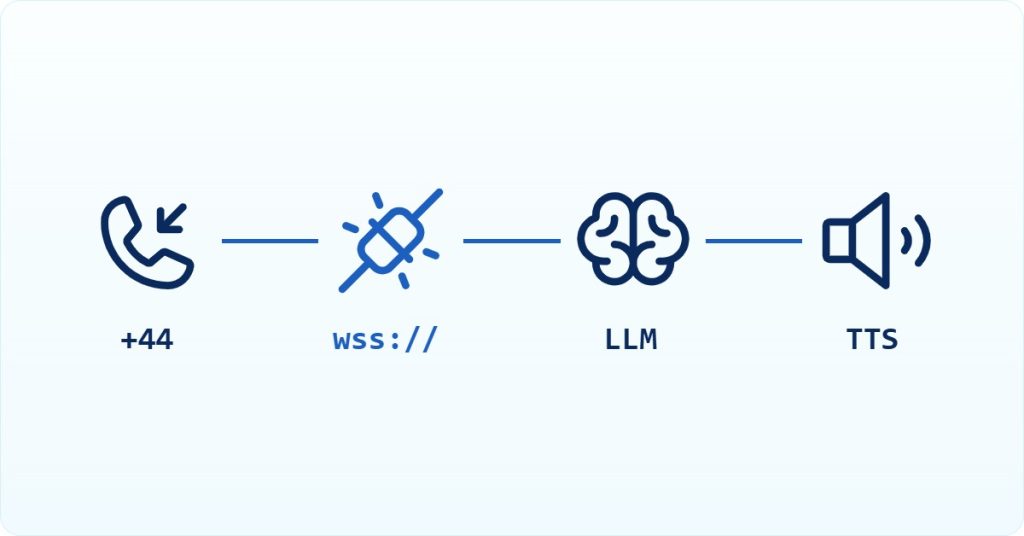
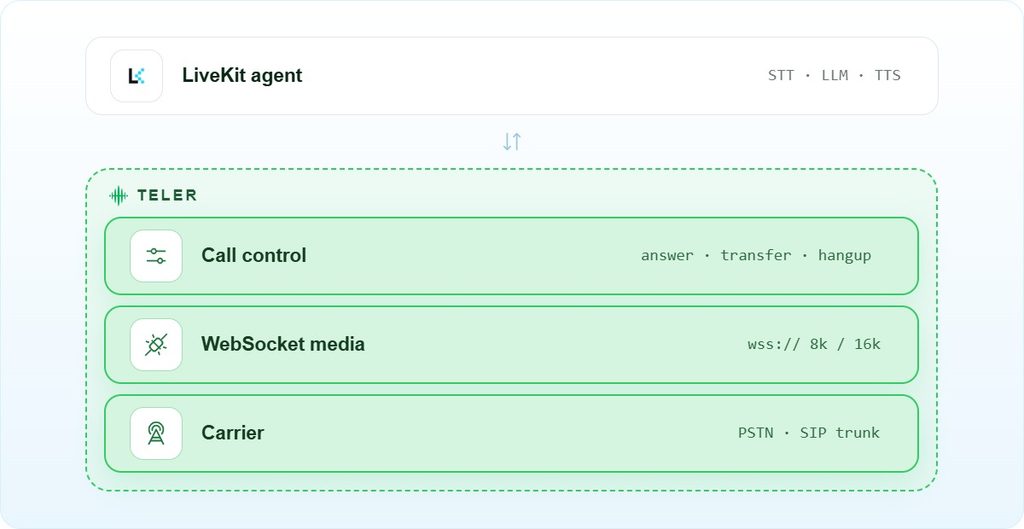
AI Summary: This article covers how to connect livekit agents to real telephone calls in 2026, written for backend and API integration engineers who need to understand the full media path from carrier to model. LiveKit uses SIP signaling to establish calls and RTP/SRTP to carry media after the handshake completes, per the LiveKit telephony documentation. Engineers must choose and provision their own SIP trunk or telephony provider, because LiveKit does not act as a carrier itself. Teler’s programmable voice API handles the carrier layer, WebSocket media streaming, and call control so the agent code stays at the application layer.
Scope: This walkthrough covers connecting livekit agents to PSTN calls via SIP trunking and Teler’s WebSocket transport, verified against LiveKit documentation and the Python Agents reference as of September 2026. It does not cover WebRTC-only browser sessions or the LiveKit Cloud dashboard configuration UI.
Quick Answer: LiveKit Agents reach real phone calls through SIP trunking: SIP (RFC 3261) handles call setup, then RTP/SRTP carries the audio into a LiveKit room where the agent processes it. In 2026, engineers must provision a SIP trunk separately, because LiveKit does not provide PSTN numbers or carrier access itself.
Connecting livekit agents to real telephony requires a SIP trunk between the PSTN and the LiveKit room, where SIP signaling establishes the session and RTP carries the audio that the agent framework then processes through STT, LLM, and TTS stages.
What are LiveKit Agents?
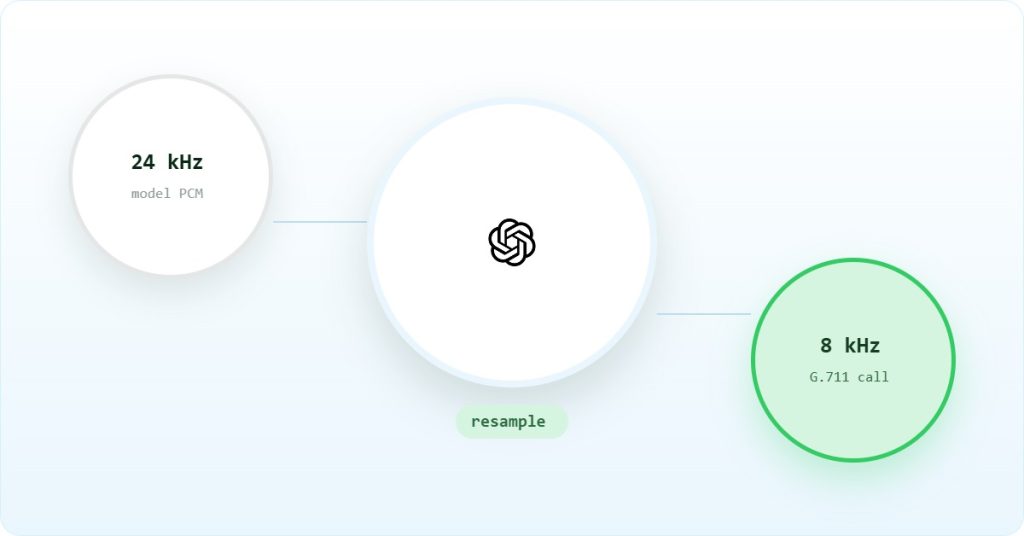
LiveKit Agents is an open-source framework for building real-time voice AI applications in Python and Node.js that sits in the media orchestration layer between user audio and AI provider backends. It abstracts WebRTC room management, turn detection, interruption handling, and LLM orchestration so engineers work at the pipeline level rather than the packet level. The framework does not provide PSTN connectivity, phone numbers, or carrier access. A developer must supply the SIP trunk or telephony provider that bridges the public telephone network to a LiveKit room, plus any resampling logic if the chosen STT model expects a sample rate different from what the SIP codec negotiates.
Why is real telephony integration hard for livekit agents?
The core engineering constraint is a protocol and format boundary. LiveKit’s internal transport is WebRTC, which negotiates codecs dynamically between browser clients and the server. The PSTN side speaks SIP for signaling and delivers audio over RTP, typically encoded with ITU-T G.711 at 8 kHz. When a caller dials a number, the audio arrives at the SIP participant inside the LiveKit room already shaped by narrowband telephony assumptions, and any STT or TTS model expecting wideband audio at 16 kHz or higher requires a resampling step that adds latency.
Turn detection compounds the problem. LiveKit Agents includes built-in voice activity detection (VAD) and interruption handling, but the framework defers no-speech timers and audio processing until sip.callStatus == "active", so pre-answer audio such as ringback and carrier early media does not trigger the agent prematurely. Getting that state machine right under real carrier conditions, where early media behavior varies by carrier, is where most teams lose time.
What does the audio path look like from carrier to model?
Understanding each hop prevents the resampling and latency surprises that appear only under real call conditions. The table below maps each segment of the path, the transport and format at that segment, and who owns it.
| Hop | Transport | Format / codec | Owner |
|---|---|---|---|
| PSTN to SIP trunk | SS7 / IP | G.711 PCM, 8 kHz | Carrier / trunk provider |
| SIP trunk to LiveKit room | SIP (RFC 3261) signaling, RTP/SRTP media | Negotiated at handshake; DTMF via telephone-event/8000 | SIP trunk + LiveKit SIP service |
| LiveKit room to agent process | WebRTC internally; HTTP and WebSockets to backend | Depends on negotiated codec | LiveKit Agents framework |
| Agent process to STT | WebSocket or HTTP | Provider-specific; often 16 kHz PCM | Developer + STT provider |
| TTS output back to room | WebSocket or HTTP | Provider-specific | Developer + TTS provider |
| Room audio to caller | RTP/SRTP via SIP trunk | G.711 or negotiated codec | LiveKit SIP service + trunk |
The LiveKit documentation specifies telephone-event/8000 as the RTP payload type for DTMF tones, which matters when the agent needs to receive keypad input from callers interacting with legacy IVR menus. The exact sample rate that LiveKit’s agent framework outputs is not specified in the surfaced primary documentation, so engineers should verify codec negotiation in their SIP trunk logs before assuming any particular format at the room boundary.
Prerequisites for connecting livekit agents to telephony
- A LiveKit Cloud account or a self-hosted LiveKit server with SIP service enabled
- A SIP trunk from a provider that supports credential authentication via
auth_usernameandauth_password, or IP-based authentication - A DID (Direct Inward Dialing) phone number provisioned on that trunk, in E.164 format
- Python 3.9 or later, or Node.js 18 or later, for the Agents SDK
- A Teler account for WebSocket media streaming and call control, with API credentials
- STT and TTS provider credentials (the framework is model-agnostic; OpenAI, Deepgram, ElevenLabs, and others are supported)
- Network reachability between your SIP trunk provider and the LiveKit SIP service endpoint
- The LiveKit Python Agents SDK installed:
pip install livekit-agents
How to connect livekit agents to real phone calls: step by step
Step 1: Configure the SIP trunk in LiveKit
Before the agent can answer a call, LiveKit needs to know which SIP trunk to accept audio from. The trunk configuration tells LiveKit where to expect SIP INVITE messages and how to authenticate them. Use the LiveKit SIP API or the dashboard to register the trunk with the hostname and credentials your provider gave you.
import livekit.api

async def create_sip_trunk(client: livekit.api.LiveKitAPI):
    trunk = await client.sip.create_sip_inbound_trunk(
        livekit.api.CreateSIPInboundTrunkRequest(
            trunk=livekit.api.SIPInboundTrunkInfo(
                name="production-trunk",
                numbers=["+12025550100"],
                auth_username="SIP_AUTH_USERNAME",
                auth_password="SIP_AUTH_PASSWORD",
            )
        )
    )
    return trunk.sip_trunk_id
Store the returned sip_trunk_id: you reference it when creating dispatch rules and outbound participants. The auth_username and auth_password values must match what your SIP trunk provider expects for digest authentication.
Step 2: Create a dispatch rule to route inbound calls to an agent
A dispatch rule tells LiveKit which agent worker to spin up when a call arrives on the trunk. Without a dispatch rule, LiveKit has nowhere to route the call. The rule below puts each caller in a new room with the call- prefix; with automatic dispatch (no agent_name set on the worker), an agent joins every new room
async def create_dispatch_rule(client: livekit.api.LiveKitAPI, trunk_id: str):
    rule = await client.sip.create_sip_dispatch_rule(
        livekit.api.CreateSIPDispatchRuleRequest(
            trunk_ids=[trunk_id],
            rule=livekit.api.SIPDispatchRule(
                dispatch_rule_individual=livekit.api.SIPDispatchRuleIndividual(
                    room_prefix="call-",
                )
            ),
        )
    )
    return rule
The room_prefix value determines the room name the SIP participant joins; keep it short and collision-resistant in production.
Step 3: Write the agent entrypoint
The agent entrypoint is the Python function that runs when a participant joins the room. For SIP calls, the framework defers audio processing until sip.callStatus == "active", so the agent does not respond to ringback or carrier early media. The entrypoint wires together STT, LLM, and TTS into a pipeline.
from livekit import agents
from livekit.agents import Agent, AgentSession
from livekit.plugins import deepgram, openai, silero
async def entrypoint(ctx: agents.JobContext):
await ctx.connect()
session = AgentSession(
    vad=silero.VAD.load(),
    stt=deepgram.STT(),
    llm=openai.LLM(model="gpt-4o"),
    tts=openai.TTS(),
)
await session.start(
    room=ctx.room,
    agent=Agent(instructions="You are a helpful phone assistant."),
)
await session.say("Hello, how can I help you today?", allow_interruptions=True)
if name == “main“:
agents.cli.run_app(agents.WorkerOptions(entrypoint_fnc=entrypoint))The allow_interruptions=True flag enables barge-in: if the caller speaks while the agent is talking, the framework sets the interruption flag and stops the current utterance. See the known failure mode in the production section below for a bug where this flag is not cleared correctly between turns.
Step 4: Stream audio through Teler for outbound calls
For outbound calls, or when you want low-level control over the media path, Teler’s WebSocket transport gives your server direct access to raw audio. To feed that audio into a LiveKit agent, use the bridge from Teler’s LiveKit recipe; the handler below shows the raw protocol. The caller connects through a Teler number, and the audio arrives at your server over a WebSocket in configurable chunks. The default sample rate is 8 kHz and the default chunk size is 400 ms; both are set in the stream Call Flow. Audio you send back must be 16-bit PCM at 8 kHz.
import asyncio
import websockets
import json

async def handle_call(websocket):
    audio_queue = asyncio.Queue()
    # run_pipeline reads caller audio from the queue, runs streaming STT,
    # LLM and TTS, and sends replies with send_audio()
    pipeline = asyncio.create_task(run_pipeline(audio_queue, websocket))
    try:
        async for message in websocket:
            event = json.loads(message)
            if event["type"] == "audio":
                await audio_queue.put(base64.b64decode(event["data"]["audio_b64"]))
    finally:
        # No end message: Teler closes the socket when the call ends
        await audio_queue.put(None)
        await pipeline

async def send_audio(websocket, pcm_8k: bytes):
    await websocket.send(json.dumps({
        "type": "audio",
        "audio_b64": base64.b64encode(pcm_8k).decode(),
        "chunk_id": uuid.uuid4().hex,  # required, unique per stream
    }))

async def on_barge_in(websocket):
    # Call when your VAD detects the caller talking over the agent
    await websocket.send(json.dumps({"type": "clear"}))
async def main():
    async with websockets.serve(handle_call, "0.0.0.0", 8765):
        await asyncio.Future()
Your server sends {“type”: “clear”} to Teler when it detects the caller talking over the agent; Teler then drops all audio still queued for playback. Teler never sends clear to you, so interruption detection stays in your code.See the Teler API documentation for the full message type reference and chunk size configuration options.
Step 5: Handle DTMF input from callers
Callers interacting with legacy IVR menus send DTMF tones when they press keypad digits. LiveKit transmits these as telephone-event/8000 RTP payloads, and the Agents framework exposes them through the participant event API. The agent can listen for DTMF events and branch conversation logic accordingly, which matters for flows where the caller must press 1 to confirm or 2 to cancel.
from livekit import rtc

def on_dtmf(dtmf_event: rtc.SipDTMF):
    digit = dtmf_event.digit
    print(f"Caller pressed: {digit}")
    # Route conversation based on digit

ctx.room.on("sip_dtmf_received", on_dtmf)
Most teams discover their latency problem is not the model, it is the resampling hop they added between the carrier and the STT engine. An 8 kHz G.711 stream going into a 16 kHz STT model through a naive resampler adds 80 to 120 milliseconds before the first token even leaves the LLM. Fix the codec negotiation at the SIP trunk first, then profile the model.
– Subhash Kalluri, Founder & CEO, FreJun
What breaks in production with livekit agents and telephony?
The failure modes below come from public GitHub issues on the LiveKit repositories. Each report appeared at least once; none should be described as common until more data exists.
| Symptom | Root cause | Fix / status |
|---|---|---|
Agent fails to connect and drops mid-call when wait_until_answered=True on LiveKit server 1.9.11 | PR #4222 changed SIP psrpc client creation and broke timeout handling for WithRequestTimeout() | Add a psrpc config section with max_attempts: 0 and timeout: 0s to disable retry middleware (reported once, GitHub issue #4269, Jan 2026) |
| Twilio SIP call connects but only the intro audio plays, then silence | Unresolved | No fix reported (reported once, GitHub issue #3605, Oct 2025) |
| Agent delivers greeting then stops responding to microphone input in FastAPI gateway setup | Unresolved | No fix reported (reported once, GitHub issue #3797, Jul 2025) |
| Agent marked as speaking but emits no audio after barge-in, causing long silences | Shared interruption flag _interrupted_event set on interruption and not cleared before next speech starts, so new audio frames are dropped | PR #3406 submitted; clear interruption state before next utterance (reported once, GitHub issue #3418, Sep 2025) |
| Agent stops responding after 2 to 3 concurrent sessions on self-hosted server | Unresolved | No fix reported (reported once, GitHub issue #4331, Dec 2025) |
The interruption flag bug deserves attention because it is silent: the call stays connected, the agent appears active, but the caller hears nothing. If you see long pauses after a barge-in in your staging environment, check whether the interruption state is cleared before the next agent.say() call. The concurrency collapse at 2 to 3 sessions on self-hosted deployments also deserves attention if you plan to run your own LiveKit server rather than use LiveKit Cloud, since the research date still shows the root cause as unresolved.
One honest limitation of Teler in this context: Teler targets sub-100ms packet delivery as a design specification, but real-world latency under congested carrier paths or distant points of presence will exceed that target. Engineers building latency-sensitive applications should test under realistic network conditions, not just in the same region as the PoP.
Which telephony integration approach is right for your livekit agents setup?
| Approach | Where media terminates | Latency cost | Operational burden | Lock-in |
|---|---|---|---|---|
| SIP trunk into a LiveKit room | SIP participant inside the room; LiveKit bridges RTP to WebRTC | SIP handshake plus media bridging; moderate | Trunk provisioning, codec negotiation, dispatch rules | Low; trunk is portable |
| Provider-native connector (e.g., Twilio bridge) | External voice platform; audio crosses into LiveKit via provider glue | Extra hop through provider; moderate to high | Provider SDK maintenance, connector config | High; tied to provider |
| WebRTC-first agent with separate telephony ingress | Browser or WebRTC client; telephony handled outside the agent | Low for WebRTC path; separate media path for PSTN | Two media paths, likely resampling outside the agent | Low for agent; depends on telephony choice |
| Custom SIP/RTP media server in front of the agent | Your own media server; you forward audio to the agent | Highest; full custom bridging | Jitter buffer, call control, codec translation all custom | None; full control |
For most teams building livekit agents that need to answer PSTN calls, the SIP trunk approach is the right starting point. It keeps the media path inside LiveKit’s infrastructure, uses the dispatch rule system built into the framework, and leaves the trunk portable if you switch providers. The provider-native connector approach makes sense only when your phone system already lives in that provider and the migration cost outweighs the lock-in risk. The custom media server approach is justified when you need full control over call routing, legacy PBX integration, or compliance recording at the RTP layer before audio reaches the agent.
For teams who want to avoid SIP trunk provisioning entirely, Teler’s programmable voice API handles carrier connectivity, number provisioning in 50 or more countries, and WebSocket media delivery so the agent code stays at the application layer. See the top voice APIs for LiveKit in the US for a comparison of provider options, and the top SIP trunking providers in the US if you prefer to manage your own trunk.
Frequently asked questions
What audio format does LiveKit use between the SIP trunk and the agent?
The codec is negotiated at the SIP handshake. PSTN carriers typically deliver G.711 PCM at 8 kHz, and DTMF tones arrive as telephone-event/8000 RTP payloads per the LiveKit telephony documentation. The exact sample rate that the LiveKit Agents framework outputs to the room is not specified in the primary documentation, so verify codec negotiation in your SIP trunk logs before assuming a format at the room boundary.
Does LiveKit provide phone numbers or PSTN access?
No. LiveKit does not act as a carrier. The documentation describes SIP as the bridge between traditional telephony systems and LiveKit rooms, with telephony connectors or trunks sitting between the caller and LiveKit. Engineers must provision a DID number through a SIP trunk provider or a telephony API like Teler, which provisions numbers in 50 or more countries via API.
When should I use a SIP trunk versus a provider connector for livekit agents?
Use a SIP trunk when you want a portable, low-lock-in path that stays inside LiveKit’s infrastructure. Use a provider connector when your phone system already lives in that provider and reconfiguring it would cost more than the lock-in. Connectors handle bidirectional audio, media processing, and codec translation, but they add a provider-specific hop and tie your agent to that vendor’s SDK lifecycle.
What happens to concurrent sessions on a self-hosted LiveKit server?
A reported issue (GitHub #4331, December 2025) shows agents stopping responses after 2 to 3 concurrent sessions on self-hosted deployments. The root cause is unresolved as of September 2026. If you need production concurrency, test your self-hosted setup under realistic load before launch, or use LiveKit Cloud where the infrastructure is managed. The documented limits for concurrent sessions are not published in the primary documentation.
How does barge-in work, and what can go wrong?
Barge-in lets a caller interrupt the agent mid-utterance. LiveKit Agents sets an interruption flag when the caller speaks, which stops the current audio stream. A confirmed bug (GitHub #3418, September 2025) shows the shared _interrupted_event flag is not cleared before the next speech starts, causing the agent to appear as speaking while emitting no audio. PR #3406 was submitted to fix this; check whether your version includes that patch before deploying to production.
What must I build myself when using livekit agents with telephony?
You must supply the SIP trunk or telephony provider, the DID number, any resampling logic between the carrier codec and your STT model’s expected sample rate, and call control logic for transfers and hangups. LiveKit provides the room, the agent pipeline, VAD, and interruption handling. Teler covers carrier connectivity, WebSocket media streaming, and call control if you want to avoid building the telephony layer yourself. Check current Teler pricing for the cost structure.
How does answering machine detection work with livekit agents?
LiveKit’s answering machine detection (AMD) listens to the start of the call, classifies it with an LLM, and returns a result before the agent speaks. The documentation requires AMD initialization before creating the SIP participant, ensuring detection starts before audio arrives. The detector also pauses agent speech until classification completes. This prevents the agent from delivering a greeting to a voicemail system.
Can I use livekit agents with a model other than OpenAI?
Yes. The framework is model-agnostic. The OpenAI integration provides one supported provider path, but it does not require users to choose OpenAI. The documentation allows third-party providers, although the surfaced primary documentation does not enumerate the complete native STT, LLM, and TTS provider matrix. Teler is also model-agnostic and works with OpenAI Realtime, Gemini Live, ElevenLabs, Deepgram, Ultravox, and custom models.
Conclusion
With the SIP trunk configured, the dispatch rule in place, and the agent entrypoint handling the sip.callStatus == "active" gate, livekit agents can answer real PSTN calls and run a full STT-LLM-TTS pipeline on the audio. The decision that matters most is where the media terminates: a SIP trunk keeps the path inside LiveKit and stays portable, while a provider connector trades portability for faster setup if your phone system already lives in that provider. If you want to skip SIP trunk provisioning entirely and work at the application layer, the programmable SIP infrastructure that Teler provides handles carrier connectivity, number provisioning, and WebSocket media delivery so the agent code stays focused on conversation logic rather than telephony plumbing.