AI Summary: This article covers the vapi vs teler comparison for backend engineers deciding how to structure a real-time AI phone agent stack in 2026. Vapi is a voice AI orchestration platform that manages call control, assistant configuration, and agent logic over WebSocket-based listen and control URLs; its WebSocket transport carries raw audio in a format set per call: pcm_s16le at 16 kHz by default, or mulaw at 8 kHz. Teler is a programmable telephony layer that streams raw audio at 8k or 16k Hz in configurable chunks, giving developers direct access to the media path. Engineers must decide which layer owns the media, then build any bridging between the two.
Scope: This article covers the architectural boundary between Vapi and Teler as documented in their respective public sources as of September 2026. It does not cover SIP-side PBX configuration or carrier provisioning beyond what each platform exposes through its API.
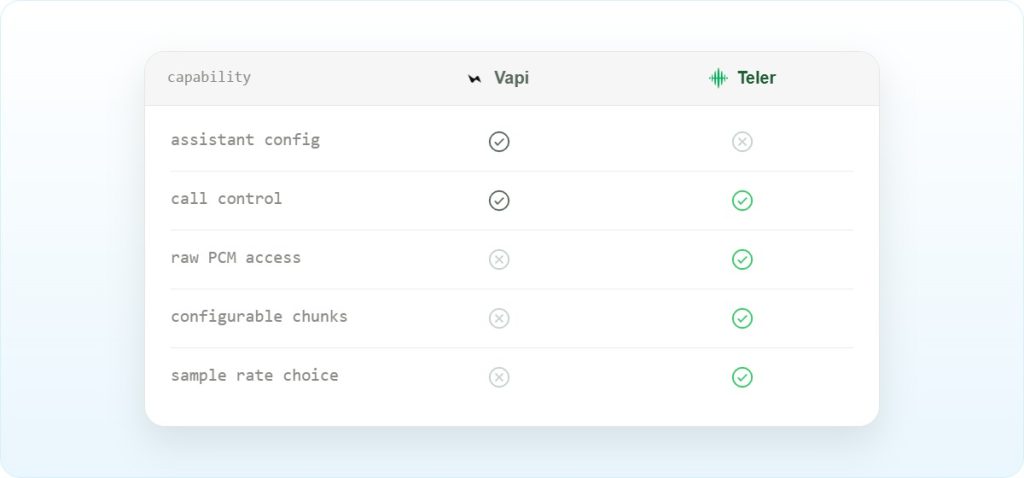
Quick Answer: In the vapi vs teler comparison, Vapi operates at the orchestration layer, managing call control and agent logic through WebSocket listen and control URLs, while Teler operates at the telephony layer, streaming raw audio at 8k or 16k Hz in 20 to 2000 ms chunks. The two can coexist in a stack, but the developer must build the audio bridge between them.
The vapi vs teler distinction comes down to which layer owns the media path: Vapi abstracts call control and agent orchestration, while Teler gives developers direct access to raw audio streams over WebSocket at a configurable sample rate.
What is Vapi, and where does it stop?
Vapi is a voice AI platform that provides telephony control for developers building real-time, low-latency voice agents over phone, web, and SIP. It occupies the orchestration layer: it manages the call lifecycle, assistant configuration, phone number provisioning, and live call control through a structured API. api runs the STT, LLM, and TTS pipeline itself, configured through the assistant. For live calls it exposes a listenUrl (listen-only monitoring) and a controlUrl. For bringing your own audio transport, it offers a WebSocket transport (provider vapi.websocket) that carries raw audio in a format you set per call: pcm_s16le at 16 kHz by default, or mulaw at 8 kHz. Vapi converts sample rates automatically.
Why does the vapi vs teler boundary matter for production stacks?
The boundary matters because the two platforms terminate media at different points in the stack, and that determines where latency accumulates. Vapi’s call control path adds a managed hop between the carrier and your agent logic. Teler targets sub-100ms packet delivery as a design specification, streaming audio directly to your server so your code sits in the hot path. When you treat either platform as a batch processor rather than a streaming transport, latency compounds quickly.
A practitioner writing on Dev.to in January 2026 documented the consequence directly: real-time audio streaming in Vapi breaks when you treat it like batch processing, and the fix requires buffering 2 to 3 chunks before streaming, raising the buffer to around 30 chunks under load, and decoding Twilio mulaw to PCM before forwarding. That same integration also requires heartbeat pings every 10 seconds to prevent WebSocket inactivity timeouts. These are not edge cases; they are the baseline engineering cost of working at the media layer without a dedicated telephony transport underneath.
How does audio move from carrier to model and back?
The end-to-end path in a typical AI phone agent stack crosses several format and transport boundaries. The table below maps each hop, the format at that hop, and which system owns it.
| Hop | Format | Transport | Owner |
|---|---|---|---|
| PSTN carrier to platform edge | G.711 PCM, 8 kHz (ITU-T G.711) | SIP/RTP (RFC 3261, RFC 3550) | Carrier + platform |
| Platform edge to developer server (Teler) | 16-bit linear PCM, base64 in JSON, 8k or 16k Hz, chunk size a multiple of 20 ms (default 400 ms) | WebSocket (RFC 6455) | Teler |
| Platform edge to developer server (Vapi) | pcm_s16le (16 kHz default) or mulaw (8 kHz), set per call | WebSocket transport (websocketCallUrl) | Vapi |
| Developer server to STT engine | PCM or Opus depending on engine | WebSocket or HTTP | Developer |
| STT to LLM | Text | HTTP or streaming | Developer |
| LLM to TTS | Text | HTTP or streaming | Developer |
| TTS audio back to platform | Must match platform expectation | WebSocket | Developer |
One specific mismatch worth noting: when using OpenAI Realtime as the model layer, that API outputs audio at 24 kHz. Teler streams at 8k or 16k by default. The developer must resample between those two rates. Vapi’s WebSocket transport takes the format and sample rate per call and converts sample rates automatically, so a Teler-to-Vapi bridge can send 8 kHz audio as is.
Prerequisites before connecting Vapi and Teler
- A Vapi account with an assistant configured via the Vapi API or dashboard. No Vapi phone number is needed when Teler carries the call; Vapi doesn’t allow phone number parameters on WebSocket transport calls.
- A Teler account with a provisioned number in the target country; Teler supports provisioning in 50+ countries via API
- A publicly reachable server with a valid TLS certificate, required for both Vapi webhooks and Teler WebSocket connections
- An STT engine (Deepgram, AssemblyAI, or equivalent) and a TTS engine capable of streaming audio output
- An LLM endpoint, either a hosted model or a self-hosted one, with a latency budget that fits inside the conversational turn window
- A resampling library if your TTS outputs at 24 kHz and your telephony transport expects 8 kHz;
librosaorffmpegare common choices - Familiarity with WebSocket framing per RFC 6455 and with RTP payload types per RFC 3551
How do you wire Vapi and Teler together in a single stack?
The integration has three distinct phases: receiving the inbound call on one platform, bridging the audio stream to the other, and injecting synthesized audio back into the live call. Each phase has a specific failure mode if you get the ordering wrong.
Step 1: Receive the call and open the media stream
When a call arrives on a Teler number, Teler fetches your call flow, and when that flow returns a stream action, it opens a WebSocket to the ws_url and begins streaming audio in the configured chunk size. The default chunk size is 400 ms and the default sample rate is 8k; both are set in the stream Call Flow (chunk_size, sample_rate). Your server must accept the WebSocket upgrade and begin reading frames immediately; a slow accept causes the first audio chunks to queue and adds perceived latency to the first agent turn.
import asyncio
import websockets
import json

async def handle_call(websocket):
    # Teler sends "start" first, then "audio" messages.
    # There is no end message: the loop exits when Teler closes the socket.
    async for message in websocket:
        event = json.loads(message)
        if event["type"] == "audio":
            audio_chunk = event["data"]["audio_b64"]  # base64, 16-bit PCM at 8k
            await process_audio(audio_chunk)

async def main():
    async with websockets.serve(handle_call, "0.0.0.0", 8765):
        await asyncio.Future()

asyncio.run(main())
Watch the type field: Teler sends a single “start” message with stream metadata, then “audio” messages. Only “audio” messages carry media.
Step 2: Forward audio to STT and route through the LLM
Pass the decoded audio to your STT engine as a stream, not as a completed buffer. Batching audio before sending it to STT adds the full buffer duration to your first-token latency. If your STT engine expects 16k Hz and Teler is streaming at 8k, resample before forwarding. The resampling must happen in the streaming path, not as a post-processing step.
import base64
import numpy as np
import soxr

# Create one per call so filter state carries across chunks
resampler = soxr.ResampleStream(8000, 16000, 1, dtype="int16")

def resample_8k_to_16k(audio_b64: str) -> bytes:
    pcm = np.frombuffer(base64.b64decode(audio_b64), dtype=np.int16)
    return resampler.resample_chunk(pcm).tobytes()
Use one ResampleStream per call: resampling each chunk independently produces clicks at chunk boundaries. (audioop was removed in Python 3.13.)
Step 3: Inject synthesized audio and handle barge-in
When the TTS engine returns audio, send it back to Teler over the same WebSocket connection. Teler requires you to send back at least 500 ms of audio per write to avoid choppy playback. If the caller interrupts, send a clear signal to flush queued audio before injecting the new response.
async def inject_audio(websocket, audio_bytes: bytes, chunk_id: str):
    # audio_bytes must be 16-bit linear PCM at 8 kHz
    await websocket.send(json.dumps({
        "type": "audio",
        "audio_b64": base64.b64encode(audio_bytes).decode(),
        "chunk_id": chunk_id,  # required, unique per stream
    }))

async def clear_queue(websocket):
    await websocket.send(json.dumps({"type": "clear"}))
Call clear_queue as soon as the caller starts speaking over the agent. Without it, the new response plays after whatever audio is still queued.
For Vapi’s side of the stack, the controlUrl WebSocket accepts call control messages during an active call. Vapi’s API reference documents the Calls, Assistants, and Phone Numbers endpoints, and the Teler docs include a Vapi recipe with a ready-made bridge. The vendor-official example repository at VapiAI/examples (last commit January 2026) contains starting points for several integration patterns, though no telephony-specific reference implementation was present in the retrieved snapshots.
Most teams discover their latency problem is not the model, it is the resampling hop they added between the carrier and the STT engine. A 24 kHz TTS output feeding back into an 8 kHz telephony stream without a proper conversion stage adds audible artifacts that no amount of model tuning will fix.
– Subhash Kalluri, Founder & CEO, FreJun
What breaks in production when you mix these two layers?
The failure modes below come from documented community reports and practitioner write-ups. Frequency is noted honestly; a single report is not a common failure, but it is a real one.
| Symptom | Root cause | Fix | Frequency |
|---|---|---|---|
| Caller-side latency around 4000 ms | Streaming latency, region placement, or load sensitivity in the Vapi call path | Set optimizeStreamingLatency to 1 or 2; move servers closer to the user region | 2 reports |
Web call ends with error-assistant-did-not-receive-customer-audio | Increased WebRTC latency prevented audio delivery | Increase customerJoinTimeoutSeconds to 60 | 1 report (Vapi status page, October 2025) |
| Silence timeout fires on custom transcriber | WebSocket closes or stops delivering audio before the timeout fires | No fix reported; check server logs for dropped connections | 1 report |
| Twilio call drops with error 31921 | WebSocket handshake between Twilio and Vapi does not complete | Verify Server URL config, inspect server logs, check network stability | 1 report |
| Choppy playback from underbuffering | Treating the stream as batch; audioBuffer overflow drops chunks | Buffer 2 to 3 chunks before streaming; raise to 30 chunks under load | 1 report (Dev.to, January 2026) |
| Stream stalls after idle periods | WebSocket inactivity timeout fires before long silences finish | Send heartbeat pings every 10 seconds; raise SESSION_TTL to at least 15000 ms | 1 report (Dev.to, January 2026) |
| Telnyx answer handshake fails | Webhook blocks synchronously; codec path does not accept Opus 48 kHz or PCMU 8 kHz fallback | Return HTTP 200 immediately; validate asynchronously; resample between Opus 48 kHz and PCMU 8 kHz | 1 report |
The failure that catches most teams is the underbuffering case. Developers familiar with HTTP request-response patterns write audio handling code that accumulates a full response before sending it. In a streaming telephony context, that accumulation delay is audible as a pause before every agent turn. Teler’s chunk size defaults to 400 ms, and the platform requires at least 500 ms sent back per write. If your TTS engine produces audio faster than 500 ms per chunk, you need to buffer and batch before injecting.
One honest limitation of Teler worth stating: when you configure the stream at 8k Hz and your model layer outputs at 24 kHz, the resampling is entirely your responsibility. Teler does not perform automatic sample rate conversion. The platform specification is clear on the input and output rates, but the conversion logic between them is developer-owned code that must live in the hot path of every call.
Which architecture fits which team in the vapi vs teler decision?
The right choice depends on where your team wants to own complexity. The table below maps the four main approaches against the axes that matter most for production AI phone agents.
| Approach | Media termination | Latency cost | Operational burden | Lock-in |
|---|---|---|---|---|
| Vapi managed orchestration | Vapi infrastructure | Managed hop; latency not published | Low app-side media work | High; platform owns the call control plane |
| Teler raw WebSocket streaming | Developer server | Sub-100ms packet delivery target | Developer owns buffering, resampling, barge-in | Low; model-agnostic, bring your own STT/LLM/TTS |
| SIP trunk into media server | Developer SIP infrastructure | Depends on media server placement | SIP signaling, RTP handling, jitter buffering, codec negotiation per RFC 4566 | Low; full carrier control |
| WebRTC gateway | Browser or gateway | NAT traversal adds variable latency per RFC 8445 | Signaling complexity, browser constraints, gateway maintenance | Medium; WebRTC stack is standard but gateway is custom |
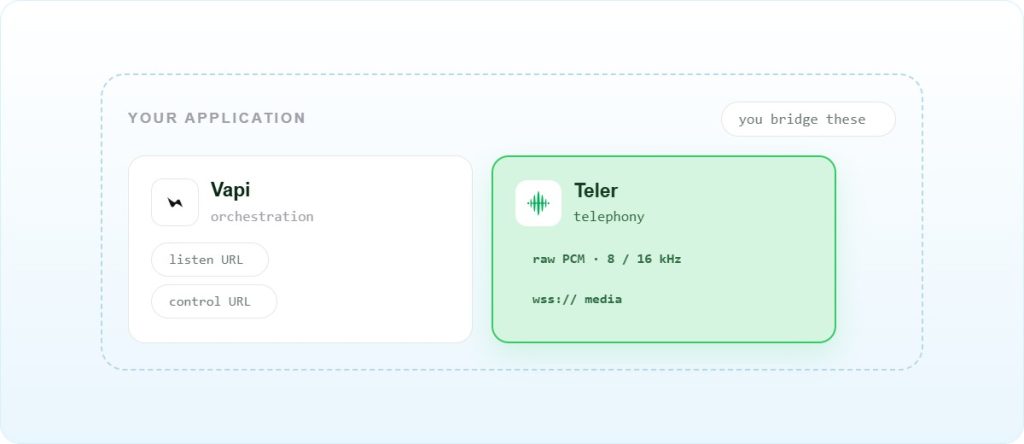
If your goal is to launch a phone agent quickly with managed telephony control and you do not need direct access to raw PCM audio, Vapi’s orchestration layer is the faster path. If you need full control over the audio loop, want to swap STT, LLM, or TTS providers without platform permission, or need the sub-100ms packet delivery target that comes from owning the media path, Teler is the right foundation. The two are not mutually exclusive: some teams let Teler carry the call and bridge its audio into Vapi’s WebSocket transport, so Vapi runs the agent while Teler owns the carrier side. Teler’s Vapi recipe includes a ready-made bridge for this.
For teams already running SIP infrastructure, a SIP trunk into a media server with Teler handling the AI-facing WebSocket layer is often the lowest-disruption migration path. The SIP Trunking vs Elastic SIP Trunking post covers that boundary in more detail. For teams building from scratch, the programmable SIP as AI backbone post explains why the signaling layer matters as much as the media layer when you scale beyond a few concurrent calls.
Frequently asked questions
Does Vapi publish a numeric audio sample rate for its WebSocket stream?
Yes, for its WebSocket transport. You set the format per call: pcm_s16le (16-bit PCM, 16 kHz by default) or mulaw (8 kHz), and Vapi converts sample rates automatically.
Can Teler and Vapi run in the same call stack?
Yes, but the developer owns the bridge. Teler handles the carrier-facing media path and streams raw audio to your server. If you also use Vapi for agent orchestration, your server must maintain two WebSocket sessions simultaneously and route audio between them. Teler’s docs include a Vapi recipe that ships a working bridge, which you can run as is or adapt.
What happens when the WebSocket connection drops mid-call?
On the Vapi side, a dropped WebSocket during a Twilio-backed call has produced error 31921 in at least one documented case, indicating the streaming connection did not complete cleanly. On the Teler side, Teler opens the WebSocket to your server, so your server can’t reconnect it; if it drops, the stream ends. Put your reconnect logic on the provider-side connections (STT, TTS, or Vapi), and use Teler’s stream webhooks to detect a stream that ended unexpectedly. Build reconnect logic with exponential backoff and test it under load before going to production.
Should I use SIP trunking or WebSocket streaming for a new AI phone agent?
WebSocket streaming is the right default for new builds. SIP trunking, as defined in RFC 3261, gives you full carrier control and works well when you already have SIP infrastructure, but it requires handling RTP media, jitter buffering, and codec negotiation yourself. WebSocket streaming over Teler abstracts those concerns while still giving you raw audio access. Use SIP when you have an existing PBX or carrier relationship that cannot move.
What does Teler not handle automatically?
Teler does not perform automatic sample rate conversion. If your TTS engine outputs at 24 kHz, as OpenAI Realtime does, and your Teler stream is configured at 8k Hz, the resampling is your code. Teler also does not manage STT, LLM routing, or TTS; those are developer-supplied. The platform’s scope is carrier connectivity, media streaming, and call control primitives. See the Teler documentation for the full list of what the platform exposes.
How does barge-in work at the protocol level?
Barge-in, where the caller speaks while the agent is still playing audio, requires two things: a voice activity detector (VAD) on the inbound audio stream to detect the interruption, and a mechanism to flush queued outbound audio. Teler exposes {"type": "clear"} for the flush. Your server must detect the interruption via VAD, send the clear signal, then inject the new response. If you skip the clear signal, the old audio and the new audio overlap on the caller’s end.
What is the minimum chunk size Teler accepts for injected audio?
The inbound chunk size must be a multiple of 20 ms, with a default of 400 ms. It controls how often your server receives audio frames.
Is there a reference implementation for connecting Vapi to a custom telephony backend?
Vapi maintains a public examples repository at VapiAI/examples, last updated January 2026, but no telephony-specific reference implementation was present in the retrieved snapshots. The Python and TypeScript server SDKs are actively maintained, with the Python SDK last updated July 2026 and the TypeScript SDK last updated August 2026. For Teler-specific patterns, the Building Bidirectional Streaming Voice Agents Using Teler with Gemini Live post walks through a complete streaming integration.
What the vapi vs teler comparison means for your next build
After working through the vapi vs teler comparison, the decision reduces to one question: does your team need to own the media path, or is managed call orchestration sufficient? Vapi gives you a faster path to a working agent with less media-layer code, at the cost of opacity around audio format and sample rate. Teler gives you raw audio at a documented rate, configurable chunk sizes, and model-agnostic routing, at the cost of writing your own resampling, buffering, and barge-in logic. If your requirements include swapping model providers, running custom audio processing, or hitting a specific latency target with a documented specification, the telephony layer is the right foundation. If you are prototyping and need a working phone agent in a day, the orchestration layer gets you there faster. Visit the Teler product page to see the full capability set, or check current Teler pricing before committing to an architecture.